OCPPEye 26 — sehen, was
zwischen Ladestation und Backend läuft.OCPPEye 26 — see what's going on
between charging station and backend.
Eigenes Backend, Proxy, Ladestations-Simulator und Debug-Konsole für OCPP 1.6J und 2.0.1 – für Inbetriebnehmer und Backend-Entwickler.Your own backend, proxy, charging station simulator and debug console for OCPP 1.6J and 2.0.1 — for commissioning engineers and backend developers.
Ladestationen verbinden sich direkt mit OCPPEye, oder OCPPEye sitzt als Proxy zwischen Station und ihrem Backend und schneidet alles mit. Der Simulator spielt eine oder mehrere Ladestationen – von Hand oder mit realen Abläufen im Zeitraffer. Jede Nachricht erscheint dekodiert in der Debug-Konsole, mit Antwortzeit an der Anfrage; EisBär-OCPP-Logs lassen sich einlesen.Charging stations connect directly to OCPPEye, or OCPPEye sits as a proxy between the station and its backend and captures everything. The simulator plays one or more charging stations — by hand or with realistic sequences in time-lapse. Every message appears decoded in the debug console, with the response time on the request; EisBär OCPP logs can be imported.
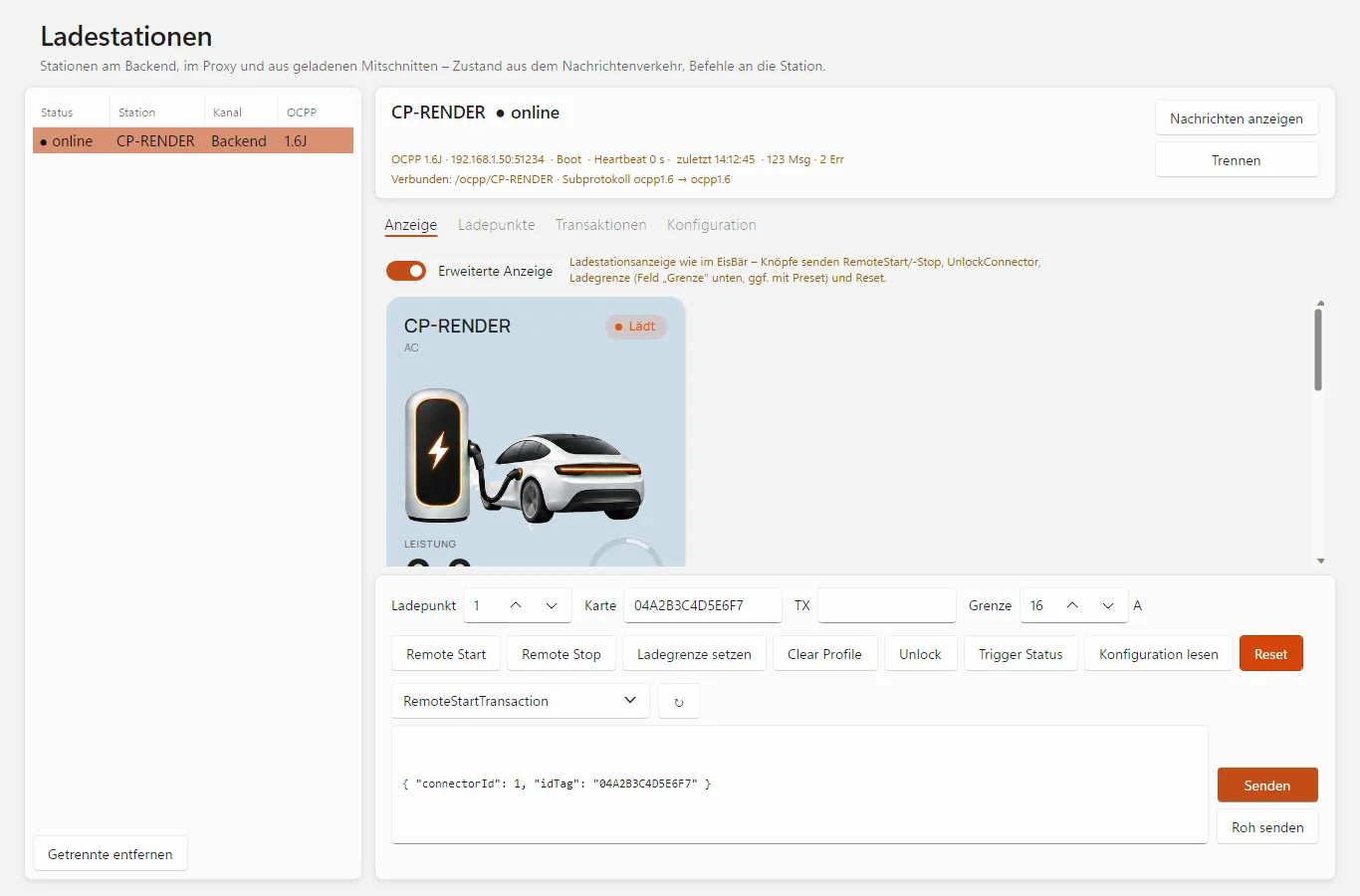
Ladestationen: Zustand der verbundenen Station, Ladestationsanzeige und Befehle per Schnellknopf oder als JSON. (Bild aus dem Programm, Testdaten.)Charging stations: state of the connected station, charging station display and commands via quick button or as JSON. (Image from the program, test data.)
Backend, Proxy und Ladestation in einem WerkzeugBackend, proxy and charging station in one tool
Für Inbetriebnehmer von Ladeinfrastruktur und Entwickler von Backends und Lademanagement.For people commissioning charging infrastructure and developers of backends and load management.
Eigenes Backend (CSMS)Your own backend (CSMS)
Ladestationen verbinden sich per ws:// oder wss://. OCPPEye zeigt den Handshake vollständig – Pfad, Subprotokolle, Basic-Auth, TLS –, auch abgelehnte Versuche. Antwortverhalten einstellbar: Boot-Status und Intervall, Authorize nach Liste oder pauschal, Antwort verzögern.Charging stations connect via ws:// or wss://. OCPPEye shows the full handshake — path, subprotocols, basic auth, TLS —, even rejected attempts. Adjustable response behaviour: boot status and interval, authorize by list or for all, delayed responses.
Proxy zwischen Station und BackendProxy between station and backend
Die Station wird auf OCPPEye umgestellt, OCPPEye verbindet weiter zum eigentlichen Backend und reicht jede Nachricht unverändert durch. Eigene Befehle an die Station oder ans Backend lassen sich einschleusen; deren Antworten fängt OCPPEye ab.The station is pointed at OCPPEye, which connects on to the actual backend and passes every message through unchanged. You can inject your own commands to the station or the backend; OCPPEye intercepts their responses.
Ladestations-SimulatorCharging station simulator
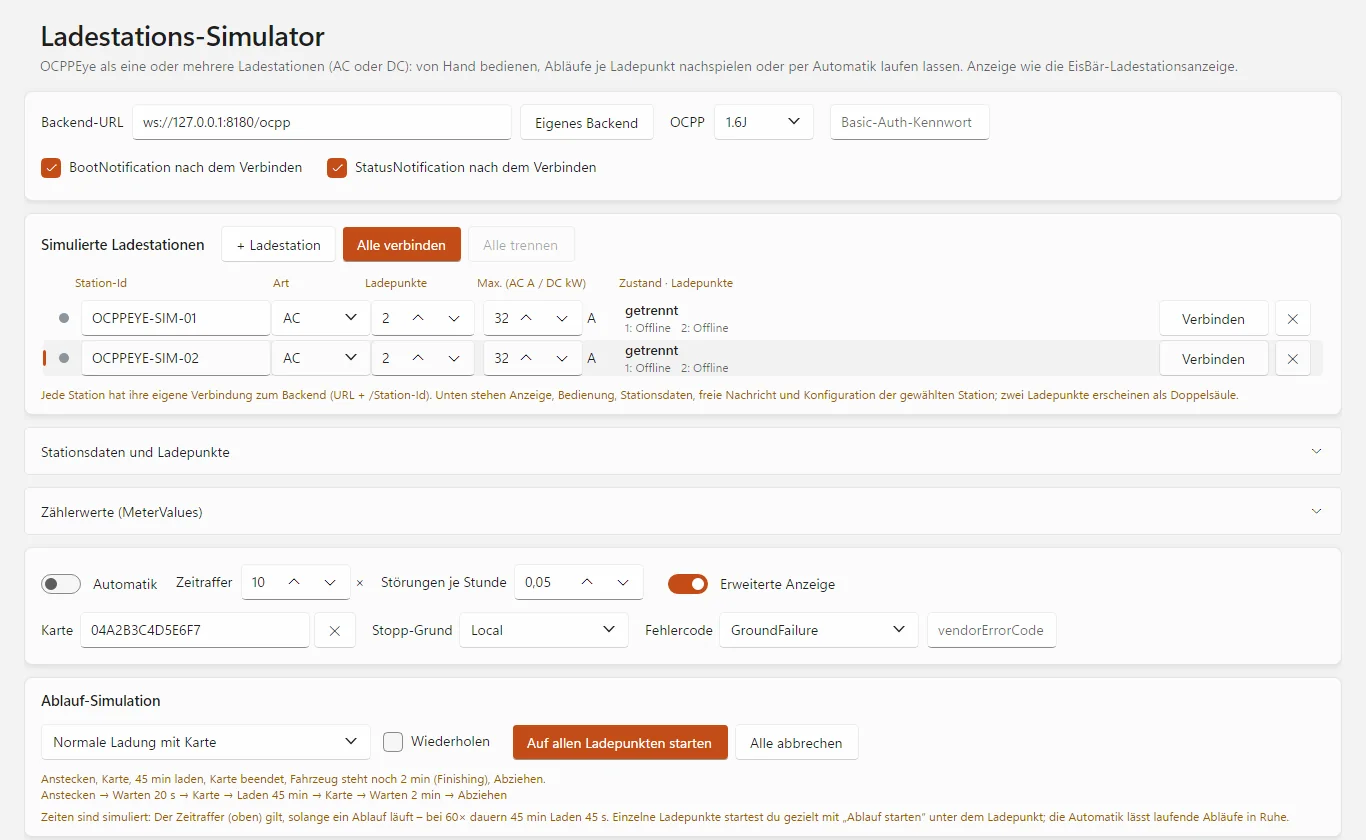
Eine oder mehrere simulierte Stationen, AC oder DC, 1.6J oder 2.0.1, je mit eigener Verbindung. Knöpfe je Zustand: Stecker, Karte, Pausieren, Fertig, Störung. Phasen per Klick abschaltbar, die Leistung folgt Station und Ladeprofil.One or more simulated stations, AC or DC, 1.6J or 2.0.1, each with its own connection. Buttons per state: plug, card, pause, finish, fault. Phases can be switched off with a click; the power follows station and charging profile.
Abläufe im ZeitrafferSequences in time-lapse
12 Ablauf-Profile – von der normalen Ladung über Pausen, Vollladen und unbekannte Karte bis zu Störung, Verbindungsabbruch und Remote-Start. Je Ladepunkt gezielt startbar; die Automatik spielt reale Abläufe nach.12 sequence profiles — from normal charging via pauses, charging to full and unknown card to fault, connection loss and remote start. Startable per charge point; the automatic mode replays realistic sequences.
Debug-KonsoleDebug console
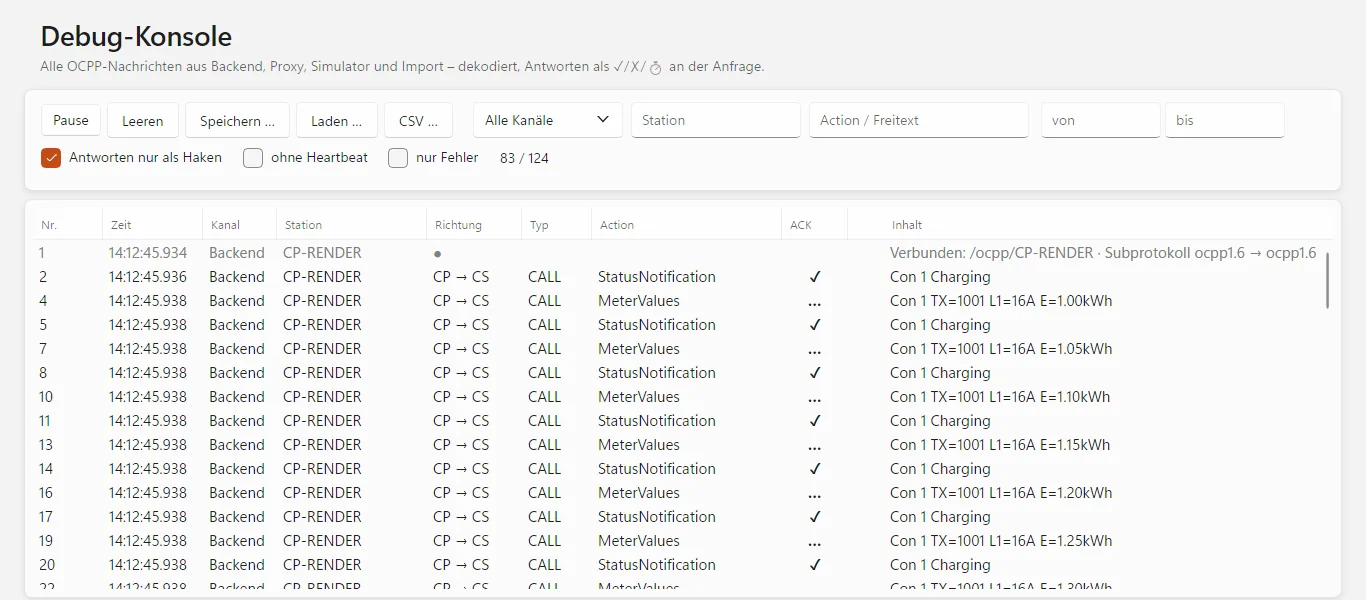
Jede OCPP-Nachricht dekodiert mit Kurzfassung. Antworten über die Nachrichten-Id zugeordnet: ✓ CallResult mit Antwortzeit, ✗ CallError, ⏱ keine Antwort. Filter nach Kanal, Station, Action und Zeit, CSV-Export, Mitschnitte speichern und laden.Every OCPP message decoded with a summary. Responses matched via the message ID: ✓ CallResult with response time, ✗ CallError, ⏱ no response. Filter by channel, station, action and time, CSV export, save and load captures.
EisBär-OCPP-Logs einlesenImport EisBär OCPP logs
Die Debug-Konsole liest EisBär-OCPP-Logs (Messages Full/Reduced) und dekodiert sie wie live – auch die Strecke zwischen EisBär und einem weiteren Backend.The debug console reads EisBär OCPP logs (messages full/reduced) and decodes them just like live — including the link between EisBär and a further backend.
Ladestationen bedienenOperate charging stations
Zustand je Ladepunkt, Transaktionen und Konfiguration. Schnellknöpfe für Remote Start/Stop, Ladegrenze, Clear Profile, Unlock, Trigger Status und Reset – oder jeden Befehl frei als JSON, auch roh.State per charge point, transactions and configuration. Quick buttons for remote start/stop, charging limit, clear profile, unlock, trigger status and reset — or any command freely as JSON, even raw.
Wie im EisBärJust like EisBär
Stationskonfiguration lesen, als .cfg ablegen und eine Soll-Konfiguration schreiben wie der EisBär, EisBär-Presets auswerten. Die Ladestationsanzeige entspricht der des EisBär.Read the station configuration, save it as .cfg and write a target configuration just like EisBär, evaluate EisBär presets. The charging station display matches the one in EisBär.
Außerdem:Also: Basic-Auth · selbstsigniertes Zertifikat für wss:// · Hell/Dunkel · automatische Updates · Zusammenarbeit mit der Eye Suite 26basic auth · self-signed certificate for wss:// · light/dark · automatic updates · works with the Eye Suite 26
Jede Nachricht sichtbar, jede Rolle spielbarEvery message visible, every role playable
Backend (CSMS)Backend (CSMS)
Die Station baut eine WebSocket-Verbindung zu ws://PC:Port/Pfad/Station-Id auf. Antworten: BootNotification mit einstellbarem Status und Intervall, Authorize nach Liste oder pauschal, StartTransaction mit fortlaufender Transaktionsnummer, übrige Nachrichten nach Spezifikation. Mit „Antwort verzögern“ prüfst du das Timeout-Verhalten der Station.The station opens a WebSocket connection to ws://PC:port/path/station-ID. Responses: BootNotification with adjustable status and interval, authorize by list or for all, StartTransaction with a running transaction number, other messages according to the specification. With “Delay response” you test the timeout behaviour of the station.
Proxy-ModusProxy mode
Für jede Station eine Verbindung zum eigentlichen Backend – gleiche Station-Id, gleiches Subprotokoll, der Authorization-Header wird durchgereicht. Jede Nachricht erscheint einmal in der Debug-Konsole (⇄). Eingeschleuste Befehle (✎) sind als eigene markiert. Endet eine Seite, schließt OCPPEye auch die andere.One connection to the actual backend for each station — same station ID, same subprotocol, the authorization header is passed through. Every message appears once in the debug console (⇄). Injected commands (✎) are marked as OCPPEye's own. If one side ends, OCPPEye closes the other one too.
Simulator von HandSimulator by hand
BootNotification und StatusNotification nach dem Verbinden einzeln abschaltbar, Status frei wählbar senden, Karte vorhalten (Authorize, Start – dieselbe Karte beendet). Mehrere Stationen als Liste mit Station-Id, AC/DC, Ladepunkten und Leistung; Stationen mit zwei Ladepunkten erscheinen als Doppelsäule.BootNotification and StatusNotification after connecting can be switched off individually, any status can be sent, present a card (authorize, start — the same card ends the session). Several stations as a list with station ID, AC/DC, charge points and power; stations with two charge points appear as a double column.
Zählerwerte und LadeprofileMeter values and charging profiles
Messgrößen aus der Konfiguration der simulierten Station, einstellbare Formen der Zählerwerte – auch die, die der EisBär ausgleicht (ABL, Delta, nur Gesamtstrom, kW/kWh, Zähler je Ladung). Ladeprofile in A und W; die Leistung folgt immer der Vorgabe.Measurands from the configuration of the simulated station, adjustable forms of meter values — including those that EisBär compensates (ABL, Delta, total current only, kW/kWh, meter per session). Charging profiles in A and W; the power always follows the limit.
Debug-KonsoleDebug console
Zeigt jede OCPP-Nachricht aus Backend, Proxy, Simulator und Import: CP → CS (Station an Backend) bzw. CS → CP, Ereignisse grau, Fehler rot. Mit „Antworten nur als Haken“ bleiben nur Anfragen in der Liste; die Detailansicht zeigt beide als JSON.Shows every OCPP message from backend, proxy, simulator and import: CP → CS (station to backend) or CS → CP, events in grey, errors in red. With “Responses as ticks only”, only requests remain in the list; the detail view shows both as JSON.
StationskonfigurationStation configuration
Das Backend liest nach dem Boot die Konfiguration und legt sie ab – <Id>_all_latest.cfg immer, die Soll-Datei nur, solange sie fehlt. Auf Wunsch schreibt es die Soll-Konfiguration zurück (2.0.1 per SetVariables) und fordert laut Preset Boot und Status an. Im Simulator lässt sich eine Station aus einer .cfg-Datei nachbilden.After boot, the backend reads the configuration and saves it — <Id>_all_latest.cfg always, the target file only as long as it is missing. On request it writes the target configuration back (2.0.1 via SetVariables) and requests boot and status according to the preset. In the simulator, a station can be recreated from a .cfg file.
Auf einen BlickAt a glance
| OCPP | 1.6J · 2.0.1 |
| RollenRoles | Backend (CSMS), Proxy, Ladestation (Simulator)Backend (CSMS), proxy, charging station (simulator) |
| VerbindungConnection | WebSocket ws:// und wss://, Basic-Auth (Benutzer = Station-Id)WebSocket ws:// and wss://, basic auth (user = station ID) |
| Ports (Vorgabe)Ports (default) | Backend TCP 8180, Proxy TCP 8181Backend TCP 8180, proxy TCP 8181 |
| SimulatorSimulator | AC und DC, mehrere Stationen und Ladepunkte, 12 Ablauf-Profile, Automatik im ZeitrafferAC and DC, several stations and charge points, 12 sequence profiles, automatic mode in time-lapse |
| MitschnittCapture | eigenes Format .ocpplog, CSV-Export, Import von EisBär-OCPP-Logsown .ocpplog format, CSV export, import of EisBär OCPP logs |
Sechs typische EinsätzeSix typical jobs
Inbetriebnahme einer LadestationCommissioning a charging station
Station an OCPPEye als Backend anmelden und sehen, was sie meldet: Boot-Daten, Ladepunkte, Status und Zählerwerte – und ob der Verbindungsaufbau überhaupt gelingt.Register the station with OCPPEye as the backend and see what it reports: boot data, charge points, status and meter values — and whether the connection succeeds at all.
Fehlersuche im laufenden BetriebTroubleshooting in live operation
Als Proxy zwischen Station und ihrem Backend schneidet OCPPEye den gesamten Verkehr mit, ohne ihn zu verändern.As a proxy between the station and its backend, OCPPEye captures all traffic without changing it.
Backend-EntwicklungBackend development
Der Simulator spielt eine oder mehrere Ladestationen gegen das eigene Backend – von Hand oder mit Abläufen wie Störung oder Verbindungsabbruch.The simulator plays one or more charging stations against your own backend — by hand or with sequences such as fault or connection loss.
Lademanagement prüfenCheck load management
Der Simulator folgt den Ladeprofilen des Backends. So siehst du, ob Vorgaben in A oder W ankommen und wirken.The simulator follows the backend's charging profiles. So you see whether limits in A or W arrive and take effect.
EisBär-Logs auswertenAnalyse EisBär logs
EisBär-OCPP-Logs einlesen, dekodiert durchsuchen und Antwortzeiten ablesen.Import EisBär OCPP logs, search them decoded and read off response times.
Konfiguration sichernSave configuration
Die Konfiguration einer Station als .cfg-Datei ablegen und eine Soll-Konfiguration zurückschreiben – wie im EisBär.Save the configuration of a station as a .cfg file and write back a target configuration — just like in EisBär.
Erst testen, dann lizenzierenTry first, license later
Lade OCPPEye 26 herunter und fordere eine kostenlose Testlizenz an. Aktiviert wird die Lizenz direkt im Programm.Download OCPPEye 26 and request a free trial licence. The licence is activated right in the program.
- Windows: eine einzelne ProgrammdateiWindows: a single program file
- Linux x64 und arm64 (Raspberry Pi)Linux x64 and arm64 (Raspberry Pi)
- Updates installiert das Programm auf Wunsch selbstThe program installs updates itself on request
- Kostenlos, alle FunktionenFree, all features
- Ohne Lizenz schon nutzbar: Debug-Konsole und ImportUsable even without a licence: debug console and import
- Jahreslizenz für einen Rechner, Laufzeit 12 MonateAnnual licence for one computer, 12-month term
- Alle Funktionen inklusive Backend, Proxy und SimulatorAll features including backend, proxy and simulator
- Updates während der Laufzeit inklusiveUpdates included during the term
- Aktivierung direkt im ProgrammActivation right in the program
Für eine Lizenz schreib uns bitte an info@busbaer.de. Die Lizenz ist an einen Rechner gebunden; bei einem Rechnerwechsel melde dich bitte bei uns. Nach Ablauf kannst du die Debug-Konsole samt Import weiter nutzen, aber Backend, Proxy und Simulator nicht mehr starten.For a licence, please write to us at info@busbaer.de. The licence is tied to one computer; if you change computers, please get in touch. After expiry you can still use the debug console including import, but you can no longer start the backend, proxy or simulator.

Teil der Eye Suite 26Part of the Eye Suite 26
Alle Eye-Tools fügen sich in die kostenlose Eye Suite 26 ein: Ist sie installiert, zeigt ihr Dashboard den Lizenzstand von OCPPEye 26, und der Verkehr erscheint zusätzlich im Gesamtmonitor der Suite – zusammen mit KNX, Modbus und den anderen Protokollen. Ohne Suite arbeitet OCPPEye 26 genauso.All Eye tools fit into the free Eye Suite 26: once it is installed, its dashboard shows the licence status of OCPPEye 26, and the traffic also appears in the suite's combined monitor — together with KNX, Modbus and the other protocols. Without the suite, OCPPEye 26 works just the same.
Unter Windows fragt OCPPEye 26 beim ersten Start einmal, ob es sich nach C:\Program Files\Alexander Maier GmbH\OCPPEye 26\ installieren soll, und legt Verknüpfungen auf dem Desktop und im Startmenü an. Dafür sind einmalig Administratorrechte nötig, spätere Updates laufen ohne.On Windows, OCPPEye 26 asks once on first start whether it should install itself to C:\Program Files\Alexander Maier GmbH\OCPPEye 26\, and creates shortcuts on the desktop and in the Start menu. This needs administrator rights once; later updates run without them.
Windows, Linux und Raspberry PiWindows, Linux and Raspberry Pi
| Windows | 64 Bit64-bit |
| Linux | 64 Bit: x64 für PCs, arm64 z. B. für Raspberry Pi 4 oder 5 mit Raspberry Pi OS 64 Bit (Bookworm oder neuer) und Desktop. 32-Bit-Systeme werden nicht unterstützt.64-bit: x64 for PCs, arm64 e.g. for Raspberry Pi 4 or 5 with Raspberry Pi OS 64-bit (Bookworm or later) and desktop. 32-bit systems are not supported. |
| Installation | Windows: eine einzelne Programmdatei, .NET ist enthalten; beim ersten Start wird die Installation nach C:\Program Files\Alexander Maier GmbH\ angeboten.Linux: tar xzf OCPPEye26-linux-<arch>.tar.gz, dann im entpackten Ordner bash install.sh – danach im Startmenü oder im Terminal mit ocppeye26Windows: a single program file, .NET included; on first start the program offers to install itself to C:\Program Files\Alexander Maier GmbH\.Linux: tar xzf OCPPEye26-linux-<arch>.tar.gz, then run bash install.sh in the unpacked folder — afterwards start it from the menu or with ocppeye26 in a terminal |
| NetzwerkNetwork | Backend und Proxy lauschen auf TCP (Vorgabe 8180 bzw. 8181) – die Firewall muss die Ports eingehend zulassenBackend and proxy listen on TCP (default 8180 and 8181) — the firewall must allow the ports inbound |
| Internet | für Lizenzaktivierung und Updatesfor licence activation and updates |
Das Programm aktualisiert sich danach auf Wunsch selbst. Für macOS gibt es noch keinen Download.After that, the program updates itself on request. There is no macOS download yet.
Häufige FragenFrequently asked questions
Welche OCPP-Versionen werden unterstützt?Which OCPP versions are supported?
OCPP 1.6J und OCPP 2.0.1 – im Backend, im Proxy und im Simulator. Die Station nennt die Version beim Verbindungsaufbau im Subprotokoll (ocpp1.6 bzw. ocpp2.0.1).
OCPP 1.6J and OCPP 2.0.1 — in the backend, in the proxy and in the simulator. The station names the version in the subprotocol when it connects (ocpp1.6 or ocpp2.0.1).
Wie kann ich OCPPEye testen?How can I try OCPPEye?
Programm herunterladen und über „Testlizenz anfordern“ auf dieser Seite eine kostenlose Testlizenz anfordern; aktiviert wird sie im Programm. Die Debug-Konsole einschließlich des Imports von Mitschnitten und EisBär-Logs ist auch ohne Lizenz nutzbar; für Backend, Proxy und Simulator brauchst du die Test- oder Jahreslizenz.
Download the program and request a free trial licence via “Request trial licence” on this page; it is activated in the program. The debug console, including importing captures and EisBär logs, can also be used without a licence.
Was brauche ich, damit sich eine Ladestation mit OCPPEye verbindet?What do I need for a charging station to connect to OCPPEye?
Backend starten und in der Ladestation die angezeigte Adresse als Backend-URL eintragen – ohne Station-Id, die hängt die Station selbst an. Die Firewall muss den TCP-Port eingehend zulassen (Vorgabe 8180 für das Backend, 8181 für den Proxy). Abgelehnte Verbindungsversuche zeigt die Debug-Konsole mit Grund: 404 Pfad, 401 Basic-Auth, 400 Subprotokoll.
Start the backend and enter the displayed address as the backend URL in the charging station — without the station ID, the station appends it itself. The firewall must allow the TCP port inbound (default 8180 for the backend, 8181 for the proxy). The debug console shows rejected connection attempts with the reason: 404 path, 401 basic auth, 400 subprotocol.
Verändert der Proxy die Nachrichten?Does the proxy change the messages?
Nein. Jede Nachricht läuft unverändert durch und erscheint einmal in der Debug-Konsole. Für jede Station baut OCPPEye eine eigene Verbindung zum eigentlichen Backend auf – gleiche Station-Id, gleiches Subprotokoll, Basic-Auth wird durchgereicht. Nur Befehle, die du selbst einschleust, und deren Antworten fängt OCPPEye ab.
No. Every message passes through unchanged and appears once in the debug console. For each station OCPPEye opens its own connection to the actual backend — same station ID, same subprotocol, basic auth is passed through. Only commands you inject yourself, and their responses, are intercepted by OCPPEye.
Was kann der Simulator?What can the simulator do?
OCPPEye verbindet sich als eine oder mehrere Ladestationen mit einem Backend – 1.6J oder 2.0.1, AC oder DC. Je Ladepunkt bedienst du Stecker, Karte, Pausieren, „Fertig“ und Störung; ein Klick auf eine Phase schaltet sie ab. Die Leistung folgt der Vorgabe von Station und Ladeprofil. Befehle des Backends wie Remote Start/Stop, Reset, Verfügbarkeit, Konfiguration, Ladeprofile und TriggerMessage beantwortet der Simulator wie eine echte Station.
OCPPEye connects to a backend as one or more charging stations — 1.6J or 2.0.1, AC or DC. Per charge point you operate plug, card, pause, “Finish” and fault; a click on a phase switches it off. The power follows the limits of station and charging profile. The simulator answers backend commands such as remote start/stop, reset, availability, configuration, charging profiles and TriggerMessage like a real station.
Was sind die Abläufe?What are the sequences?
Vorgefertigte Ladevorgänge im Zeitraffer, je Ladepunkt startbar: 12 Profile, darunter normale Ladung, Direktstart, Karte zuerst, Pausen, Vollladen, unbekannte Karte, Störung, Abziehen, Verbindungsabbruch, einphasig, Remote-Start und Feierabend. Die Automatik spielt reale Abläufe selbständig nach.
Prepared charging sessions in time-lapse, startable per charge point: 12 profiles, including normal charging, direct start, card first, pauses, charging to full, unknown card, fault, unplugging, connection loss, single-phase, remote start and end of the working day. The automatic mode replays realistic sequences on its own.
Kann ich EisBär-OCPP-Logs auswerten?Can I analyse EisBär OCPP logs?
Ja. „Laden“ in der Debug-Konsole liest eigene Mitschnitte (.ocpplog) und EisBär-OCPP-Logs (Messages Full/Reduced). Die Nachrichten werden wie live dekodiert und Anfragen ihren Antworten zugeordnet.
Yes. “Load” in the debug console reads OCPPEye's own captures (.ocpplog) and EisBär OCPP logs (messages full/reduced). The messages are decoded just like live and requests are matched to their responses.
Wird TLS unterstützt?Is TLS supported?
Ja. Das Backend nimmt Verbindungen über ws:// und wss:// an. Für wss:// ohne eigene PFX-Datei legt OCPPEye ein selbstsigniertes Zertifikat im Datenordner an. Benutzer und Kennwort prüft es per Basic-Auth (Benutzer = Station-Id).
Yes. The backend accepts connections via ws:// and wss://. For wss:// without your own PFX file, OCPPEye creates a self-signed certificate in the data folder. It checks user and password via basic auth (user = station ID).
Kann OCPPEye die Konfiguration einer Station sichern?Can OCPPEye save the configuration of a station?
Ja. Nach dem Boot liest das Backend die Konfiguration (1.6 per GetConfiguration, 2.0.1 per GetBaseReport) und legt sie als .cfg-Datei ab – im selben Format wie der EisBär. Auf Wunsch schreibt OCPPEye eine Soll-Konfiguration zurück; EisBär-Presets werden ausgewertet.
Yes. After boot, the backend reads the configuration (1.6 via GetConfiguration, 2.0.1 via GetBaseReport) and saves it as a .cfg file — in the same format as EisBär. On request OCPPEye writes a target configuration back; EisBär presets are evaluated.
Läuft OCPPEye unter Linux oder auf dem Mac?Does OCPPEye run on Linux or Mac?
Unter Linux ja: Pakete für x64 und arm64, auch für den Raspberry Pi 4 oder 5 mit Raspberry Pi OS 64 Bit. Für macOS gibt es noch keinen Download.
Linux yes: packages for x64 and arm64, also for the Raspberry Pi 4 or 5 with Raspberry Pi OS 64-bit. There is no download for macOS yet.
Muss ich etwas installieren?Do I have to install anything?
Unter Windows ist OCPPEye eine einzelne Programmdatei. Beim ersten Start fragt es einmal, ob es sich nach „C:\Program Files\Alexander Maier GmbH\OCPPEye 26\“ installieren soll, und legt Verknüpfungen an; dafür sind einmalig Administratorrechte nötig. Unter Linux entpackst du das Archiv und startest install.sh.
On Windows, OCPPEye is a single program file. On first start it asks once whether it should install itself to “C:\Program Files\Alexander Maier GmbH\OCPPEye 26\” and creates shortcuts; this needs administrator rights once. On Linux you unpack the archive and run install.sh.
Kann ich die Lizenz auf einen anderen Rechner übertragen?Can I transfer the licence to another computer?
Die Lizenz ist an einen Rechner gebunden. Bei einem Rechnerwechsel melde dich bitte bei uns.
The licence is tied to one computer. If you change computers, please get in touch with us.
Was hat OCPPEye mit der Eye Suite 26 zu tun?What does OCPPEye have to do with the Eye Suite 26?
Ist die kostenlose Eye Suite 26 installiert, zeigt ihr Dashboard den Lizenzstand von OCPPEye 26, und die OCPP-Nachrichten aus Backend, Proxy und Simulator erscheinen zusätzlich im Gesamtmonitor der Suite. Ohne Suite arbeitet OCPPEye unverändert.
If the free Eye Suite 26 is installed, its dashboard shows the licence status of OCPPEye 26, and the OCPP messages from backend, proxy and simulator also appear in the suite's combined monitor. Without the suite, OCPPEye works unchanged.
Noch eine Frage? Schreib uns an info@busbaer.de.Another question? Write to us at info@busbaer.de.
Sehen, was die Ladestation sagt.See what the charging station says.
OCPPEye26.exe herunterladen, Testlizenz anfordern, Backend starten – und die erste BootNotification im Klartext sehen.Download OCPPEye26.exe, request a trial licence, start the backend — and see the first BootNotification in plain text.
Sprich uns anGet in touch
KontaktContact
+49 (0) 6271 – 91 94 70
info@busbaer.de
Alexander Maier GmbH
Beckstraße 3
D-69412 Eberbach
ImpressumImprint
Alexander Maier GmbH
Beckstraße 3
D-69412 Eberbach
Geschäftsführer:Managing director: Alexander Maier
Sitz der Gesellschaft:Registered office: Eberbach
Registergericht:Register court: Mannheim
Handelsregister:Commercial register: HRB 335404
USt-IdNr.:VAT ID: DE177682654
Telefon:Phone: +49 (0) 6271 – 91 94 70
E-Mail: info@busbaer.de