Eye Suite 26 — alle Eye-Tools
auf einen Blick.Eye Suite 26 — all Eye tools
at a glance.
Dashboard, Starter und Gesamtmonitor für KNXEye 26, ModEye26, MQTTEye 26, BACnetEye 26, OCPPEye 26, DALIEye 26 und den KNX IP-Scanner. Kostenlos.Dashboard, launcher and combined monitor for KNXEye 26, ModEye26, MQTTEye 26, BACnetEye 26, OCPPEye 26, DALIEye 26 and the KNX IP-Scanner. Free.
Die Eye Suite 26 zeigt alle Eye-Tools mit Version und Lizenzstand, installiert fehlende per Klick und meldet, wenn eine neue Version bereitsteht. Laufende Tools schicken ihren Verkehr in den Gesamtmonitor – alle Protokolle auf einer Zeitachse. Jedes Tool läuft weiterhin auch für sich allein.The Eye Suite 26 shows all Eye tools with version and licence status, installs missing ones in one click and tells you when a new version is available. Running tools send their traffic to the combined monitor — all protocols on one timeline. Every tool still runs on its own as well.
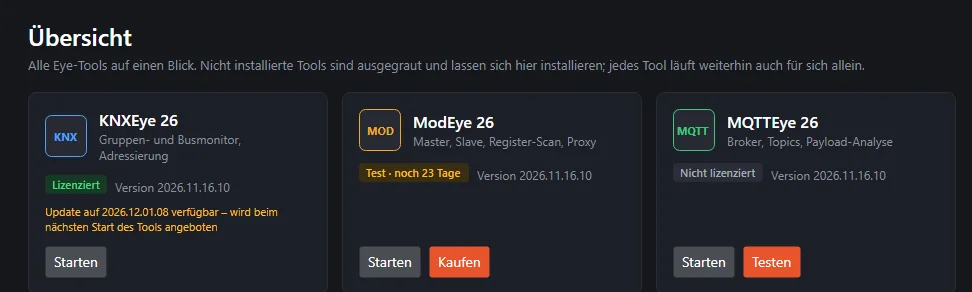
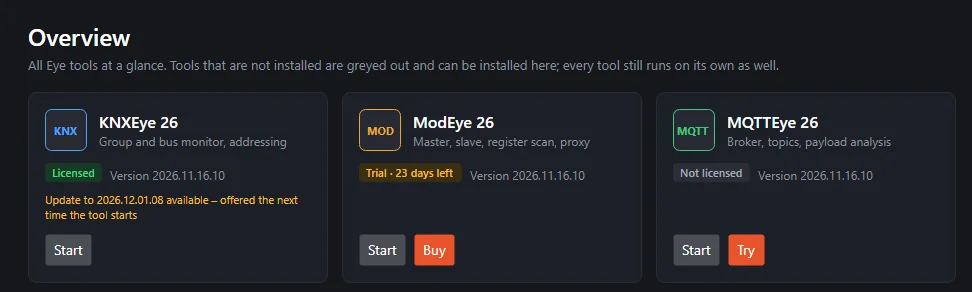
Ausschnitt der Übersicht: je Tool Version, Lizenzstand und Hinweis auf eine neuere Version. (Bild aus dem Programm, Beispieldaten.)Part of the overview: version, licence status and a note about a newer version for each tool. (Image from the program, sample data.)
Starter, Lizenzübersicht und GesamtmonitorLauncher, licence overview and combined monitor
Für alle, die mit mehreren Eye-Tools arbeiten – und für alle, die eines kennenlernen wollen.For everyone who works with several Eye tools — and for everyone who wants to get to know one.
Alle Tools auf einen BlickAll tools at a glance
Kacheln mit Version, Lizenzstand und ob das Tool gerade läuft. Nicht installierte Tools sind ausgegraut; ein grüner Punkt in der linken Leiste markiert ein laufendes Tool.Tiles with version, licence status and whether the tool is currently running. Tools that are not installed are greyed out; a green dot in the left bar marks a running tool.
Installation per KlickInstallation in one click
„Installieren“ lädt die aktuelle Version vom Server nach C:\Program Files\Alexander Maier GmbH\ und legt Verknüpfungen an. „Starten“ öffnet das Tool als eigenes Programm.“Install” downloads the current version from the server to C:\Program Files\Alexander Maier GmbH\ and creates shortcuts. “Start” opens the tool as a separate program.
Lizenzstand im BlickLicence status at a glance
Jede Kachel zeigt, ob ein Tool lizenziert, im Test oder abgelaufen ist; oben rechts steht, wie viele Tools lizenziert sind. „Testen“ und „Kaufen“ direkt auf der Kachel.Every tile shows whether a tool is licensed, on trial or expired; the top right shows how many tools are licensed. “Try” and “Buy” right on the tile.
Updates im BlickUpdates at a glance
Die Suite fragt die Versionen der Tools ab und zeigt auf der Kachel, wenn eine neuere bereitsteht. Installiert wird das Update vom Tool selbst; die Suite aktualisiert sich ebenfalls selbst.The suite checks the tools' versions and shows on the tile when a newer one is available. The update is installed by the tool itself; the suite also updates itself.
GesamtmonitorCombined monitor
Alle laufenden Tools auf einer Zeitachse – KNX, Modbus, MQTT, BACnet, OCPP und DALI. Filter je Protokoll, Pausieren, Leeren; wie viele Zeilen gehalten werden, steht in den Einstellungen.All running tools on one timeline — KNX, Modbus, MQTT, BACnet, OCPP and DALI. Filter per protocol, pause, clear; how many rows are kept is set in the settings.
Tools bleiben eigenständigTools stay standalone
Jedes Tool hat eigene Lizenz, Einstellungen und Updates und läuft auch ohne Suite. Der Verkehr geht nur lokal auf demselben Rechner an die Suite.Every tool has its own licence, settings and updates and also runs without the suite. The traffic goes to the suite locally on the same computer only.
Ein Tool je Protokoll – gemeinsam in der SuiteOne tool per protocol — together in the suite
Jedes Tool lässt sich aus der Suite installieren und starten, aber auch einzeln herunterladen. Mehr zu jedem Tool auf seiner eigenen Seite.Every tool can be installed and started from the suite, but also downloaded on its own. More about each tool on its own page.
Alle Protokolle auf einer ZeitachseAll protocols on one timeline
Laufende Tools melden sich automatisch bei der Suite. Der Verkehr der Tools erscheint mit Zeit, Protokoll, Art, Adresse bzw. Topic, Bedeutung, Wert und Kanal – neueste oben.Running tools register with the suite automatically. Their traffic appears with time, protocol, kind, address or topic, meaning, value and channel — newest at the top.


Gesamtmonitor mit Telegrammen aus OCPPEye, ModEye, MQTTEye und KNXEye. (Bild aus dem Programm, Beispieldaten.)Combined monitor with telegrams from OCPPEye, ModEye, MQTTEye and KNXEye. (Image from the program, sample data.)
In drei SchrittenIn three steps
Suite laden und startenDownload and start the suite
EyeSuite26.exe herunterladen und starten. Beim ersten Start bietet die Suite an, sich nach C:\Program Files\Alexander Maier GmbH\ zu installieren – einmalig mit Administratorrechten.Download and start EyeSuite26.exe. On first start the suite offers to install itself to C:\Program Files\Alexander Maier GmbH\ — once, with administrator rights.
Tools installieren und startenInstall and start tools
Fehlende Tools per „Installieren“ holen, vorhandene per „Starten“ öffnen. Testlizenz anfordern oder kaufen direkt auf der Kachel.Get missing tools with “Install”, open existing ones with “Start”. Request a trial licence or buy right on the tile.
Verkehr im GesamtmonitorTraffic in the combined monitor
Laufende Tools melden sich automatisch; ihr Verkehr erscheint im Gesamtmonitor. Schließt man die Suite, laufen die Tools weiter.Running tools register automatically; their traffic appears in the combined monitor. If you close the suite, the tools keep running.
Kostenlos für WindowsFree for Windows
Die Suite ist kostenlos. Jedes Tool hat seine eigene Lizenz; „Testen“ und „Kaufen“ stehen auf der Kachel des Tools.The suite is free. Every tool has its own licence; “Try” and “Buy” are on the tool's tile.
| BetriebssystemOperating system | Windows, 64 BitWindows, 64-bit |
| Installation | eine einzelne Programmdatei; Suite und Tools liegen gemeinsam unter C:\Program Files\Alexander Maier GmbH\ – der Ordner wird einmalig mit Administratorrechten vorbereitet, danach laufen Installationen und Updates ohne erneute Abfragea single program file; the suite and the tools live together under C:\Program Files\Alexander Maier GmbH\ — the folder is prepared once with administrator rights, after that installations and updates run without asking again |
| ToolsTools | MQTTEye 26, BACnetEye 26, OCPPEye 26 und DALIEye 26 ab Version 2026.11.16.13 melden Lizenzstand und Verkehr an die SuiteMQTTEye 26, BACnetEye 26, OCPPEye 26 and DALIEye 26 from version 2026.11.16.13 report licence status and traffic to the suite |
| Internet | für das Installieren der Tools und für Updatesfor installing the tools and for updates |
| PreisPrice | kostenlosfree |
Häufige FragenFrequently asked questions
Was kostet die Eye Suite 26?How much does the Eye Suite 26 cost?
Nichts. Die Suite selbst ist kostenlos. Jedes Tool hat seine eigene Lizenz; den kostenlosen KNX IP-Scanner zeigt die Suite ebenfalls an.
Nothing. The suite itself is free. Every tool has its own licence; the suite also shows the free KNX IP-Scanner.
Brauche ich die Suite, um ein Eye-Tool zu nutzen?Do I need the suite to use an Eye tool?
Nein. Jedes Tool bleibt ein eigenständiges Programm und funktioniert auch ohne die Suite – mit eigener Lizenz, eigenen Einstellungen und eigenem Update. Die Suite ist Starter, Lizenzübersicht und Gesamtmonitor; schließt man sie, laufen die Tools weiter.
No. Every tool remains a separate program and also works without the suite — with its own licence, its own settings and its own updates. The suite is launcher, licence overview and combined monitor; if you close it, the tools keep running.
Welche Tools zeigt die Suite?Which tools does the suite show?
KNXEye 26, ModEye26, MQTTEye 26, BACnetEye 26, OCPPEye 26 und DALIEye 26 sowie den kostenlosen KNX IP-Scanner. Nicht installierte Tools sind ausgegraut und lassen sich direkt aus der Suite installieren.
KNXEye 26, ModEye26, MQTTEye 26, BACnetEye 26, OCPPEye 26 and DALIEye 26 as well as the free KNX IP-Scanner. Tools that are not installed are greyed out and can be installed straight from the suite.
Wie installiere ich ein Tool?How do I install a tool?
„Installieren“ auf der Kachel lädt die aktuelle Version des Tools vom Server und legt sie am Installationsort ab. Danach startet „Starten“ das Tool als eigenes Programm. Updates installiert jedes Tool selbst; die Suite zeigt auf der Kachel an, wenn eine neuere Version bereitsteht.
“Install” on the tile downloads the current version of the tool from the server and places it in the installation folder. After that, “Start” launches the tool as a separate program. Each tool installs its own updates; the suite shows on the tile when a newer version is available.
Wohin wird installiert?Where is it installed?
Suite und Tools liegen gemeinsam unter „C:\Program Files\Alexander Maier GmbH\<Produkt>\“. Der Ordner wird einmalig mit Administratorrechten vorbereitet; danach laufen die Installation über die Suite und alle Updates ohne erneute Abfrage. Verknüpfungen kommen auf den Desktop und ins Startmenü unter „Alexander Maier GmbH“.
The suite and the tools live together under “C:\Program Files\Alexander Maier GmbH\<product>\”. The folder is prepared once with administrator rights; after that, installing via the suite and all updates run without asking again. Shortcuts go on the desktop and into the Start menu under “Alexander Maier GmbH”.
Wie funktionieren die Lizenzen?How do the licences work?
Jede Kachel zeigt den Lizenzstand, den das Tool beim letzten Start gemeldet hat; oben rechts steht, wie viele der kostenpflichtigen Tools lizenziert sind. „Testen“ fordert eine kostenlose Testlizenz an, „Kaufen“ öffnet den Shop. Aktiviert wird die Lizenz im Tool selbst. Steht „Lizenz unbekannt“ da, das Tool einmal starten.
Every tile shows the licence status the tool reported when it last started; the top right shows how many of the paid tools are licensed. “Try” requests a free trial licence, “Buy” opens the shop. The licence is activated in the tool itself. If it says “License unknown”, start the tool once.
Was zeigt der Gesamtmonitor?What does the combined monitor show?
Laufende Tools melden sich automatisch bei der Suite und schicken ihren Verkehr in den Gesamtmonitor – alle Protokolle auf einer Zeitachse, neueste oben, mit Zeit, Protokoll, Art, Adresse bzw. Topic, Bedeutung, Wert und Kanal. Die farbigen Knöpfe blenden einzelne Protokolle aus, „Pausieren“ hält die Anzeige an, „Leeren“ löscht sie.
Running tools register with the suite automatically and send their traffic to the combined monitor — all protocols on one timeline, newest at the top, with time, protocol, kind, address or topic, meaning, value and channel. The coloured buttons hide individual protocols, “Pause” freezes the display, “Clear” empties it.
Verlassen die Daten meinen Rechner?Does the data leave my computer?
Nein. Die Tools übergeben ihren Verkehr über eine lokale Verbindung auf demselben Rechner an die Suite, nur für den angemeldeten Benutzer. Läuft keine Suite, entsteht im Tool dafür kein Aufwand.
No. The tools hand their traffic to the suite via a local connection on the same computer, only for the signed-in user. If no suite is running, this costs the tool nothing.
Welche Tool-Versionen arbeiten mit der Suite zusammen?Which tool versions work with the suite?
MQTTEye 26, BACnetEye 26, OCPPEye 26 und DALIEye 26 ab Version 2026.11.16.13 melden Lizenzstand und Verkehr an die Suite. Ältere Versionen aktualisieren sich über ihr eigenes Update.
MQTTEye 26, BACnetEye 26, OCPPEye 26 and DALIEye 26 from version 2026.11.16.13 report licence status and traffic to the suite. Older versions update themselves via their own update.
Gibt es die Suite für Linux oder macOS?Is the suite available for Linux or macOS?
Nein, die Eye Suite 26 gibt es für Windows. Die Tools MQTTEye 26, BACnetEye 26, OCPPEye 26 und DALIEye 26 laufen zusätzlich unter Linux – dort jeweils für sich allein.
No, the Eye Suite 26 is available for Windows. The tools MQTTEye 26, BACnetEye 26, OCPPEye 26 and DALIEye 26 also run on Linux — there each on its own.
Welche Sprachen gibt es?Which languages are available?
19 Sprachen wie die Tools, dazu hell, dunkel oder wie Windows.
19 languages like the tools, plus light, dark or following Windows.
Noch eine Frage? Schreib uns an info@busbaer.de.Another question? Write to us at info@busbaer.de.
Alle Eye-Tools an einem Ort.All Eye tools in one place.
EyeSuite26.exe herunterladen, starten – und die Tools, die du brauchst, per Klick dazuholen.Download and start EyeSuite26.exe — and add the tools you need in one click.
Sprich uns anGet in touch
KontaktContact
+49 (0) 6271 – 91 94 70
info@busbaer.de
Alexander Maier GmbH
Beckstraße 3
D-69412 Eberbach
ImpressumImprint
Alexander Maier GmbH
Beckstraße 3
D-69412 Eberbach
Geschäftsführer:Managing director: Alexander Maier
Sitz der Gesellschaft:Registered office: Eberbach
Registergericht:Register court: Mannheim
Handelsregister:Commercial register: HRB 335404
USt-IdNr.:VAT ID: DE177682654
Telefon:Phone: +49 (0) 6271 – 91 94 70
E-Mail: info@busbaer.de