MQTTEye 26 — sehen, was
über den Broker läuft.MQTTEye 26 — see what's
going through the broker.
Broker im Netz finden, alle Topics als Baum mit letztem Wert, Verlauf und Diagramm, Nachrichten senden, aufzeichnen und wiedergeben – für MQTT 3.1, 3.1.1 und 5.0.Find brokers on the network, all topics as a tree with last value, history and chart, publish, record and replay messages — for MQTT 3.1, 3.1.1 and 5.0.
MQTTEye 26 verbindet sich über TCP, TLS oder WebSocket mit einem oder mehreren Brokern gleichzeitig, zeigt JSON eingerückt, Zahlen als Diagramm und Binärdaten als Hex-Dump und vergleicht jede Nachricht mit ihrem Vorwert. Fehlt der Broker noch, startet MQTTEye selbst einen – zum Testen von Geräten.MQTTEye 26 connects to one or several brokers at once via TCP, TLS or WebSocket, shows JSON indented, numbers as a chart and binary data as a hex dump, and compares every message with its previous value. No broker yet? MQTTEye starts one itself — for testing devices.
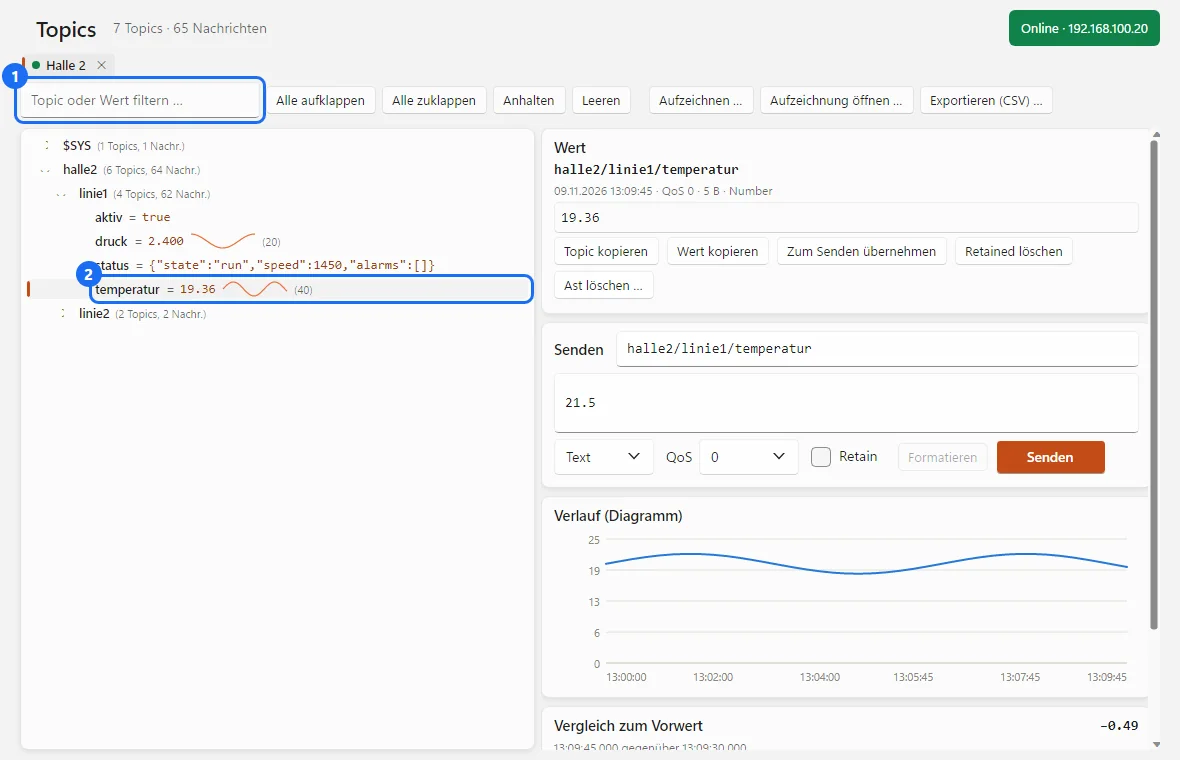
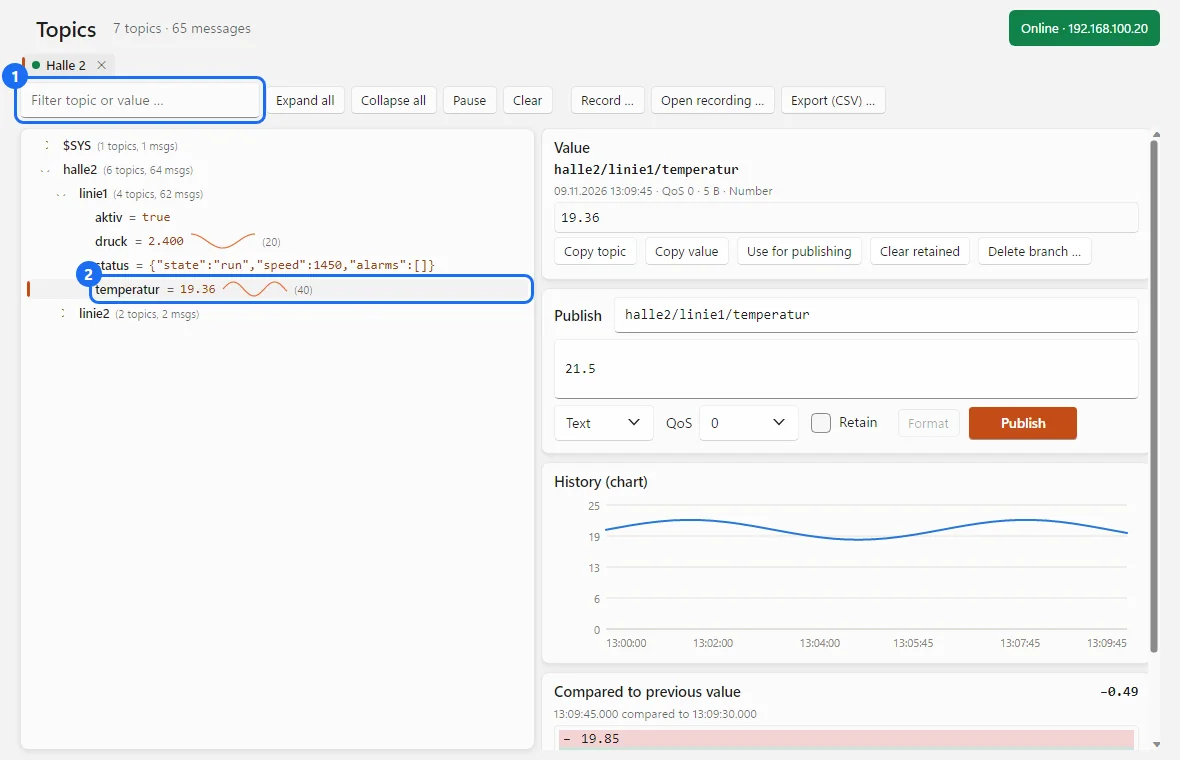
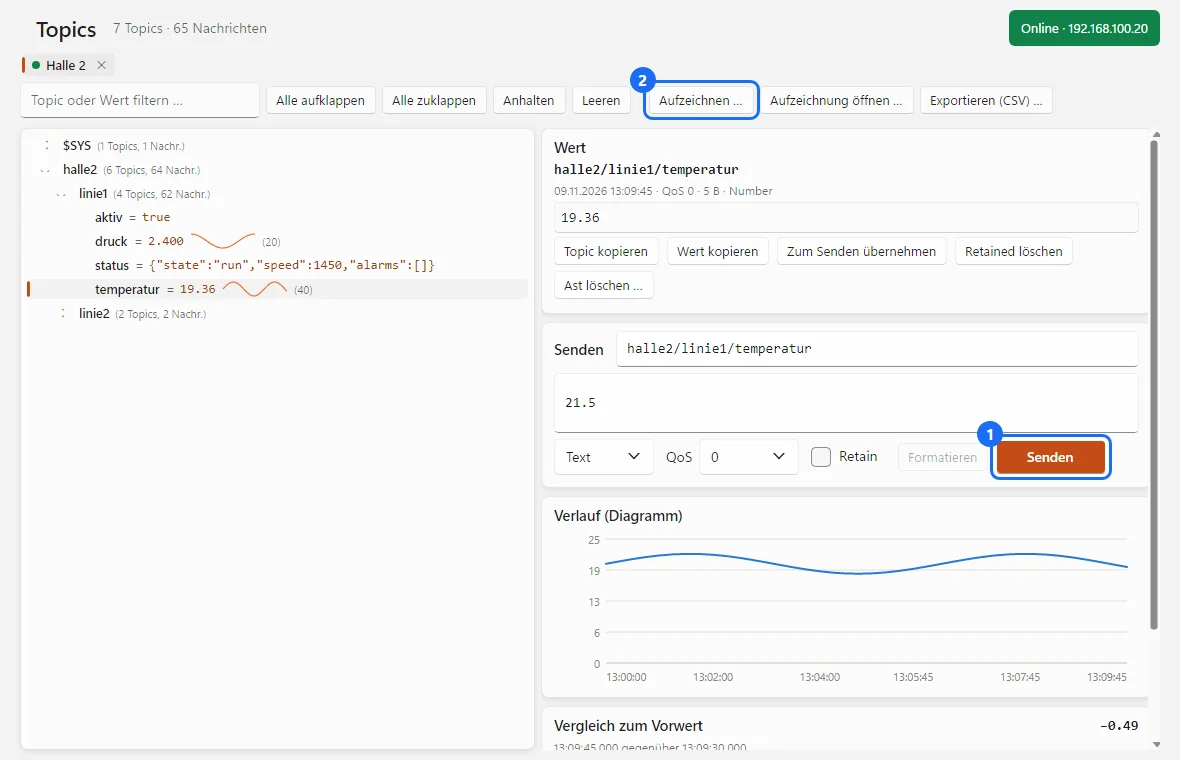
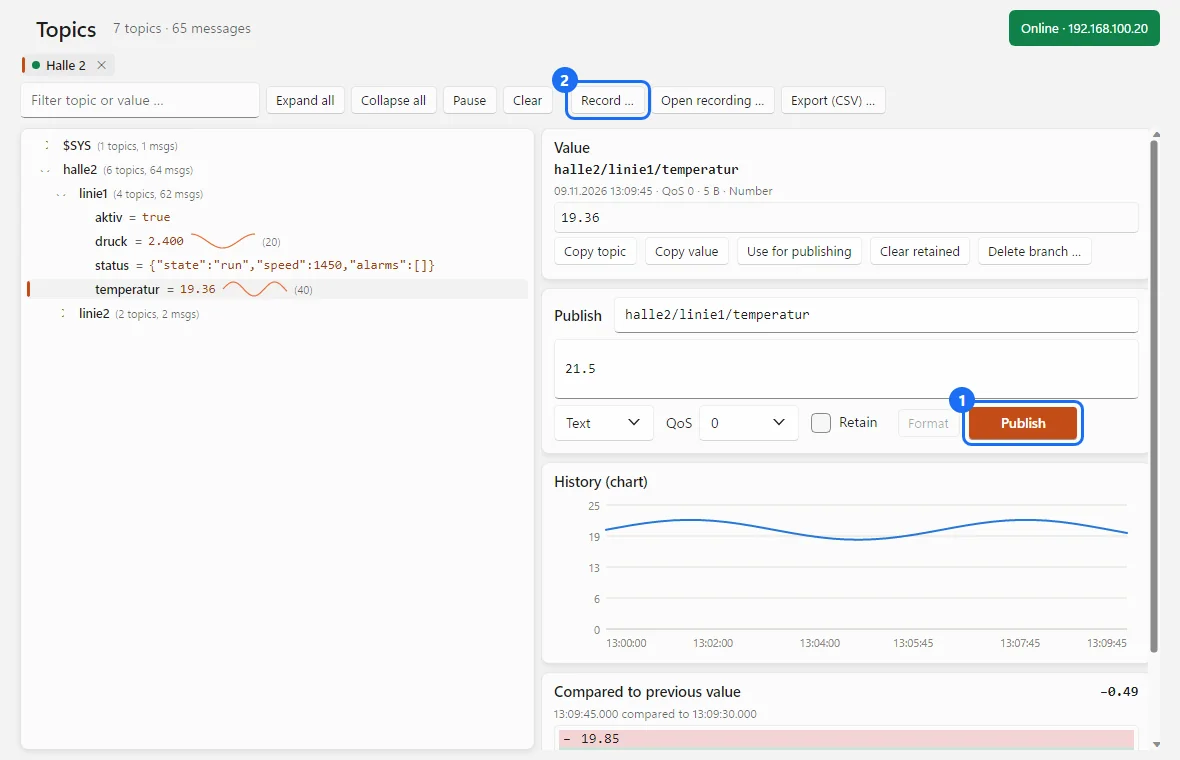
Topic-Baum mit letztem Wert und Verlaufskurve, rechts Wert, Senden und Diagramm des gewählten Topics. (Bild aus dem Programm, Beispieldaten.)Topic tree with last value and trend curve; on the right value, publish and chart of the selected topic. (Image from the program, sample data.)
Vom Broker-Scan bis zur WiedergabeFrom broker scan to replay
Für Inbetriebnehmer, Systemintegratoren und Entwickler, die mit MQTT-Brokern und -Geräten arbeiten.For commissioning engineers, system integrators and developers working with MQTT brokers and devices.
Broker im Netz findenFind brokers on the network
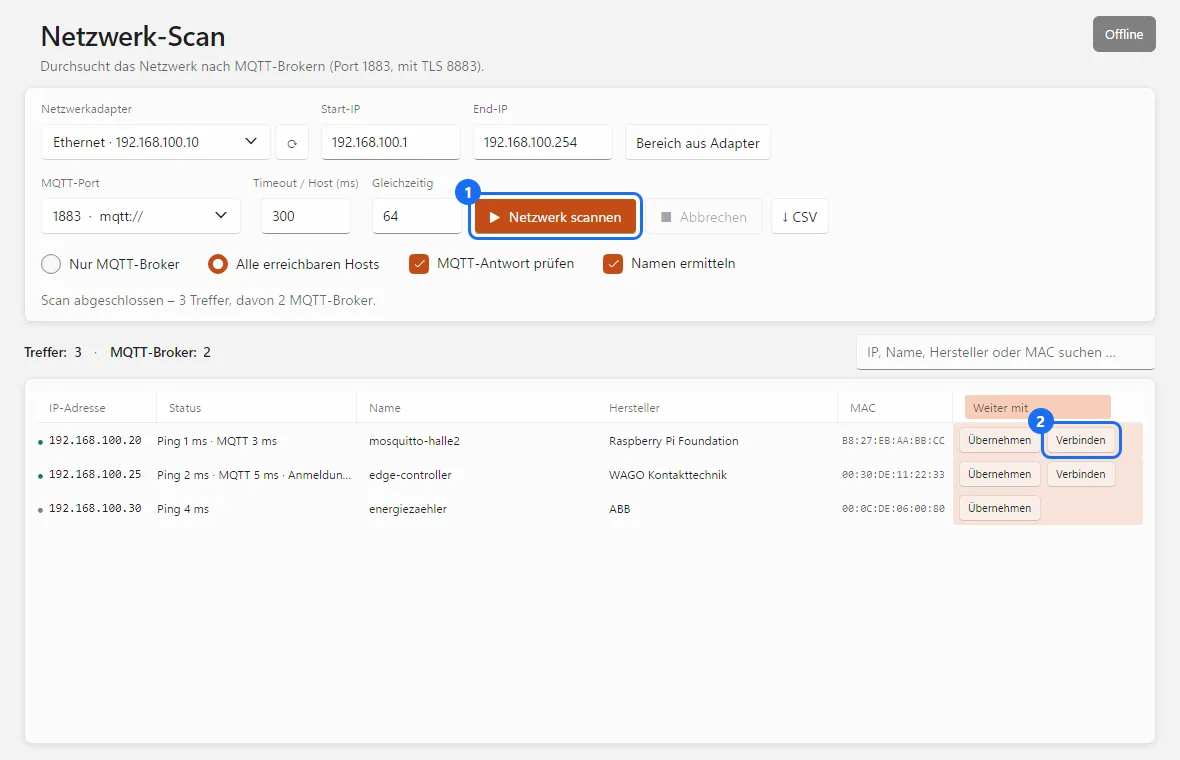
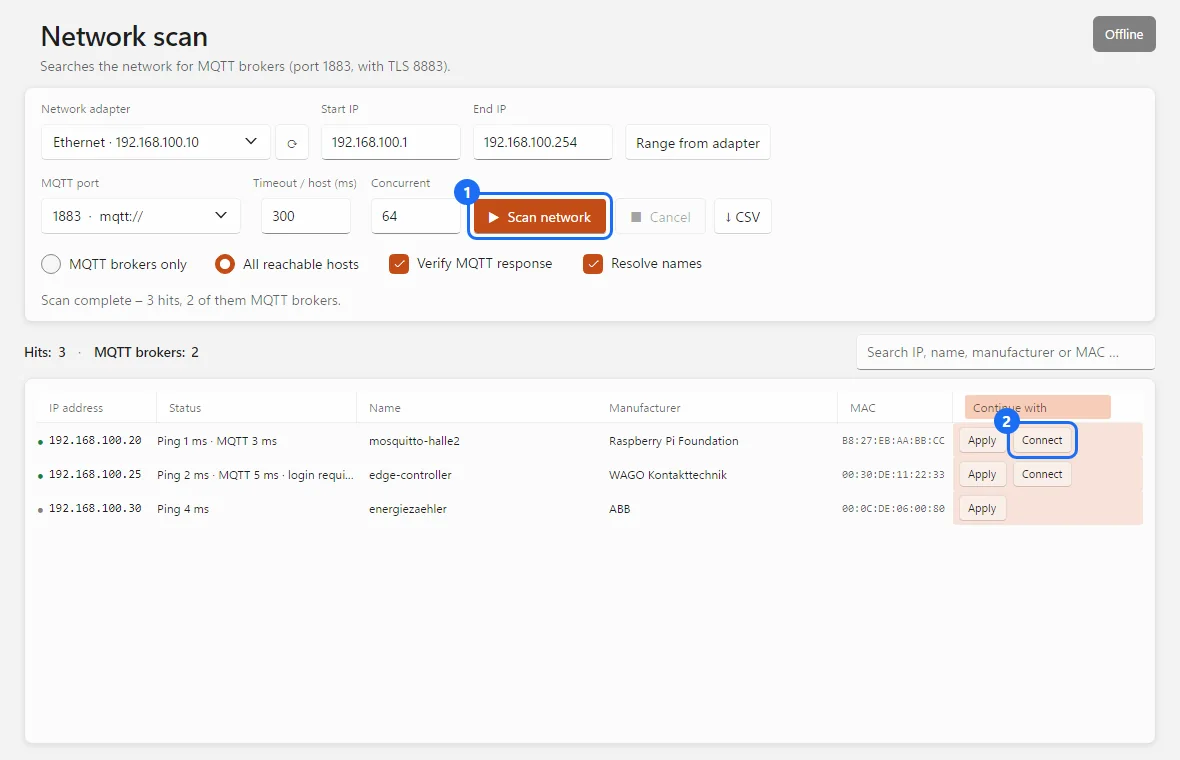
Der Netzwerk-Scan prüft einen IP-Bereich auf Port 1883, 8883 (TLS) oder einem eigenen Port und meldet sich auf Wunsch per MQTT an: „MQTT“ erscheint nur bei echten Brokern, „Anmeldung nötig“, wenn Zugangsdaten verlangt werden. Dazu Name, MAC-Adresse und Hersteller.The network scan checks an IP range on port 1883, 8883 (TLS) or a custom port and, on request, logs in via MQTT: “MQTT” only appears for real brokers, “login required” if credentials are needed. Plus name, MAC address and manufacturer.
Topic-Baum mit ZählernTopic tree with counters
Jede Topic-Ebene ist ein Knoten mit letztem Wert; Äste zeigen die Zahl der Topics und Nachrichten darunter – so findet man lebhafte Bereiche auch zugeklappt. Filter in Topic und Wert, „Anhalten“ friert den Baum ein.Every topic level is a node with its last value; branches show the number of topics and messages below — so you find busy areas even when collapsed. Filter by topic and value; “Pause” freezes the tree.
Werte verstehenUnderstand the values
JSON eingerückt, Zahlen und true/false als Diagramm, Binärdaten als Hex-Dump, bei MQTT 5 Content-Type und User Properties. Der Vergleich zum Vorwert zeigt, was sich geändert hat – bei JSON je Zeile, bei Zahlen die Differenz.JSON indented, numbers and true/false as a chart, binary data as a hex dump, with MQTT 5 also content type and user properties. The comparison with the previous value shows what changed — line by line for JSON, the difference for numbers.
Senden und aufräumenPublish and clean up
Text, JSON oder XML senden – JSON und XML werden vorher geprüft und lassen sich einrücken. QoS und Retain wählbar. Retained-Nachrichten einzeln oder als ganzen Ast löschen.Publish text, JSON or XML — JSON and XML are validated first and can be indented. QoS and retain selectable. Delete retained messages one by one or as a whole branch.
Mehrere Broker gleichzeitigSeveral brokers at once
Jede Verbindung bekommt eine eigene Registerkarte mit eigenem Baum. Verbindungsprofile speichern – ein Doppelklick auf ein Profil verbindet sofort.Every connection gets its own tab with its own tree. Save connection profiles — a double-click on a profile connects right away.
TLS und ZertifikateTLS and certificates
mqtts:// und wss://, Prüfung gegen die eigene CA des Brokers, Client-Zertifikate als PFX/P12 oder PEM – unter Windows auch direkt aus dem Zertifikatsspeicher. Last Will mit MQTT-5-Eigenschaften.mqtts:// and wss://, verification against the broker's own CA, client certificates as PFX/P12 or PEM — on Windows also straight from the certificate store. Last will with MQTT 5 properties.
Aufzeichnen und wiedergebenRecord and replay
Alle Nachrichten als JSON Lines aufzeichnen, später wie live ansehen oder an einen Broker zurückspielen – im Originaltempo oder schneller, wahlweise nur ein Ast und mit Topic-Präfix. Topics als CSV exportieren.Record all messages as JSON Lines, view them later just like live or replay them to a broker — at the original speed or faster, optionally just one branch and with a topic prefix. Export topics as CSV.
Eingebauter BrokerBuilt-in broker
MQTTEye als Broker über TCP und/oder TLS, mit selbstsigniertem oder eigenem Zertifikat, optional mit Anmeldung. Verbundene Clients mit Abonnements; „Hinauswerfen“ löst den Last Will aus. So lassen sich Geräte gegen MQTTEye testen.MQTTEye as a broker over TCP and/or TLS, with a self-signed or your own certificate, optionally with a login. Connected clients with their subscriptions; “Kick” triggers the last will. That way devices can be tested against MQTTEye.
Außerdem:Also: Kurzeinführung beim ersten Start · Hell/Dunkel · 19 Sprachen · automatische Updates · Zusammenarbeit mit der Eye Suite 26quick tour on first start · light/dark · 19 languages · automatic updates · works with the Eye Suite 26
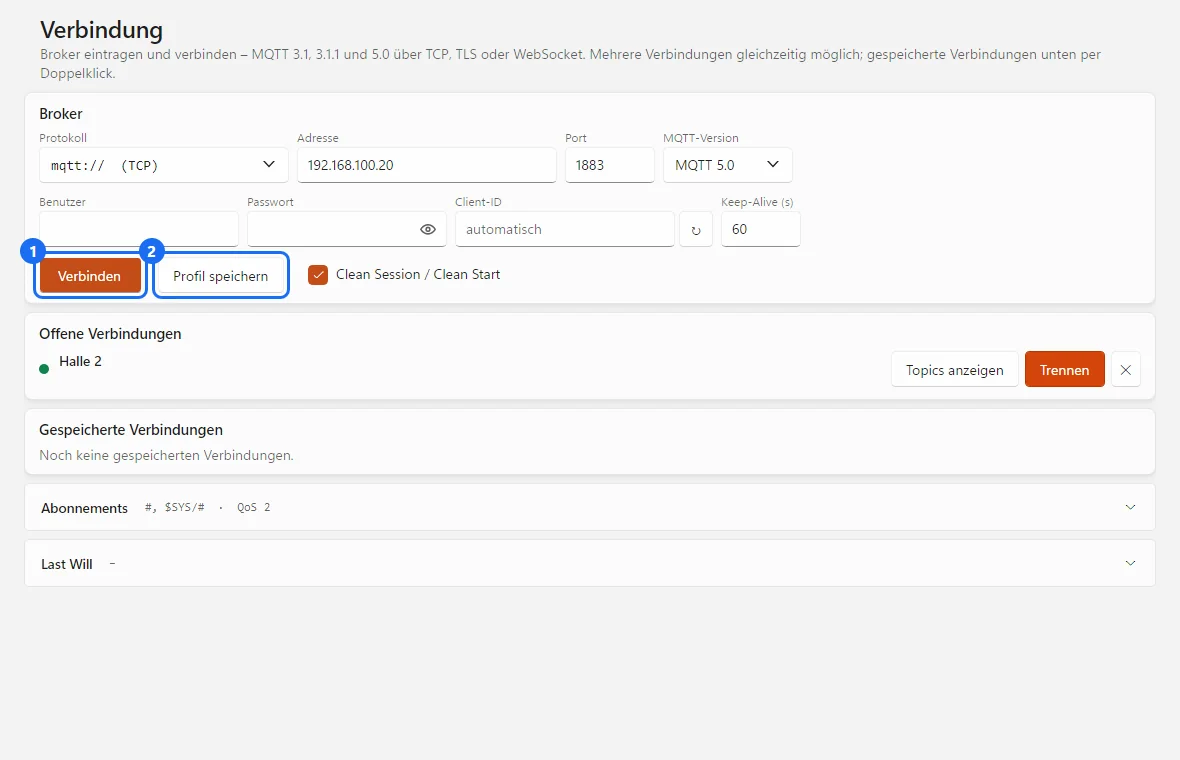
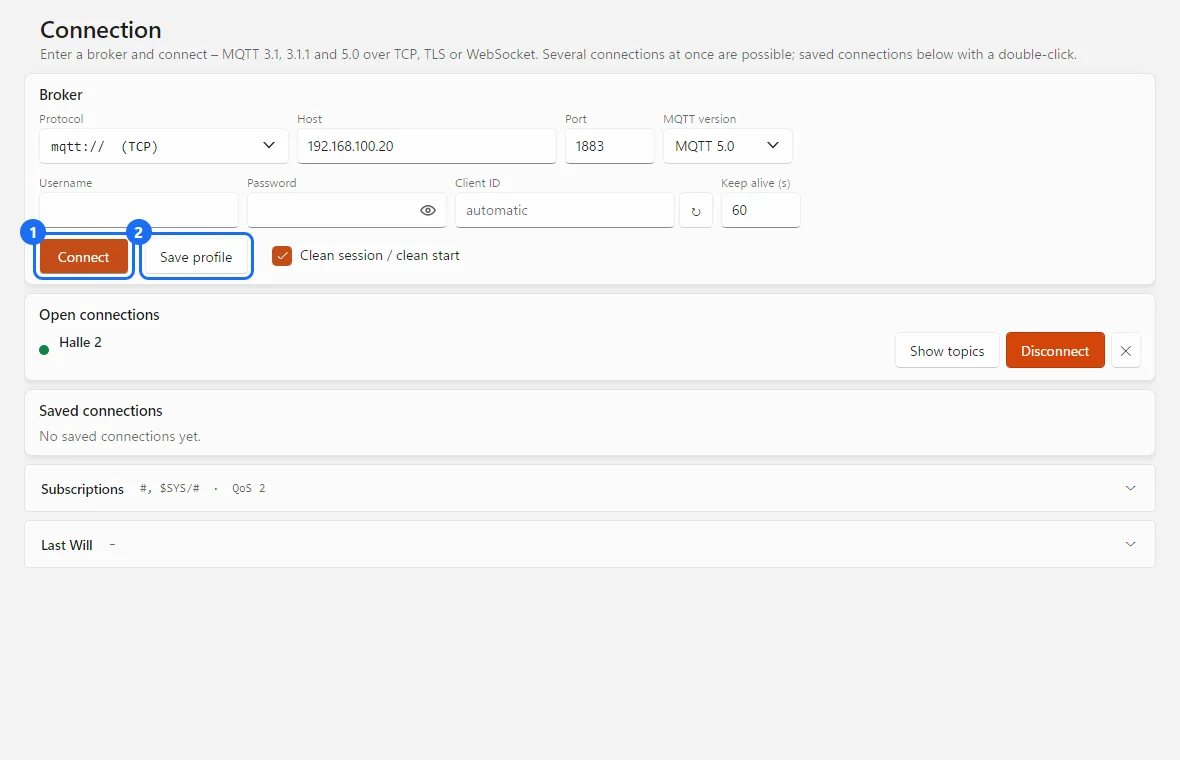
In vier Schritten zu deinen MQTT-DatenYour MQTT data in four steps
Dieselben Schritte zeigt MQTTEye beim ersten Start selbst.MQTTEye shows the same steps itself on first start.
Protokolle, Verbindungen, FormateProtocols, connections, formats
| MQTT | 3.1 · 3.1.1 · 5.0 |
| VerbindungConnection | TCP (mqtt://, Port 1883), TLS (mqtts://, Port 8883), WebSocket (ws:// und wss://)TCP (mqtt://, port 1883), TLS (mqtts://, port 8883), WebSocket (ws:// and wss://) |
| SicherheitSecurity | Benutzer und Passwort, eigene CA des Brokers, Client-Zertifikat als PFX/P12 oder PEM, unter Windows aus dem ZertifikatsspeicherUser and password, the broker's own CA, client certificate as PFX/P12 or PEM, on Windows from the certificate store |
| SendenPublish | Text, JSON, XML · QoS 0, 1, 2 · Retain · bei MQTT 5 mit Content-TypeText, JSON, XML · QoS 0, 1, 2 · retain · with MQTT 5 including content type |
| Last Will | ja, bei MQTT 5 mit Verzögerung, Ablaufzeit und Content-Typeyes, with MQTT 5 including delay, expiry and content type |
| AufzeichnungRecording | JSON Lines (eine Nachricht je Zeile, Binärdaten Base64), Wiedergabe an einen BrokerJSON Lines (one message per line, binary data as Base64), replay to a broker |
| Export | Topics als CSVTopics as CSV |
| Eingebauter BrokerBuilt-in broker | TCP und/oder TLS, optional mit Anmeldung; Retained und Sitzungen im SpeicherTCP and/or TLS, optionally with login; retained messages and sessions in memory |
Sechs typische EinsätzeSix typical jobs
InbetriebnahmeCommissioning
Prüfen, ob Geräte auf den richtigen Topics die richtigen Werte senden, und Werte gezielt senden – mit dem Topic des gewählten Eintrags schon im Sendefeld.Check that devices publish the right values on the right topics, and publish values deliberately — with the topic of the selected entry already in the publish field.
Verbindung klärenSort out the connection
Der Netzwerk-Scan zeigt, wo ein Broker antwortet und ob er eine Anmeldung verlangt. Abgelehnte Zugangsdaten und TLS-Fehler meldet MQTTEye mit Grund.The network scan shows where a broker answers and whether it requires a login. MQTTEye reports rejected credentials and TLS errors with the reason.
Geräte ohne Anlagen-Broker testenTest devices without the site broker
Der eingebaute Broker ist das Gegenstück auf dem Schreibtisch. Wirft man einen Client hinaus, sieht man, ob sein Last Will richtig ankommt.The built-in broker is the counterpart on your desk. Kick a client to see whether its last will arrives correctly.
AufräumenClean up
Alte Retained-Nachrichten einzeln oder als ganzen Ast vom Broker entfernen.Remove old retained messages from the broker one by one or as a whole branch.
Abläufe nachstellenReproduce sequences
Eine Aufzeichnung an einen Broker zurückspielen – mit Topic-Präfix wie „replay/“, damit echte Geräte nicht reagieren.Replay a recording to a broker — with a topic prefix such as “replay/” so that real devices do not react.
DokumentationDocumentation
Topics als CSV für Excel exportieren, Aufzeichnungen weitergeben und später wieder öffnen.Export topics as CSV for Excel, pass on recordings and open them again later.
Erst testen, dann lizenzierenTry first, license later
Lade MQTTEye 26 herunter und fordere eine kostenlose Testlizenz an. Aktiviert wird die Lizenz direkt im Programm.Download MQTTEye 26 and request a free trial licence. The licence is activated right in the program.
- Windows: eine einzelne ProgrammdateiWindows: a single program file
- Linux x64 und arm64 (Raspberry Pi)Linux x64 and arm64 (Raspberry Pi)
- Updates installiert das Programm auf Wunsch selbstThe program installs updates itself on request
- Kostenlos, alle FunktionenFree, all features
- Online anfordern, Aktivierung im ProgrammRequest online, activate in the program
- Jahreslizenz für einen Rechner, Laufzeit 12 MonateAnnual licence for one computer, 12-month term
- Alle Funktionen, alle 19 SprachenAll features, all 19 languages
- Updates während der Laufzeit inklusiveUpdates included during the term
- Aktivierung direkt im ProgrammActivation right in the program
Für eine Lizenz schreib uns bitte an info@busbaer.de. Die Lizenz ist an einen Rechner gebunden; bei einem Rechnerwechsel melde dich bitte bei uns. Den Lizenzcode bekommst du per E-Mail und aktivierst ihn direkt im Programm.For a licence, please write to us at info@busbaer.de. The licence is tied to one computer; if you change computers, please get in touch. You receive the licence code by e-mail and activate it right in the program.

Teil der Eye Suite 26Part of the Eye Suite 26
Alle Eye-Tools fügen sich in die kostenlose Eye Suite 26 ein: Ist sie installiert, zeigt ihr Dashboard den Lizenzstand von MQTTEye 26, und der Verkehr erscheint zusätzlich im Gesamtmonitor der Suite – zusammen mit KNX, Modbus und den anderen Protokollen. Ohne Suite arbeitet MQTTEye 26 genauso.All Eye tools fit into the free Eye Suite 26: once it is installed, its dashboard shows the licence status of MQTTEye 26, and the traffic also appears in the suite's combined monitor — together with KNX, Modbus and the other protocols. Without the suite, MQTTEye 26 works just the same.
Unter Windows fragt MQTTEye 26 beim ersten Start einmal, ob es sich nach C:\Program Files\Alexander Maier GmbH\MQTTEye 26\ installieren soll, und legt Verknüpfungen auf dem Desktop und im Startmenü an. Dafür sind einmalig Administratorrechte nötig, spätere Updates laufen ohne.On Windows, MQTTEye 26 asks once on first start whether it should install itself to C:\Program Files\Alexander Maier GmbH\MQTTEye 26\, and creates shortcuts on the desktop and in the Start menu. This needs administrator rights once; later updates run without them.
Windows, Linux und Raspberry PiWindows, Linux and Raspberry Pi
| Windows | 64 Bit64-bit |
| Linux | 64 Bit: x64 für PCs, arm64 z. B. für Raspberry Pi 4 oder 5 mit Raspberry Pi OS 64 Bit (Bookworm oder neuer) und Desktop. 32-Bit-Systeme werden nicht unterstützt.64-bit: x64 for PCs, arm64 e.g. for Raspberry Pi 4 or 5 with Raspberry Pi OS 64-bit (Bookworm or later) and desktop. 32-bit systems are not supported. |
| Installation | Windows: eine einzelne Programmdatei, .NET ist enthalten; beim ersten Start wird die Installation nach C:\Program Files\Alexander Maier GmbH\ angeboten.Linux: tar xzf MQTTEye26-linux-<arch>.tar.gz, dann im entpackten Ordner bash install.sh – danach im Startmenü oder im Terminal mit mqtteye26Windows: a single program file, .NET included; on first start the program offers to install itself to C:\Program Files\Alexander Maier GmbH\.Linux: tar xzf MQTTEye26-linux-<arch>.tar.gz, then run bash install.sh in the unpacked folder — afterwards start it from the menu or with mqtteye26 in a terminal |
| NetzwerkNetwork | Zugang zum Broker (TCP, TLS oder WebSocket); für den eingebauten Broker muss die Firewall den gewählten Port eingehend zulassenAccess to the broker (TCP, TLS or WebSocket); for the built-in broker the firewall must allow the chosen port inbound |
| Internet | für Lizenzaktivierung und Updatesfor licence activation and updates |
Das Programm aktualisiert sich danach auf Wunsch selbst. Für macOS gibt es noch keinen Download.After that, the program updates itself on request. There is no macOS download yet.
Häufige FragenFrequently asked questions
Welche MQTT-Versionen und Verbindungen werden unterstützt?Which MQTT versions and connections are supported?
MQTT 3.1, 3.1.1 und 5.0 über TCP (mqtt://), TLS (mqtts://) und WebSocket (ws:// bzw. wss://). Mehrere Broker lassen sich gleichzeitig verbinden, jeder in einer eigenen Registerkarte.
MQTT 3.1, 3.1.1 and 5.0 over TCP (mqtt://), TLS (mqtts://) and WebSocket (ws:// or wss://). Several brokers can be connected at the same time, each in its own tab.
Wie kann ich MQTTEye testen?How can I try MQTTEye?
Programm herunterladen und über „Testlizenz anfordern“ auf dieser Seite eine kostenlose Testlizenz anfordern. Den Code aktivierst du direkt im Programm.
Download the program and request a free trial licence via “Request trial licence” on this page. You activate the code right in the program.
Findet MQTTEye die Broker im Netz?Does MQTTEye find the brokers on the network?
Ja. Der Netzwerk-Scan prüft einen IP-Bereich per Ping und auf dem MQTT-Port (1883, 8883 für TLS oder einen eigenen Port). Mit „MQTT-Antwort prüfen“ schickt MQTTEye eine MQTT-Anmeldung und trennt sofort wieder – so erscheint „MQTT“ nur bei echten Brokern, mit dem Zusatz „Anmeldung nötig“, wenn der Broker keine anonyme Verbindung zulässt. Broker, die nur über WebSocket erreichbar sind, erkennt der Scan nicht.
Yes. The network scan checks an IP range by ping and on the MQTT port (1883, 8883 for TLS or a custom port). With “Check MQTT response”, MQTTEye sends an MQTT login and disconnects straight away — so “MQTT” only appears for real brokers, with the note “login required” if the broker does not accept anonymous connections. Brokers that can only be reached via WebSocket are not detected by the scan.
Warum abonniert MQTTEye standardmäßig mit QoS 2?Why does MQTTEye subscribe with QoS 2 by default?
Der Broker liefert eine Nachricht mit der kleineren der beiden Stufen aus Sende- und Abo-QoS. Mit QoS 2 im Abo siehst du deshalb, mit welcher QoS ein Gerät tatsächlich sendet. Die Abo-QoS ist im Verbindungsformular wählbar.
The broker delivers a message with the lower of the publish QoS and the subscription QoS. With QoS 2 in the subscription you therefore see which QoS a device actually publishes with. The subscription QoS can be selected in the connection form.
Wie lösche ich Retained-Nachrichten?How do I delete retained messages?
„Retained löschen“ sendet eine leere Nachricht mit Retain-Flag; der Broker entfernt damit die gespeicherte Nachricht. „Ast löschen“ tut das für ein Topic und alle Topics darunter – wahlweise nur für die, deren Nachricht als retained ankam, oder für alle.
“Clear retained” sends an empty message with the retain flag; the broker then removes the stored message. “Delete branch” does this for a topic and all topics below it — either only for those whose message arrived as retained, or for all of them.
Kann MQTTEye selbst als Broker arbeiten?Can MQTTEye act as a broker itself?
Ja. Auf der Seite „Broker“ startet ein eingebauter MQTT-Broker über TCP und/oder TLS, mit selbstsigniertem oder eigenem Zertifikat und optional mit Anmeldung. Du siehst die verbundenen Clients mit ihren Abonnements und kannst einen Client hinauswerfen – das löst seinen Last Will aus. Retained-Nachrichten und Sitzungen hält der eingebaute Broker nur im Speicher; WebSocket bietet er nicht an.
Yes. On the “Broker” page a built-in MQTT broker starts over TCP and/or TLS, with a self-signed or your own certificate and optionally with a login. You see the connected clients with their subscriptions and can kick a client — which triggers its last will. The built-in broker keeps retained messages and sessions in memory only; it does not offer WebSocket.
Wie arbeite ich mit Zertifikaten?How do I work with certificates?
Für Broker mit eigenem oder selbstsigniertem Zertifikat gibst du das CA-Zertifikat des Brokers an – dann wird weiter geprüft, nur gegen diese CA. Client-Zertifikate nimmt MQTTEye als PFX/P12 mit Kennwort oder als PEM mit Schlüsseldatei; unter Windows auch direkt aus dem Zertifikatsspeicher, ohne Datei und Kennwort.
For brokers with their own or a self-signed certificate, you specify the broker's CA certificate — verification continues, just against this CA. MQTTEye accepts client certificates as PFX/P12 with a password or as PEM with a key file; on Windows also straight from the certificate store, without a file or password.
Werden Passwörter gespeichert?Are passwords stored?
Ja, verschlüsselt – unter Windows per DPAPI für den angemeldeten Benutzer. Auf einem anderen PC oder unter einem anderen Benutzer sind sie nicht lesbar und müssen neu eingegeben werden.
Yes, encrypted — on Windows via DPAPI for the signed-in user. On another PC or under another user they cannot be read and have to be entered again.
Kann ich Nachrichten aufzeichnen und später wieder abspielen?Can I record messages and replay them later?
Ja. „Aufzeichnen …“ schreibt alle Nachrichten einer Verbindung als JSON Lines in eine Datei. „Aufzeichnung öffnen …“ zeigt sie später wie live, nur ohne Broker. Aus der geöffneten Aufzeichnung spielt „An Broker senden …“ die Nachrichten an einen verbundenen Broker zurück – im Originaltempo, schneller oder ohne Pausen, wahlweise nur ein Ast und mit Topic-Präfix, damit echte Geräte nicht reagieren.
Yes. “Record …” writes all messages of a connection to a file as JSON Lines. “Open recording …” shows it later just like live, only without a broker. From the opened recording, “Send to broker …” replays the messages to a connected broker — at the original speed, faster or without pauses, optionally just one branch and with a topic prefix so that real devices do not react.
Läuft MQTTEye unter Linux oder auf dem Mac?Does MQTTEye run on Linux or Mac?
Unter Linux ja: Pakete für x64 und arm64, auch für den Raspberry Pi 4 oder 5 mit Raspberry Pi OS 64 Bit. Für macOS gibt es noch keinen Download.
Linux yes: packages for x64 and arm64, also for the Raspberry Pi 4 or 5 with Raspberry Pi OS 64-bit. There is no download for macOS yet.
Muss ich etwas installieren?Do I have to install anything?
Unter Windows ist MQTTEye eine einzelne Programmdatei. Beim ersten Start fragt es einmal, ob es sich nach „C:\Program Files\Alexander Maier GmbH\MQTTEye 26\“ installieren soll, und legt Verknüpfungen an; dafür sind einmalig Administratorrechte nötig. Unter Linux entpackst du das Archiv und startest install.sh.
On Windows, MQTTEye is a single program file. On first start it asks once whether it should install itself to “C:\Program Files\Alexander Maier GmbH\MQTTEye 26\” and creates shortcuts; this needs administrator rights once. On Linux you unpack the archive and run install.sh.
Kann ich die Lizenz auf einen anderen Rechner übertragen?Can I transfer the licence to another computer?
Die Lizenz ist an einen Rechner gebunden. Bei einem Rechnerwechsel melde dich bitte bei uns.
The licence is tied to one computer. If you change computers, please get in touch with us.
Was hat MQTTEye mit der Eye Suite 26 zu tun?What does MQTTEye have to do with the Eye Suite 26?
Ist die kostenlose Eye Suite 26 installiert, zeigt ihr Dashboard den Lizenzstand von MQTTEye 26, und empfangene wie gesendete MQTT-Nachrichten erscheinen zusätzlich im Gesamtmonitor der Suite. Ohne Suite arbeitet MQTTEye unverändert.
If the free Eye Suite 26 is installed, its dashboard shows the licence status of MQTTEye 26, and received and sent MQTT messages also appear in the suite's combined monitor. Without the suite, MQTTEye works unchanged.
Welche Sprachen gibt es?Which languages are available?
Die Oberfläche gibt es in 19 Sprachen.
The user interface is available in 19 languages.
Noch eine Frage? Schreib uns an info@busbaer.de.Another question? Write to us at info@busbaer.de.
Sehen, was über den Broker läuft.See what's going through the broker.
MQTTEye26.exe herunterladen, Testlizenz anfordern – und in wenigen Minuten den ersten Topic-Baum sehen.Download MQTTEye26.exe, request a trial licence — and see your first topic tree within minutes.
Sprich uns anGet in touch
KontaktContact
+49 (0) 6271 – 91 94 70
info@busbaer.de
Alexander Maier GmbH
Beckstraße 3
D-69412 Eberbach
ImpressumImprint
Alexander Maier GmbH
Beckstraße 3
D-69412 Eberbach
Geschäftsführer:Managing director: Alexander Maier
Sitz der Gesellschaft:Registered office: Eberbach
Registergericht:Register court: Mannheim
Handelsregister:Commercial register: HRB 335404
USt-IdNr.:VAT ID: DE177682654
Telefon:Phone: +49 (0) 6271 – 91 94 70
E-Mail: info@busbaer.de