DALIEye 26 — sehen, was
auf der DALI-Linie passiert.DALIEye 26 — see what's
happening on the DALI line.
Jedes Telegramm im Klartext, Antworten mit ihrer Bedeutung und ein Geräte-Scan, der Lampenfehler, doppelte Adressen und Geräte ohne Adresse findet – nach IEC 62386-102 und -103, über das Lunatone DALI-2 IoT.Every frame in plain text, answers with their meaning and a device scan that finds lamp failures, duplicate addresses and devices without an address — according to IEC 62386-102 and -103, via the Lunatone DALI-2 IoT.
DALIEye 26 verbindet sich über das Netzwerk mit dem Gateway und zeigt alle Telegramme der Linie dekodiert und farbig nach Art: 16 Bit an Betriebsgeräte, 24 Bit an Steuergeräte, Antworten passend zur vorangehenden Abfrage. Der Scan liest Typ, Version, GTIN, Seriennummer, Stufen und Gruppen jedes Geräts – ohne die Konfiguration zu ändern. Ohne Anlage zeigt die Simulation, wie es aussieht.DALIEye 26 connects to the gateway over the network and shows all frames of the line decoded and coloured by kind: 16-bit to control gear, 24-bit to control devices, answers matched to the preceding query. The scan reads type, version, GTIN, serial number, levels and groups of every device — without changing the configuration. No installation at hand? The simulation shows what it looks like.
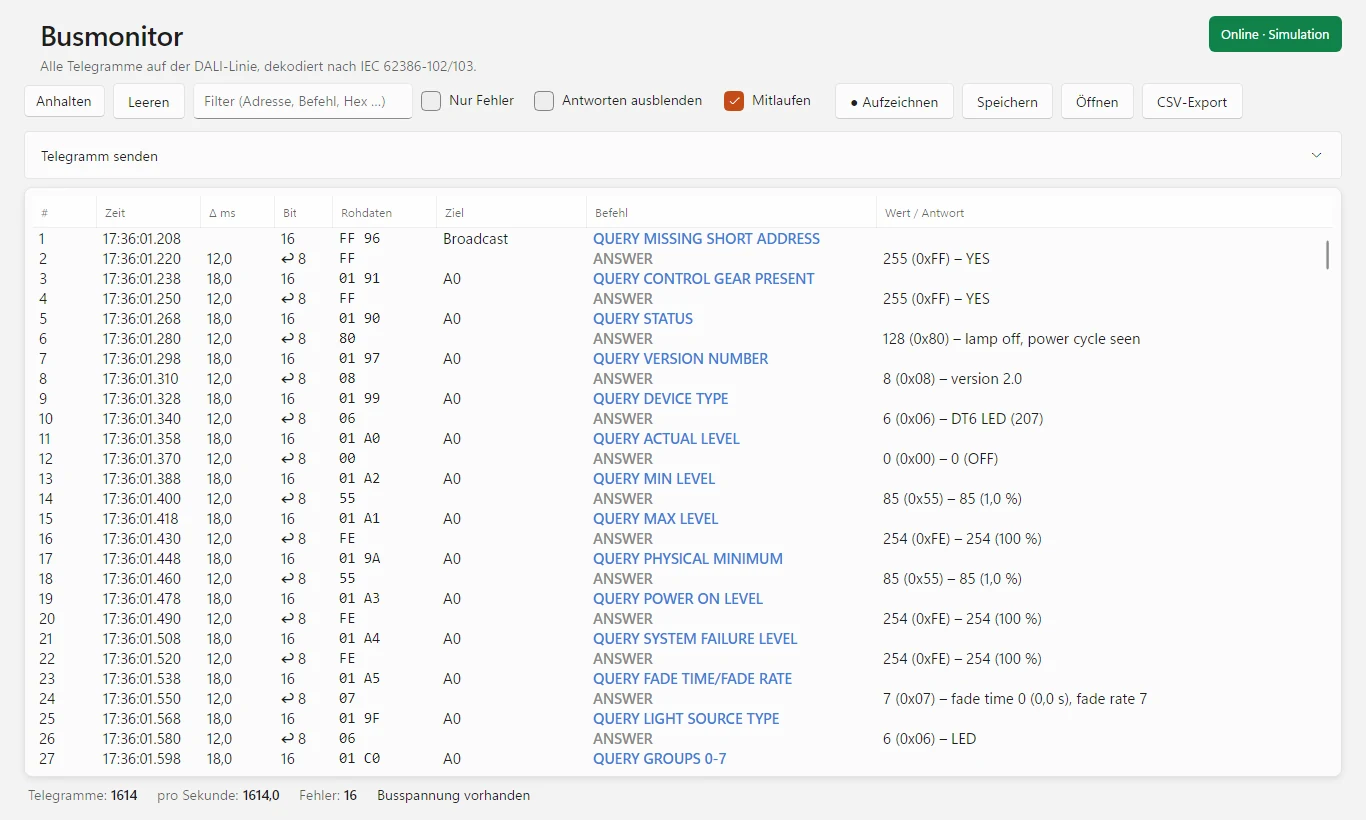
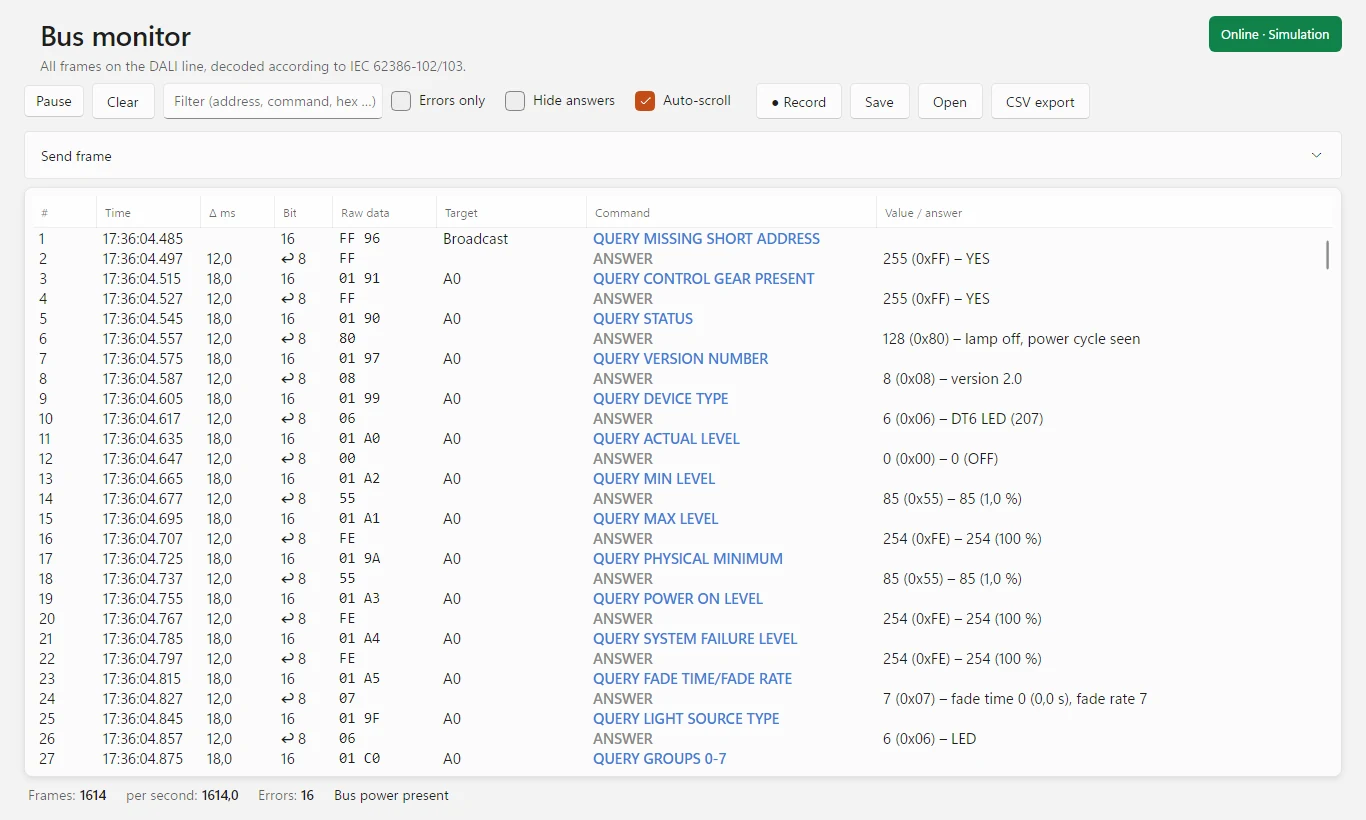
Busmonitor: jede Abfrage mit ihrer Antwort und deren Bedeutung, z. B. QUERY STATUS → „lamp off, power cycle seen“. (Bild aus dem Programm, Simulation.)Bus monitor: every query with its answer and what it means, e.g. QUERY STATUS → “lamp off, power cycle seen”. (Image from the program, simulation.)
Vom ersten Telegramm bis zum BefundFrom the first frame to the finding
Für Elektroinstallateure, Lichtplaner, Systemintegratoren und Inbetriebnehmer, die DALI-Anlagen prüfen, in Betrieb nehmen und Fehler suchen.For electricians, lighting designers, system integrators and commissioning engineers who check, commission and troubleshoot DALI installations.
Busmonitor im KlartextBus monitor in plain text
Alle Telegramme der Linie, dekodiert nach IEC 62386-102 und -103: Ziel, Befehl und Wert, farbig nach Art – Stufe, Befehl, Konfiguration, Abfrage, Antwort, Ereignis, Fehler.All frames of the line, decoded according to IEC 62386-102 and -103: target, command and value, coloured by kind — level, command, configuration, query, answer, event, error.
Antworten verstehenUnderstand the answers
Jede Antwort wird mit der vorangehenden Abfrage gedeutet, z. B. QUERY STATUS → „lamp failure“. „(2×)“ markiert Konfigurationsbefehle, die binnen 100 ms wiederholt wurden – so wie es die Norm verlangt.Every answer is interpreted with the preceding query, e.g. QUERY STATUS → “lamp failure”. “(2×)” marks configuration commands repeated within 100 ms — as the standard requires.
Geräte-ScanDevice scan
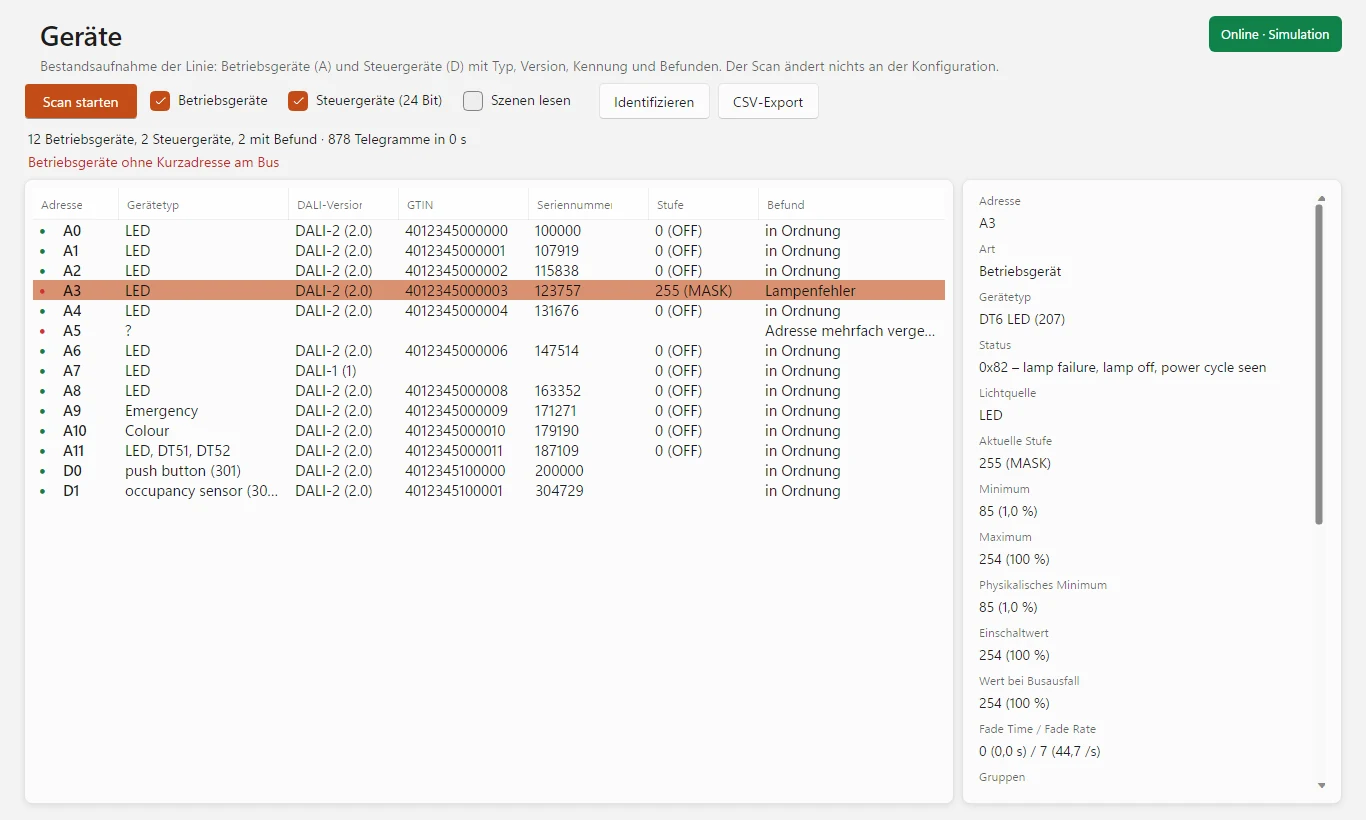
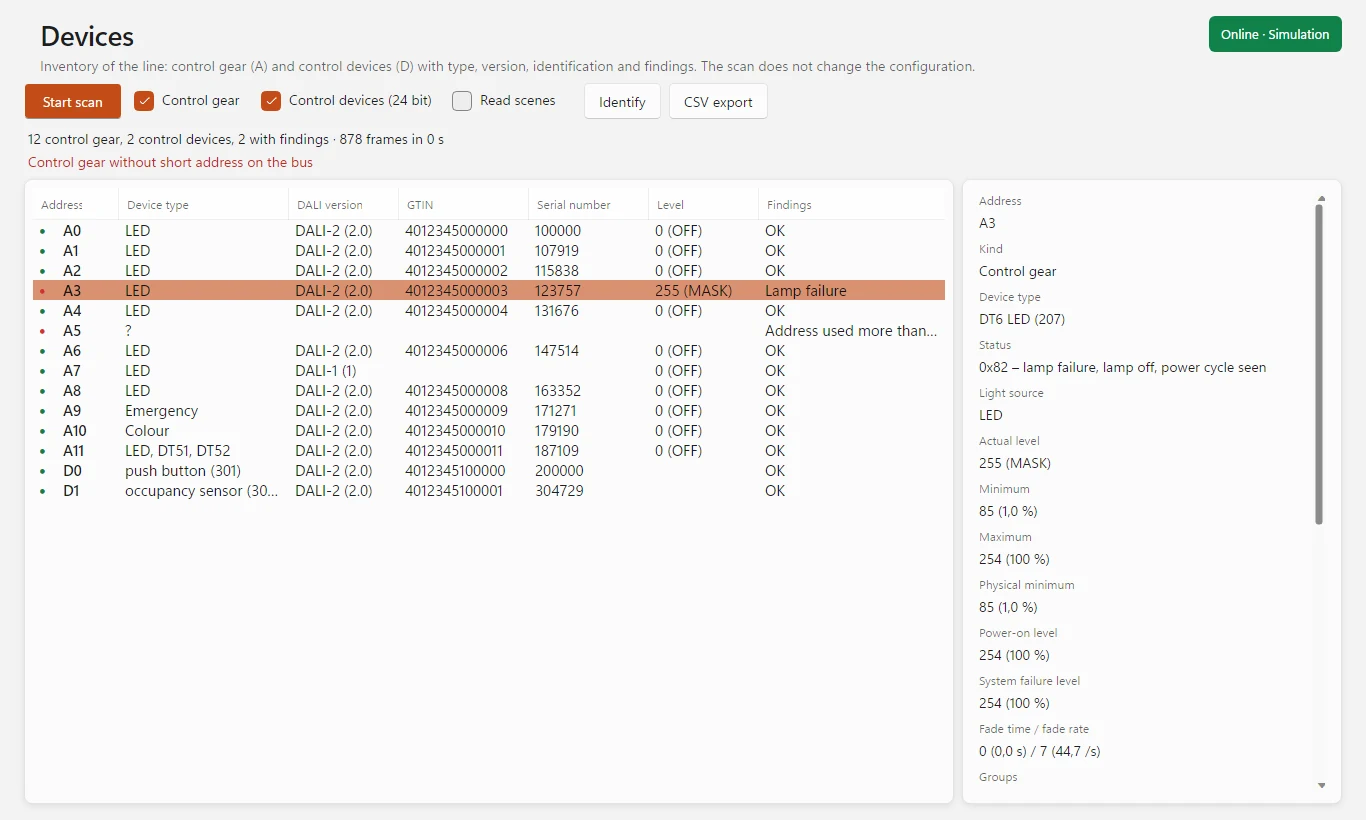
Liest jede Kurzadresse 0–63: Gerätetyp, DALI-Version, GTIN, Seriennummer, Firmware, Stufen, Gruppen und auf Wunsch Szenen – für Betriebsgeräte und 24-Bit-Steuergeräte wie Taster und Präsenzmelder.Reads every short address 0–63: device type, DALI version, GTIN, serial number, firmware, levels, groups and optionally scenes — for control gear and 24-bit control devices such as push buttons and occupancy sensors.
Befunde auf einen BlickFindings at a glance
Lampen- und Gerätefehler, doppelt vergebene Adressen, Geräte ohne Kurzadresse und fehlende Antworten erscheinen direkt in der Geräteliste – mit allen Details des gewählten Geräts daneben.Lamp and gear failures, duplicate addresses, devices without a short address and missing answers appear right in the device list — with all details of the selected device next to it.
Der Scan ändert nichtsThe scan changes nothing
Er stellt nur Abfragen und schreibt höchstens in die flüchtigen DTR-Register. Adressen, Gruppen und Szenen der Anlage bleiben, wie sie sind. Für 64 Geräte dauert er etwa 2–6 Minuten.It only sends queries and writes to the volatile DTR registers at most. The installation's addresses, groups and scenes stay as they are. For 64 devices it takes about 2–6 minutes.
Telegramme sendenSend frames
Eigene 16- oder 24-Bit-Telegramme schicken und die Antwort sofort sehen. „Identifizieren“ lässt ein DALI-2-Gerät blinken, damit man es in der Decke findet.Send your own 16- or 24-bit frames and see the answer right away. “Identify” makes a DALI-2 device flash so that you can find it in the ceiling.
Aufzeichnen und auswertenRecord and analyse
Alle Telegramme fortlaufend aufzeichnen, auch bei angehaltener Anzeige, und später wieder öffnen. Filter nach Adresse, Befehl oder Hex, „Nur Fehler“, Statistik – und Export als CSV.Record all frames continuously, even while the display is paused, and open them again later. Filter by address, command or hex, “Errors only”, statistics — and export as CSV.
Gateway finden, ohne Anlage übenFind the gateway, practise without a site
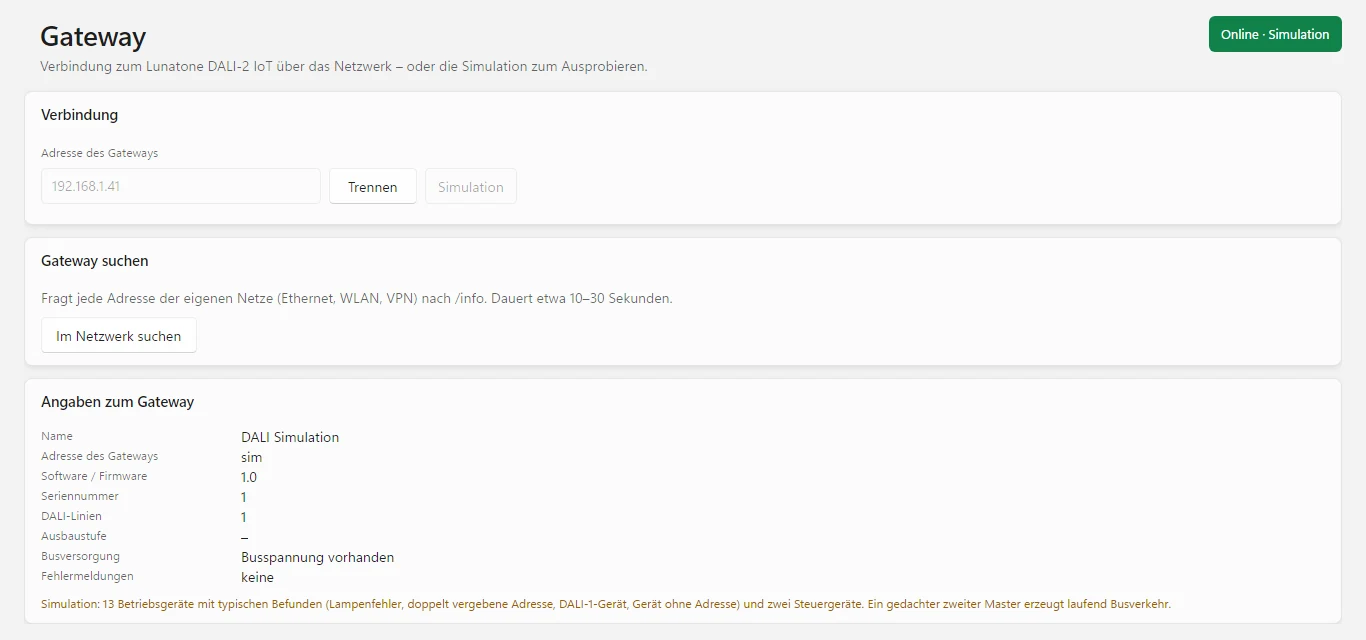
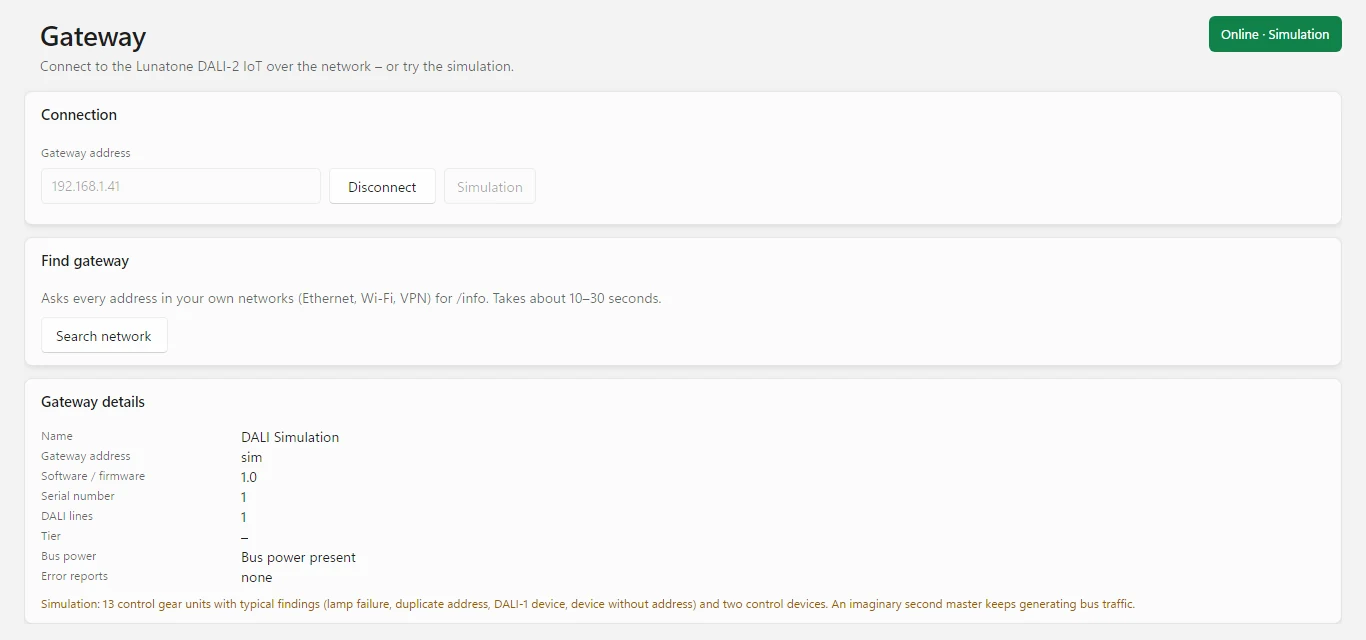
Die Suche findet das Lunatone DALI-2 IoT in den eigenen Netzen, auch über VPN. Die Simulation bildet eine Linie mit typischen Befunden nach – zum Ausprobieren und Schulen.The search finds the Lunatone DALI-2 IoT in your own networks, also over VPN. The simulation recreates a line with typical findings — for trying it out and for training.
Außerdem:Also: Adressen ab 0 oder ab 1 · Zustand der Busversorgung · Hell/Dunkel · 19 Sprachen · automatische Updates · Zusammenarbeit mit der Eye Suite 26addresses from 0 or from 1 · bus power status · light/dark · 19 languages · automatic updates · works with the Eye Suite 26
In drei Schritten zum ÜberblickAn overview in three steps
Dieselben Schritte stehen in DALIEye unter „Hilfe & Grundlagen“.DALIEye shows the same steps under “Help & basics”.
Norm, Gateway, FormateStandard, gateway, formats
| NormStandard | IEC 62386-102 (Betriebsgeräte) und -103 (Steuergeräte), DALI-2 und DALI-1IEC 62386-102 (control gear) and -103 (control devices), DALI-2 and DALI-1 |
| TelegrammeFrames | 16 Bit an Betriebsgeräte (A = Kurzadresse, G = Gruppe), 24 Bit an Steuergeräte (D = Kurzadresse, DG = Gerätegruppe), 8-Bit-Antworten16-bit to control gear (A = short address, G = group), 24-bit to control devices (D = short address, DG = device group), 8-bit answers |
| Gateway | Lunatone DALI-2 IoT (Art.-Nr. 89453886), auch IoT4, über die WebSocket-Schnittstelle, Firmware ab v1.2Lunatone DALI-2 IoT (art. no. 89453886), also IoT4, via the WebSocket interface, firmware v1.2 or later |
| AdressenAddresses | Kurzadressen 0–63, Gruppen 0–15; Anzeige wahlweise ab 0 oder ab 1Short addresses 0–63, groups 0–15; display from 0 or from 1 |
| Scan | Typ, DALI-Version, Stufen, Gruppen, Szenen (optional), Zufallsadresse, Memory Bank 0 (GTIN, Seriennummer, Firmware)Type, DALI version, levels, groups, scenes (optional), random address, memory bank 0 (GTIN, serial number, firmware) |
| AufzeichnungRecording | fortlaufend als .jsonl, später wieder zu öffnencontinuous as .jsonl, can be opened again later |
| Export | Telegramme und Scan-Ergebnis als CSVFrames and scan result as CSV |
Gut zu wissen:Good to know: Das Gateway liefert fertig dekodierte Telegramme. Signalqualität (Bitzeiten, Flanken) und Busspannung in Volt lassen sich darüber nicht messen – dafür braucht es ein Messgerät direkt am Bus. Die Zeitstempel stammen aus dem Gateway und taugen für Abstände im Millisekundenbereich.The gateway delivers frames that are already decoded. Signal quality (bit timing, edges) and bus voltage in volts cannot be measured this way — that needs a measuring device directly on the bus. The time stamps come from the gateway and are suitable for intervals in the millisecond range.
Sechs typische EinsätzeSix typical jobs
BestandsaufnahmeInventory
Welche Geräte hängen an der Linie, mit welcher Adresse, Version und Gruppe? Der Scan liefert die Liste, der CSV-Export die Dokumentation.Which devices are on the line, with which address, version and group? The scan delivers the list, the CSV export the documentation.
Inbetriebnahme prüfenCheck commissioning
Kommen die Befehle der Steuerung an, und wie reagieren die Geräte? Der Busmonitor zeigt jeden Befehl und jede Antwort in Klartext.Do the controller's commands arrive, and how do the devices respond? The bus monitor shows every command and every answer in plain text.
Doppelte Adressen findenFind duplicate addresses
Kollidierende Antworten verraten mehrfach vergebene Kurzadressen; Geräte ohne Adresse erkennt der Scan am Bus.Colliding answers reveal short addresses used more than once; the scan detects devices without an address on the bus.
FehlersucheTroubleshooting
Lampenfehler, fehlende Busspannung, Framing-Fehler oder ein Gerät, das nicht antwortet – DALIEye zeigt, wo es hakt.Lamp failure, missing bus power, framing errors or a device that does not answer — DALIEye shows where things go wrong.
Sporadische ProblemeSporadic problems
Die Aufzeichnung läuft im Hintergrund weiter. Später öffnen, filtern und nachsehen, was zum Zeitpunkt der Störung auf der Linie lief.The recording keeps running in the background. Open it later, filter it and see what was on the line at the time of the fault.
SchulungTraining
Die Simulation zeigt eine Linie mit typischen Befunden – ideal, um DALI-Telegramme und den Scan ohne echte Anlage zu erklären.The simulation shows a line with typical findings — ideal for explaining DALI frames and the scan without a real installation.
Erst testen, dann lizenzierenTry first, license later
Lade DALIEye 26 herunter und fordere eine kostenlose Testlizenz an. Aktiviert wird die Lizenz direkt im Programm.Download DALIEye 26 and request a free trial licence. The licence is activated right in the program.
- Windows: eine einzelne ProgrammdateiWindows: a single program file
- Linux x64 und arm64 (Raspberry Pi)Linux x64 and arm64 (Raspberry Pi)
- Updates installiert das Programm auf Wunsch selbstThe program installs updates itself on request
- Kostenlos, alle FunktionenFree, all features
- Online anfordern, Aktivierung im ProgrammRequest online, activate in the program
- Jahreslizenz für einen Rechner, Laufzeit 12 MonateAnnual licence for one computer, 12-month term
- Alle Funktionen, alle 19 SprachenAll features, all 19 languages
- Updates während der Laufzeit inklusiveUpdates included during the term
- Aktivierung direkt im ProgrammActivation right in the program
Für eine Lizenz schreib uns bitte an info@busbaer.de. Die Lizenz ist an einen Rechner gebunden; bei einem Rechnerwechsel melde dich bitte bei uns. Den Lizenzcode bekommst du per E-Mail und aktivierst ihn direkt im Programm. Das Gateway Lunatone DALI-2 IoT ist nicht enthalten.For a licence, please write to us at info@busbaer.de. The licence is tied to one computer; if you change computers, please get in touch. You receive the licence code by e-mail and activate it right in the program. The Lunatone DALI-2 IoT gateway is not included.
Teil der Eye Suite 26Part of the Eye Suite 26
Alle Eye-Tools fügen sich in die kostenlose Eye Suite 26 ein: Ist sie installiert, zeigt ihr Dashboard den Lizenzstand von DALIEye 26, und die DALI-Telegramme erscheinen zusätzlich im Gesamtmonitor der Suite – zusammen mit KNX, Modbus und den anderen Protokollen. Aus der Suite gestartet, läuft DALIEye direkt im Suite-Fenster. Ohne Suite arbeitet DALIEye 26 genauso.All Eye tools fit into the free Eye Suite 26: once it is installed, its dashboard shows the licence status of DALIEye 26, and the DALI frames also appear in the suite's combined monitor — together with KNX, Modbus and the other protocols. Started from the suite, DALIEye runs right inside the suite window. Without the suite, DALIEye 26 works just the same.
Unter Windows fragt DALIEye 26 beim ersten Start einmal, ob es sich nach C:\Program Files\Alexander Maier GmbH\DALIEye 26\ installieren soll, und legt Verknüpfungen auf dem Desktop und im Startmenü an. Dafür sind einmalig Administratorrechte nötig, spätere Updates laufen ohne.On Windows, DALIEye 26 asks once on first start whether it should install itself to C:\Program Files\Alexander Maier GmbH\DALIEye 26\, and creates shortcuts on the desktop and in the Start menu. This needs administrator rights once; later updates run without them.
Gateway, Windows und LinuxGateway, Windows and Linux
| Hardware | Lunatone DALI-2 IoT (oder IoT4) mit Firmware ab v1.2 und einer DALI-Busversorgung an der Linie. Ohne Gateway läuft nur die Simulation.Lunatone DALI-2 IoT (or IoT4) with firmware v1.2 or later and a DALI bus power supply on the line. Without a gateway only the simulation runs. |
| Windows | 64 Bit64-bit |
| Linux | 64 Bit: x64 für PCs, arm64 z. B. für Raspberry Pi 4 oder 5 mit Raspberry Pi OS 64 Bit (Bookworm oder neuer) und Desktop. 32-Bit-Systeme werden nicht unterstützt.64-bit: x64 for PCs, arm64 e.g. for Raspberry Pi 4 or 5 with Raspberry Pi OS 64-bit (Bookworm or later) and desktop. 32-bit systems are not supported. |
| Installation | Windows: eine einzelne Programmdatei, .NET ist enthalten; beim ersten Start wird die Installation nach C:\Program Files\Alexander Maier GmbH\ angeboten.Linux: tar xzf DALIEye26-linux-<arch>.tar.gz, dann im entpackten Ordner bash install.sh – danach im Startmenü oder im Terminal mit dalieye26Windows: a single program file, .NET included; on first start the program offers to install itself to C:\Program Files\Alexander Maier GmbH\.Linux: tar xzf DALIEye26-linux-<arch>.tar.gz, then run bash install.sh in the unpacked folder — afterwards start it from the menu or with dalieye26 in a terminal |
| NetzwerkNetwork | PC und Gateway im selben Netz oder per VPN erreichbar; WebSocket zum Gateway darf nicht von Firewall oder Proxy blockiert werdenPC and gateway on the same network or reachable via VPN; the WebSocket connection to the gateway must not be blocked by a firewall or proxy |
| Internet | für Lizenzaktivierung und Updatesfor licence activation and updates |
Das Programm aktualisiert sich danach auf Wunsch selbst. Für macOS gibt es noch keinen Download.After that, the program updates itself on request. There is no macOS download yet.
Häufige FragenFrequently asked questions
Welches Gateway brauche ich?Which gateway do I need?
Das Lunatone DALI-2 IoT (Art.-Nr. 89453886) oder das IoT4 mit Firmware ab v1.2. DALIEye verbindet sich über dessen WebSocket-Schnittstelle. Das Gateway braucht eine DALI-Busversorgung an der Linie und kann daneben seine eigenen Aufgaben (Automationen, App) weiter erfüllen.
The Lunatone DALI-2 IoT (art. no. 89453886) or the IoT4 with firmware v1.2 or later. DALIEye connects via its WebSocket interface. The gateway needs a DALI bus power supply on the line and can keep doing its own tasks (automations, app) alongside.
Wie kann ich DALIEye testen?How can I try DALIEye?
Programm herunterladen und über „Testlizenz anfordern“ auf dieser Seite eine kostenlose Testlizenz anfordern; aktiviert wird sie im Programm. Ohne Gateway zeigt die Simulation eine Linie mit typischen Befunden.
Download the program and request a free trial licence via “Request trial licence” on this page; you activate it in the program. Without a gateway, the simulation shows a line with typical findings.
Verändert der Geräte-Scan die Anlage?Does the device scan change the installation?
Nein. Der Scan stellt nur Abfragen und schreibt höchstens in die flüchtigen DTR-Register. Adressen, Gruppen, Szenen und Stufen bleiben unverändert. Nur „Telegramm senden“ und „Identifizieren“ wirken auf die Anlage – und nur, wenn du es auslöst.
No. The scan only sends queries and writes to the volatile DTR registers at most. Addresses, groups, scenes and levels stay unchanged. Only “Send frame” and “Identify” act on the installation — and only when you trigger them.
Wie lange dauert ein Scan?How long does a scan take?
Je nach Anlage und Netzwerk etwa 2–6 Minuten für 64 Geräte. Szenen liest DALIEye nur, wenn du es auswählst.
About 2–6 minutes for 64 devices, depending on the installation and network. DALIEye reads scenes only if you select it.
Welche Befunde erkennt DALIEye?Which findings does DALIEye detect?
Lampen- und Gerätefehler aus QUERY STATUS, mehrfach vergebene Adressen (die Antworten auf gerätespezifische Abfragen kollidieren), Geräte ohne Kurzadresse am Bus und fehlende Antworten, wenn ein DALI-2-Gerät die Memory Bank 0 nicht liefert. Geräte ohne Kurzadresse werden erkannt, aber noch nicht einzeln aufgelistet.
Lamp and gear failures from QUERY STATUS, addresses used more than once (the answers to device-specific queries collide), devices without a short address on the bus and missing answers when a DALI-2 device does not deliver memory bank 0. Devices without a short address are detected but not yet listed individually.
Was bedeutet „(2×)“ im Busmonitor?What does “(2×)” mean in the bus monitor?
Das Telegramm wurde binnen 100 ms wiederholt. So müssen Konfigurationsbefehle laut Norm ankommen, damit ein Gerät sie ausführt. Fehlt die Wiederholung, ignoriert das Gerät den Befehl.
The frame was repeated within 100 ms. According to the standard, configuration commands must arrive like this for a device to execute them. Without the repetition, the device ignores the command.
Kann DALIEye Signalqualität oder Busspannung messen?Can DALIEye measure signal quality or bus voltage?
Nein. Das Gateway liefert fertig dekodierte Telegramme. Bitzeiten, Flanken und die Busspannung in Volt lassen sich darüber nicht messen – dafür braucht es ein Messgerät direkt am Bus. DALIEye zeigt aber, ob Busspannung vorhanden ist.
No. The gateway delivers frames that are already decoded. Bit timing, edges and the bus voltage in volts cannot be measured this way — that needs a measuring device directly on the bus. DALIEye does show whether bus power is present.
Was tun, wenn das Gateway nicht gefunden wird?What if the gateway is not found?
PC und Gateway müssen im selben Netz sein. Über VPN funktioniert die Suche nur, wenn der Tunnel das Netz des Gateways umfasst – sonst die Adresse von Hand eingeben. Meldet DALIEye „WebSocket nicht möglich“, Firmware des Gateways (ab v1.2) sowie Firewall und Proxy prüfen.
PC and gateway must be on the same network. Over VPN the search only works if the tunnel includes the gateway’s network — otherwise enter the address manually. If DALIEye reports “WebSocket not possible”, check the gateway firmware (v1.2 or later) as well as firewall and proxy.
Läuft DALIEye unter Linux oder auf dem Mac?Does DALIEye run on Linux or Mac?
Unter Linux ja: Pakete für x64 und arm64, auch für den Raspberry Pi 4 oder 5 mit Raspberry Pi OS 64 Bit. Für macOS gibt es noch keinen Download.
Linux yes: packages for x64 and arm64, also for the Raspberry Pi 4 or 5 with Raspberry Pi OS 64-bit. There is no download for macOS yet.
Muss ich etwas installieren?Do I have to install anything?
Unter Windows ist DALIEye eine einzelne Programmdatei. Beim ersten Start fragt es einmal, ob es sich nach „C:\Program Files\Alexander Maier GmbH\DALIEye 26\“ installieren soll, und legt Verknüpfungen an; dafür sind einmalig Administratorrechte nötig. Unter Linux entpackst du das Archiv und startest install.sh.
On Windows, DALIEye is a single program file. On first start it asks once whether it should install itself to “C:\Program Files\Alexander Maier GmbH\DALIEye 26\” and creates shortcuts; this needs administrator rights once. On Linux you unpack the archive and run install.sh.
Kann ich die Lizenz auf einen anderen Rechner übertragen?Can I transfer the licence to another computer?
Die Lizenz ist an einen Rechner gebunden. Bei einem Rechnerwechsel melde dich bitte bei uns.
The licence is tied to one computer. If you change computers, please get in touch with us.
Was hat DALIEye mit der Eye Suite 26 zu tun?What does DALIEye have to do with the Eye Suite 26?
Ist die kostenlose Eye Suite 26 installiert, zeigt ihr Dashboard den Lizenzstand von DALIEye 26, und die DALI-Telegramme erscheinen zusätzlich im Gesamtmonitor der Suite. Aus der Suite gestartet, läuft DALIEye im Suite-Fenster. Ohne Suite arbeitet DALIEye unverändert.
If the free Eye Suite 26 is installed, its dashboard shows the licence status of DALIEye 26, and the DALI frames also appear in the suite’s combined monitor. Started from the suite, DALIEye runs inside the suite window. Without the suite, DALIEye works unchanged.
Welche Sprachen gibt es?Which languages are available?
Die Oberfläche gibt es in 19 Sprachen.
The user interface is available in 19 languages.
Noch eine Frage? Schreib uns an info@busbaer.de.Another question? Write to us at info@busbaer.de.
Sehen, was auf der DALI-Linie passiert.See what's happening on the DALI line.
DALIEye26.exe herunterladen, Testlizenz anfordern – und mit dem Gateway oder der Simulation in wenigen Minuten die ersten Telegramme sehen.Download DALIEye26.exe, request a trial licence — and see your first frames within minutes, with the gateway or the simulation.
Sprich uns anGet in touch
KontaktContact
+49 (0) 6271 – 91 94 70
info@busbaer.de
Alexander Maier GmbH
Beckstraße 3
D-69412 Eberbach
ImpressumImprint
Alexander Maier GmbH
Beckstraße 3
D-69412 Eberbach
Geschäftsführer:Managing director: Alexander Maier
Sitz der Gesellschaft:Registered office: Eberbach
Registergericht:Register court: Mannheim
Handelsregister:Commercial register: HRB 335404
USt-IdNr.:VAT ID: DE177682654
Telefon:Phone: +49 (0) 6271 – 91 94 70
E-Mail: info@busbaer.de