BACnetEye 26 — sehen, was
im BACnet/IP-Netz passiert.BACnetEye 26 — see what's
happening on the BACnet/IP network.
Geräte finden, Objekte prüfen, Werte beobachten und jeden Rahmen dekodiert nachvollziehen. Und wenn das Gegenstück noch fehlt, spielt BACnetEye selbst das BACnet-Gerät.Find devices, check objects, watch values and follow every frame decoded. And if the counterpart is still missing, BACnetEye plays the BACnet device itself.
BACnetEye 26 durchsucht das Netz nach Geräten und BBMDs, liest Objekte und Properties – gezielt als ALL, REQUIRED oder OPTIONAL –, beobachtet viele Datenpunkte gleichzeitig per COV oder Polling, bearbeitet Zeitprogramme und liest Trend Logs. Die Debug-Konsole zeigt jeden gesendeten und empfangenen Rahmen dekodiert, Antworten erscheinen als Haken an der Anfrage. Im Server-Modus tritt BACnetEye als simuliertes BACnet-Gerät auf – als Testgegenstück für Visualisierungen, Gateways und Leitsysteme.BACnetEye 26 searches the network for devices and BBMDs, reads objects and properties — specifically as ALL, REQUIRED or OPTIONAL —, watches many data points at once via COV or polling, edits schedules and reads trend logs. The debug console shows every frame sent and received, decoded; responses appear as a tick on the request. In server mode, BACnetEye acts as a simulated BACnet device — as a test counterpart for visualisations, gateways and building management systems.
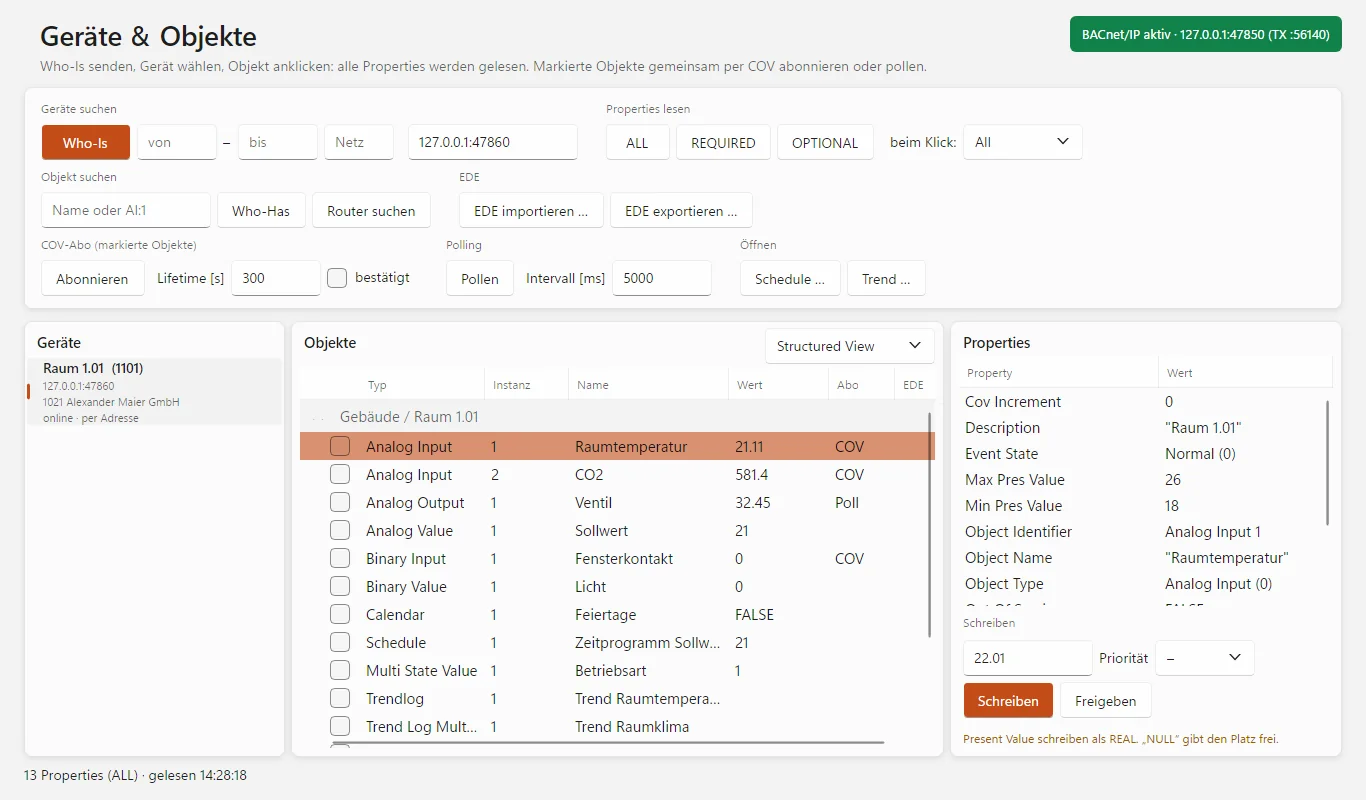
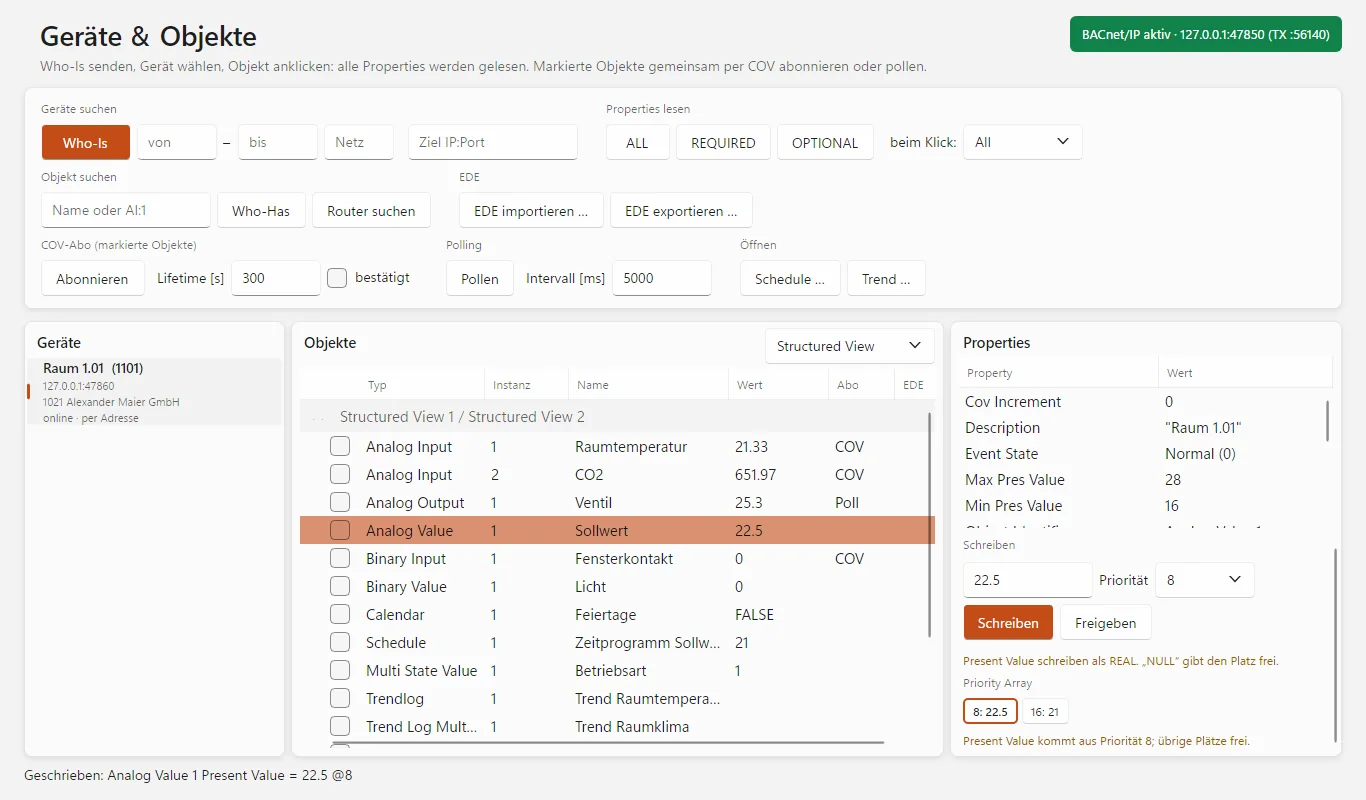
Geräte & Objekte mit gelesenen Properties und laufenden Abos. (Bild aus dem Programm, Demodaten des eigenen Server-Modus.)Devices & objects with read properties and running subscriptions. (Image from the program, demo data of the built-in server mode.)
Diagnose, Prüfung und Testgegenstück in einemDiagnostics, testing and a test counterpart in one
Für Systemintegratoren, Inbetriebnehmer und Entwickler, die BACnet/IP-Geräte und -Anlagen prüfen, in Betrieb nehmen und Fehler suchen.For system integrators, commissioning engineers and developers who test, commission and troubleshoot BACnet/IP devices and installations.
Geräte finden – auch hinter RouternFind devices — even behind routers
Netzwerk-Scan über einen IP-Bereich mit Device-Instanz und Hersteller, Who-Is als Broadcast oder gezielt an eine Adresse, Who-Has nach Objektname oder Objekt-ID. BBMD und Foreign Device mit Statusanzeige, Geräte hinter BACnet-Routern mit Netznummer.Network scan across an IP range with device instance and manufacturer, Who-Is as broadcast or targeted at an address, Who-Has by object name or object ID. BBMD and foreign device with status display, devices behind BACnet routers with network number.
Geräte prüfen wie bei der AbnahmeCheck devices as in an acceptance test
Properties gezielt als ALL, REQUIRED oder OPTIONAL anfordern. REQUIRED zeigt sofort, ob ein Gerät die Pflicht-Properties seines Objekttyps liefert. Geräte ohne ReadPropertyMultiple liest BACnetEye bei ALL automatisch einzeln.Request properties specifically as ALL, REQUIRED or OPTIONAL. REQUIRED shows immediately whether a device delivers the mandatory properties of its object type. BACnetEye reads devices without ReadPropertyMultiple property by property automatically with ALL.
Viele Werte gleichzeitig beobachtenWatch many values at once
Mehrere Objekte anhaken und per COV abonnieren – mit Lifetime und automatischer Erneuerung – oder zyklisch pollen. Die Werte laufen in der Objektliste live mit.Tick several objects and subscribe via COV — with lifetime and automatic renewal — or poll them cyclically. The values update live in the object list.
Werte schreiben mit PrioritätWrite values with priority
Present Value und andere Properties mit Priorität 1 bis 16 schreiben oder freigeben (Relinquish). Das Priority Array zeigt, welcher Platz belegt ist und welcher gerade wirkt.Write present value and other properties with priority 1 to 16, or relinquish them. The priority array shows which slot is occupied and which one is currently in effect.
Zeitprogramme und TrendsSchedules and trends
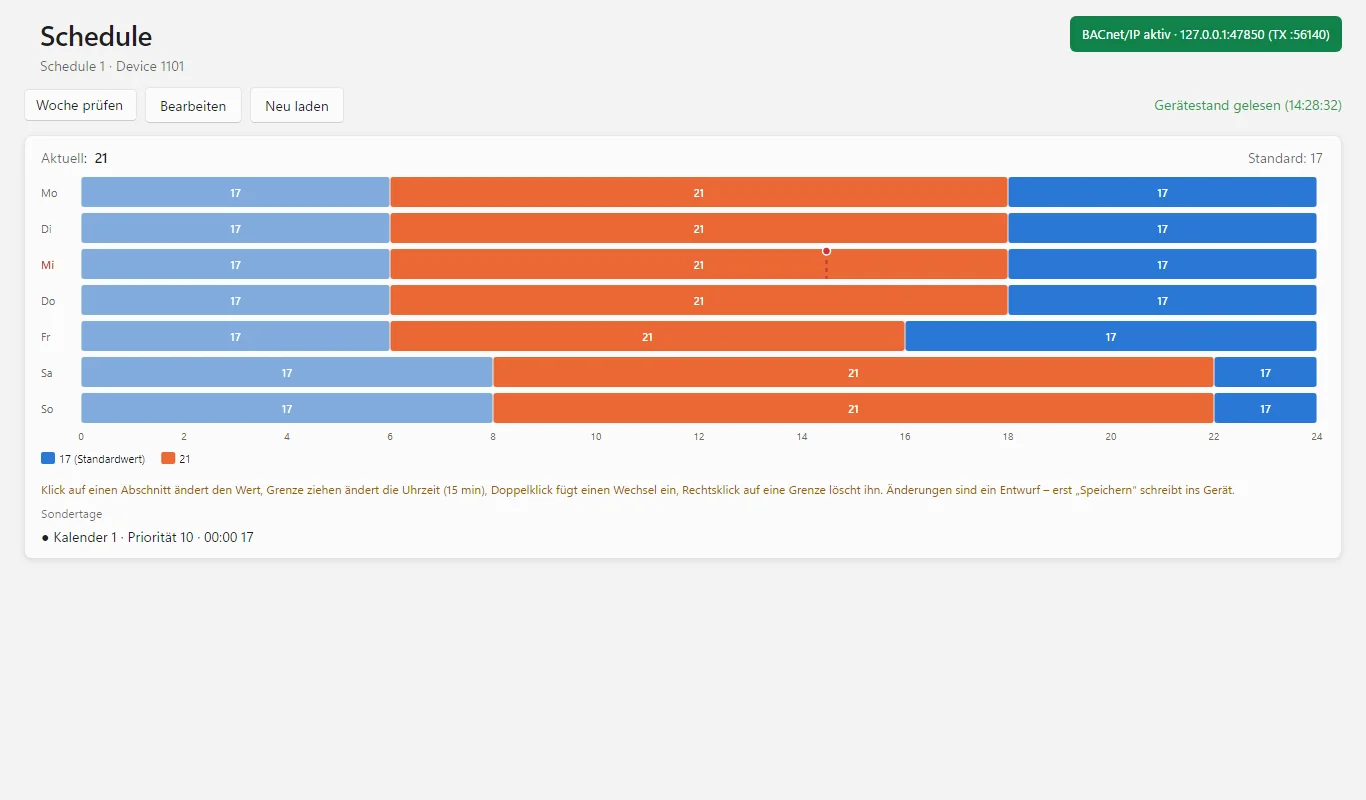
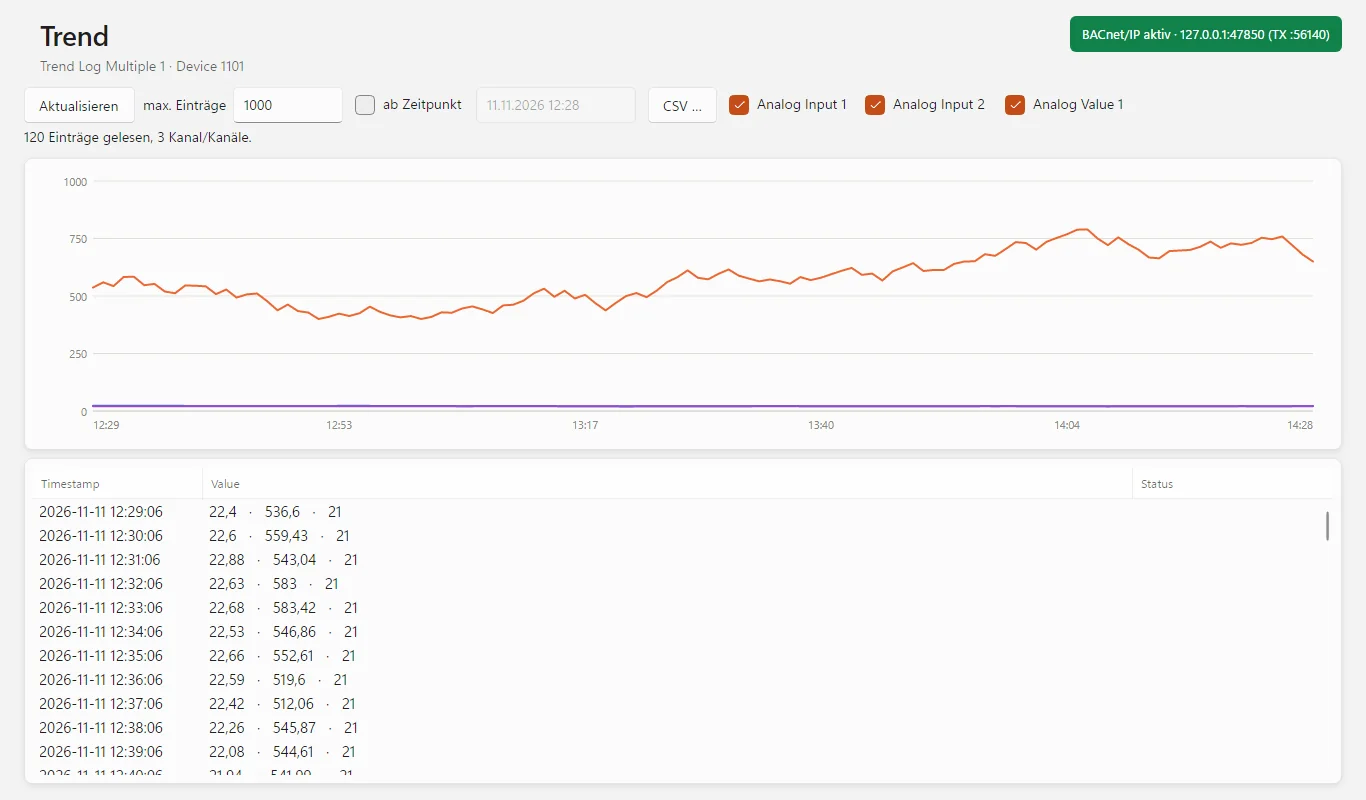
Wochenplan als Tagesbalken, Ausnahmen und Kalender ansehen, bearbeiten und zurückschreiben. Trend Log und Trend Log Multiple als Kurve und Tabelle, nach Position oder ab Zeitpunkt, Export als CSV.View, edit and write back the weekly schedule as day bars, exceptions and calendars. Trend log and trend log multiple as curve and table, by position or from a point in time, export as CSV.
Debug-Konsole wie WiresharkDebug console like Wireshark
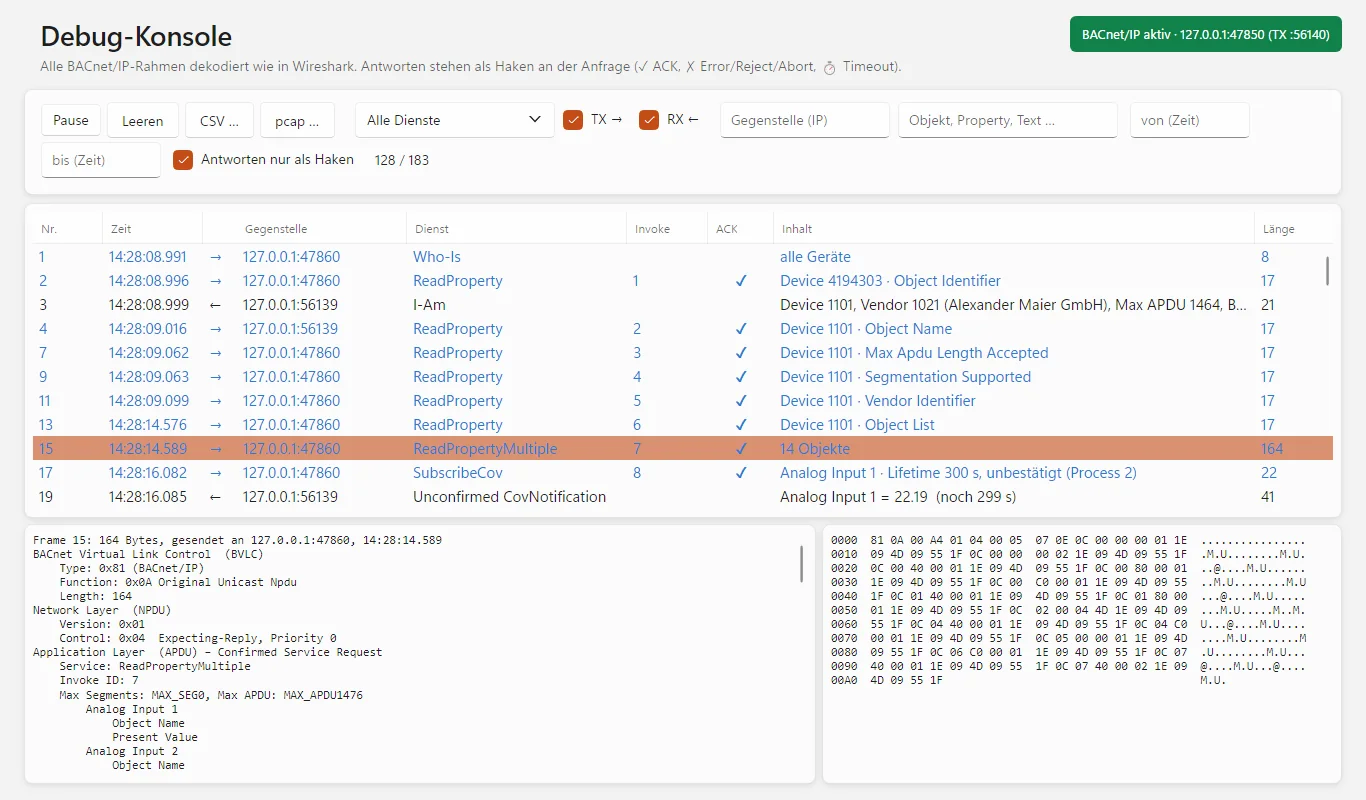
Jeder Rahmen dekodiert in BVLC, NPDU und APDU, Antworten als ✓ oder ✗ an der Anfrage, Zeitüberschreitungen als ⏱. Segmentierte Antworten zusammengesetzt, Zeitfilter, Export als CSV oder pcap für Wireshark.Every frame decoded into BVLC, NPDU and APDU, responses as ✓ or ✗ on the request, timeouts as ⏱. Segmented responses reassembled, time filter, export as CSV or pcap for Wireshark.
EDE-DatenpunktlistenEDE data point lists
EDE-Dateien einlesen – auch für Geräte, die noch nicht erreichbar sind –, mit der Anlage vergleichen (Soll/Ist) und aus einem Gerät erzeugen.Import EDE files — even for devices that cannot be reached yet —, compare them with the installation (target/actual) and generate them from a device.
Server-Modus: das Gegenstück zum TestenServer mode: the counterpart for testing
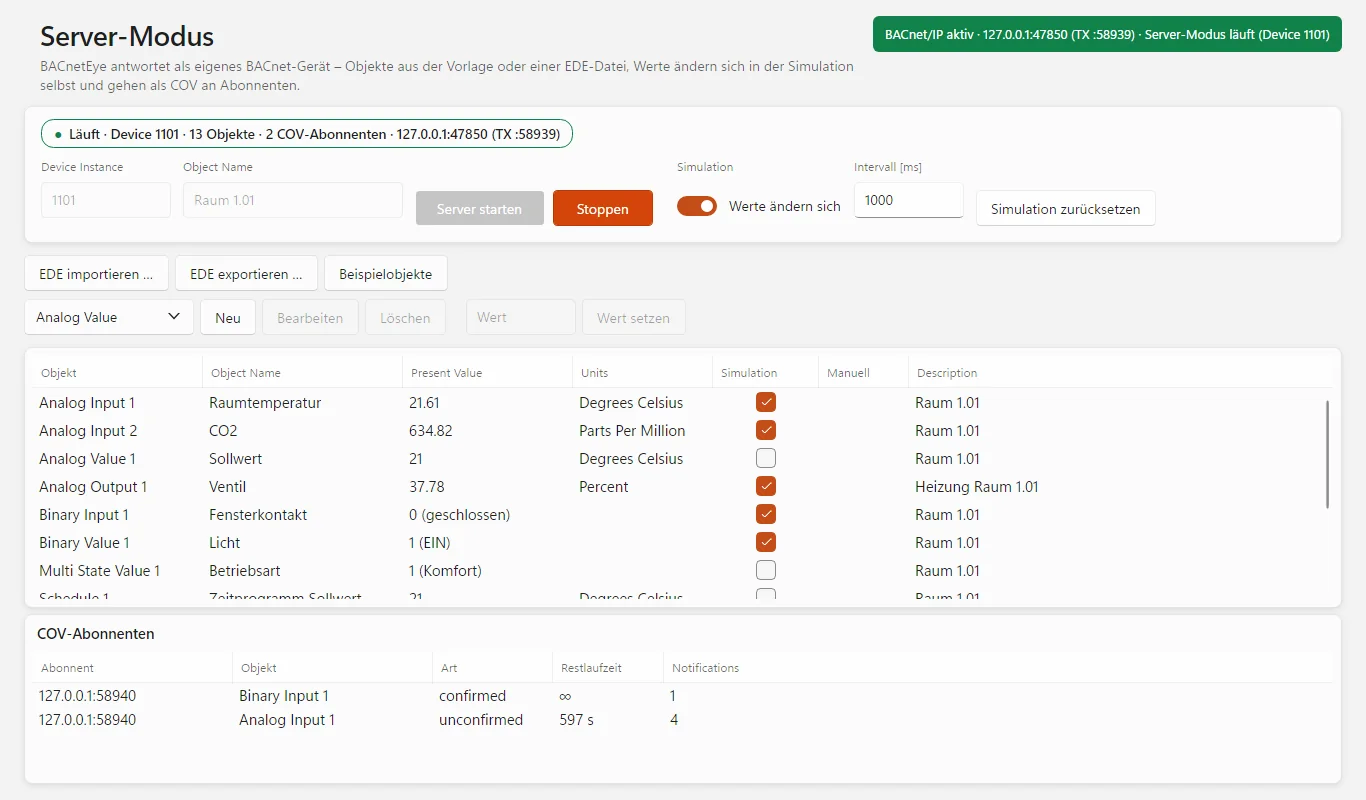
BACnetEye als eigenes BACnet-Gerät mit Beispielraum oder Objekten aus einer EDE-Datei: Simulation, COV-Meldungen, Priority Array, Zeitprogramm mit Feiertagskalender und Trend Log. Objekte anlegen, bearbeiten und löschen, Werte setzen.BACnetEye as a BACnet device of its own with a sample room or objects from an EDE file: simulation, COV notifications, priority array, schedule with holiday calendar and trend log. Create, edit and delete objects, set values.
Außerdem:Also: UDP-Port teilbar mit anderen BACnet-Programmen auf demselben Rechner · BACnetEye als BBMD · vollständige BACnet-Herstellerliste · 19 Sprachen · automatische UpdatesUDP port shareable with other BACnet programs on the same computer · BACnetEye as BBMD · complete BACnet vendor list · 19 languages · automatic updates
Vom Netzwerk-Scan bis zum eigenen BACnet-GerätFrom network scan to a BACnet device of your own
Netzwerk-ScanNetwork scan
Prüft jede Adresse eines IP-Bereichs: Ping und eine BACnet-Abfrage laufen gleichzeitig, danach werden Namen, MAC-Adressen und Hersteller ergänzt. Da BACnet/IP mit UDP arbeitet und es keinen „offenen Port“ gibt, schickt BACnetEye jeder Adresse eine ReadProperty-Anfrage auf ihr Device-Objekt, ein gezieltes Who-Is und auf Wunsch eine Abfrage der Broadcast Distribution Table – so werden auch BBMDs erkannt. Der Netzwerk-Scan ist auch ohne Lizenz nutzbar.Checks every address of an IP range: ping and a BACnet query run at the same time, then names, MAC addresses and manufacturers are added. Because BACnet/IP works with UDP and there is no “open port”, BACnetEye sends each address a ReadProperty request for its device object, a targeted Who-Is and, on request, a query of the broadcast distribution table — so BBMDs are detected too. The network scan can also be used without a licence.
Verbindung, BBMD und Foreign DeviceConnection, BBMD and foreign device
Netzwerkadapter und UDP-Port wählen (47808 / 0xBAC0 oder 47809 … 47823), Timeout und Wiederholungen einstellen. Im Standard wird der Port geteilt. Für Geräte in anderen Subnetzen meldet sich BACnetEye als Foreign Device beim BBMD an, zeigt das Ergebnis der Registrierung und registriert sich vor Ablauf der TTL selbst neu. Auf Wunsch arbeitet BACnetEye selbst als BBMD und prüft fremde BBMDs.Choose network adapter and UDP port (47808 / 0xBAC0 or 47809 … 47823), set timeout and retries. By default the port is shared. For devices in other subnets, BACnetEye registers as a foreign device with the BBMD, shows the result of the registration and re-registers itself before the TTL expires. On request BACnetEye acts as a BBMD itself and checks other BBMDs.
Geräte & ObjekteDevices & objects
Who-Is als Broadcast, für einen Bereich von Device-Instanzen, für ein bestimmtes Netz oder per Unicast an eine Zieladresse (IP oder IP:Port). Bei der Zieladresse fragt BACnetEye zusätzlich das Device-Objekt 4194303 ab und findet so auch Geräte, die ihr I-Am nur als Broadcast senden. Who-Has sucht ein Objekt nach Name oder ID, „Router suchen“ zeigt, welcher BACnet-Router welche Netze erreicht. Die Objektliste lässt sich nach Objekttyp oder nach Structured View gliedern.Who-Is as broadcast, for a range of device instances, for a specific network or by unicast to a target address (IP or IP:port). For a target address BACnetEye also queries device object 4194303 and so finds devices that only send their I-Am as broadcast. Who-Has searches for an object by name or ID; “Find routers” shows which BACnet router reaches which networks. The object list can be grouped by object type or by structured view.
Properties: ALL, REQUIRED, OPTIONALProperties: ALL, REQUIRED, OPTIONAL
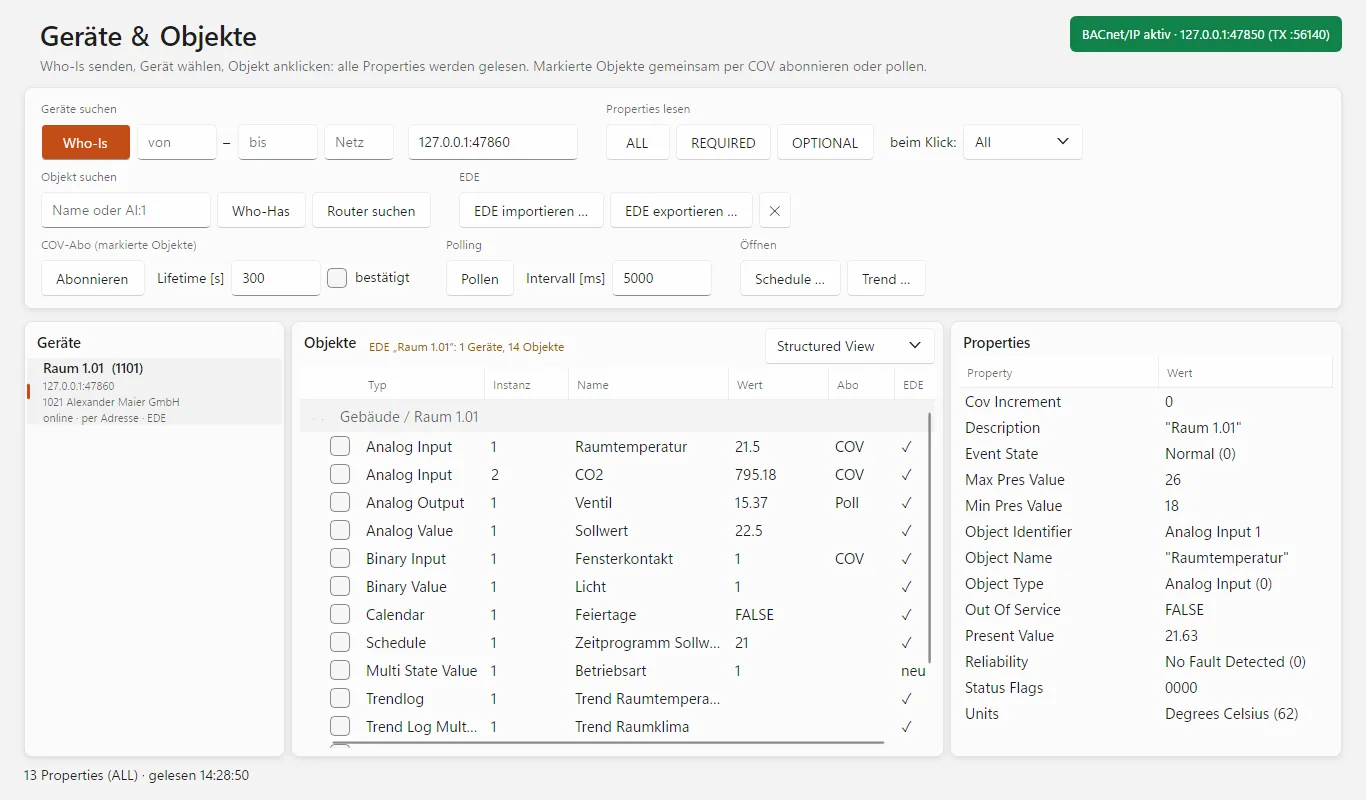
Ein Klick auf ein Objekt liest alle Properties per ReadPropertyMultiple, Aufzählungswerte erscheinen mit Namen, Fehler einzelner Properties mit Klasse und Code. Ein erneuter Klick liest neu. REQUIRED und OPTIONAL fordern gezielt die Pflicht- bzw. die optionalen Properties an und zeigen das tatsächliche Verhalten des Geräts – ohne Rückfall, damit nichts beschönigt wird.A click on an object reads all properties via ReadPropertyMultiple; enumerated values appear with names, errors of individual properties with class and code. Clicking again re-reads. REQUIRED and OPTIONAL specifically request the mandatory or the optional properties and show the actual behaviour of the device — without fallback, so nothing is glossed over.
Schreiben und Priority ArrayWriting and priority array
Wert eintragen, Priorität wählen (1 … 16 oder ohne), „Schreiben“ – danach wird das Objekt neu gelesen. „Freigeben“ schreibt NULL in den gewählten Platz. Lehnt das Gerät ab, nennt die Statuszeile den Grund, z. B. write-access-denied. Bei kommandierbaren Objekten zeigt BACnetEye die belegten Plätze des Priority Array und hebt den wirksamen hervor.Enter value, choose priority (1 … 16 or none), “Write” — then the object is read again. “Relinquish” writes NULL to the selected slot. If the device refuses, the status line names the reason, e.g. write-access-denied. For commandable objects BACnetEye shows the occupied slots of the priority array and highlights the effective one.
COV-Abos und PollingCOV subscriptions and polling
Mehrere Objekte auf einmal abonnieren – unbestätigt oder bestätigt, mit Lifetime oder unbegrenzt. BACnetEye erneuert Abos bei 80 % der Lifetime und meldet sie beim Stoppen und Beenden ab, damit Geräte keine verwaisten Meldungen weiterschicken. Wo ein Gerät kein COV anbietet, liest Polling im eingestellten Intervall.Subscribe to several objects at once — unconfirmed or confirmed, with lifetime or unlimited. BACnetEye renews subscriptions at 80% of the lifetime and cancels them when stopping and exiting, so devices do not keep sending orphaned notifications. Where a device offers no COV, polling reads at the set interval.
Schedule, Calendar und TrendSchedule, calendar and trend
Schedule mit Wochenplan als Balken von 0 bis 24 Uhr, Ausnahmen (Datum, Zeitraum, Wochenmuster oder Calendar), Schedule Default und Effective Period – alles änderbar und per WriteProperty zurückschreibbar. „Woche prüfen“ zeigt den tatsächlich geltenden Verlauf einer Kalenderwoche. Trend Log und Trend Log Multiple per ReadRange, je Kanal eine Kurve, Export als CSV.Schedule with the weekly plan as bars from 0 to 24 h, exceptions (date, period, week pattern or calendar), schedule default and effective period — all editable and writable back via WriteProperty. “Check week” shows the course that actually applies in a calendar week. Trend log and trend log multiple via ReadRange, one curve per channel, export as CSV.
Debug-KonsoleDebug console
Jeder gesendete und empfangene Rahmen, dekodiert in BVLC, NPDU und APDU, mit Hexdump. Antworten werden ihrer Anfrage zugeordnet: ✓ beantwortet, ✗ Error/Reject/Abort, ⏱ keine Antwort. Segmentierte Antworten setzt BACnetEye wieder zusammen, reine BVLC-Nachrichten erscheinen als eigene Zeilen. Filter nach Dienst, Richtung, Gegenstelle, Objekt, Property, Freitext und Zeit. Export als CSV oder pcap.Every frame sent and received, decoded into BVLC, NPDU and APDU, with hex dump. Responses are matched to their request: ✓ answered, ✗ error/reject/abort, ⏱ no response. BACnetEye reassembles segmented responses; pure BVLC messages appear as separate lines. Filter by service, direction, peer, object, property, free text and time. Export as CSV or pcap.
EDE-DateienEDE files
Datenpunktlisten nach B.I.G.-EU (Layout 2.3) samt Zustandstexten einlesen. Geräte aus der EDE erscheinen auch offline; bei Online-Geräten zeigt die Spalte „EDE“ den Soll/Ist-Abgleich: ✓, „neu“ (nur im Gerät) oder „nur EDE“ (fehlt im Gerät). Der Export liest ein Gerät komplett aus und speichert es als EDE.Import data point lists according to B.I.G.-EU (layout 2.3) including state texts. Devices from the EDE appear even offline; for online devices the “EDE” column shows the target/actual comparison: ✓, “new” (only in the device) or “EDE only” (missing in the device). The export reads out a device completely and saves it as EDE.
Server-ModusServer mode
BACnetEye beantwortet Who-Is, Who-Has, ReadProperty, ReadPropertyMultiple (ALL, REQUIRED, OPTIONAL), WriteProperty, WritePropertyMultiple, SubscribeCOV und ReadRange. Beispielobjekte eines Raums mit Zeitprogramm, Feiertagskalender, Trend Log und Structured View – oder die Objekte eines Geräts aus einer EDE-Datei. Simulierte Werte, COV-Meldungen mit einstellbarem COV Increment, Priority Array mit 16 Plätzen. Abgelehnte Schreibzugriffe beantwortet der Server mit einer Fehlermeldung samt Grund.BACnetEye answers Who-Is, Who-Has, ReadProperty, ReadPropertyMultiple (ALL, REQUIRED, OPTIONAL), WriteProperty, WritePropertyMultiple, SubscribeCOV and ReadRange. Sample objects of a room with schedule, holiday calendar, trend log and structured view — or the objects of a device from an EDE file. Simulated values, COV notifications with adjustable COV increment, priority array with 16 slots. The server answers rejected write accesses with an error message including the reason.
BACnet-DiensteBACnet services
| DienstService | als Clientas client | im Server-Modusin server mode |
|---|---|---|
| Who-Is / I-Am | ja (Broadcast, Netz, Zieladresse)yes (broadcast, network, target address) | jayes |
| Who-Has / I-Have | jayes | jayes |
| Who-Is-Router-To-Network | jayes | –– |
| ReadProperty / ReadPropertyMultiple | ja (ALL, REQUIRED, OPTIONAL)yes (ALL, REQUIRED, OPTIONAL) | ja (ALL, REQUIRED, OPTIONAL)yes (ALL, REQUIRED, OPTIONAL) |
| WriteProperty | ja, mit Prioritätyes, with priority | jayes |
| WritePropertyMultiple | –– | ja (Zeitprogramme)yes (schedules) |
| SubscribeCOV / COV | ja, bestätigt und unbestätigtyes, confirmed and unconfirmed | jayes |
| ReadRange (Trend Log) | ja, nach Position und Zeityes, by position and time | ja, nach Position, Sequenz und Zeityes, by position, sequence and time |
| Register-Foreign-Device / Read-BDT | jayes | –– |
Sechs typische EinsätzeSix typical jobs
InbetriebnahmeCommissioning
Geräte im Netz finden, Objekte und Werte prüfen, Sollwerte mit Priorität schreiben und wieder freigeben.Find devices on the network, check objects and values, write setpoints with priority and relinquish them again.
Geräteprüfung und AbnahmeDevice testing and acceptance
Mit REQUIRED und OPTIONAL siehst du, ob ein Gerät die Pflicht-Properties liefert. Die Debug-Konsole zeigt, wie es auf jede Anfrage antwortet.With REQUIRED and OPTIONAL you see whether a device delivers the mandatory properties. The debug console shows how it answers every request.
Integration und Gateway-EntwicklungIntegration and gateway development
Der Server-Modus spielt das fehlende Gerät – mit Simulation, COV, Priority Array, Zeitprogramm und Trend. Mit einer EDE-Datei bildest du ein Gerät nach, bevor es geliefert ist.The server mode plays the missing device — with simulation, COV, priority array, schedule and trend. With an EDE file you recreate a device before it is delivered.
FehlersucheTroubleshooting
Kommen COV-Meldungen an? Antwortet das Gerät, und wie schnell? Wird ein Schreibzugriff abgelehnt, und warum? Mitschnitt als pcap an den Hersteller schicken.Do COV notifications arrive? Does the device answer, and how fast? Is a write access refused, and why? Send the capture to the manufacturer as pcap.
Netze über Subnetze und RouterNetworks across subnets and routers
Geräte hinter BBMDs, als Foreign Device oder gezielt per IP erreichen, Geräte hinter BACnet-Routern mit Netznummer ansprechen.Reach devices behind BBMDs, as a foreign device or directly by IP; address devices behind BACnet routers with the network number.
DokumentationDocumentation
Anlage mit der Datenpunktliste abgleichen, den Ist-Stand eines Geräts als EDE sichern, Trends als CSV exportieren.Compare the installation with the data point list, save the actual state of a device as EDE, export trends as CSV.
Erst testen, dann lizenzierenTry first, license later
Lade BACnetEye 26 herunter und fordere eine kostenlose Testlizenz an. Aktiviert wird die Lizenz direkt im Programm.Download BACnetEye 26 and request a free trial licence. The licence is activated right in the program.
- Windows: eine einzelne ProgrammdateiWindows: a single program file
- Linux x64 und arm64 (Raspberry Pi)Linux x64 and arm64 (Raspberry Pi)
- Updates installiert das Programm auf Wunsch selbstThe program installs updates itself on request
- Kostenlos, alle FunktionenFree, all features
- Ohne Lizenz schon nutzbar: Netzwerk-Scan, EDE-Dateien ansehenUsable even without a licence: network scan, viewing EDE files
- Jahreslizenz für einen Rechner, Laufzeit 12 MonateAnnual licence for one computer, 12-month term
- Alle Funktionen inklusive Server-ModusAll features including server mode
- Updates während der Laufzeit inklusiveUpdates included during the term
- Aktivierung direkt im ProgrammActivation right in the program
Für eine Lizenz schreib uns bitte an info@busbaer.de. Die Lizenz ist an einen Rechner gebunden; bei einem Rechnerwechsel melde dich bitte bei uns. Nach Ablauf kannst du den Netzwerk-Scan weiter nutzen und EDE-Dateien ansehen, aber nicht mehr über BACnet/IP kommunizieren und den Server-Modus nicht starten.For a licence, please write to us at info@busbaer.de. The licence is tied to one computer; if you change computers, please get in touch. After expiry you can still use the network scan and view EDE files, but you can no longer communicate via BACnet/IP or start the server mode.

Teil der Eye Suite 26Part of the Eye Suite 26
Alle Eye-Tools fügen sich in die kostenlose Eye Suite 26 ein: Ist sie installiert, zeigt ihr Dashboard den Lizenzstand von BACnetEye 26, und der Verkehr erscheint zusätzlich im Gesamtmonitor der Suite – zusammen mit KNX, Modbus und den anderen Protokollen. Ohne Suite arbeitet BACnetEye 26 genauso.All Eye tools fit into the free Eye Suite 26: once it is installed, its dashboard shows the licence status of BACnetEye 26, and the traffic also appears in the suite's combined monitor — together with KNX, Modbus and the other protocols. Without the suite, BACnetEye 26 works just the same.
Unter Windows fragt BACnetEye 26 beim ersten Start einmal, ob es sich nach C:\Program Files\Alexander Maier GmbH\BACnetEye 26\ installieren soll, und legt Verknüpfungen auf dem Desktop und im Startmenü an. Dafür sind einmalig Administratorrechte nötig, spätere Updates laufen ohne.On Windows, BACnetEye 26 asks once on first start whether it should install itself to C:\Program Files\Alexander Maier GmbH\BACnetEye 26\, and creates shortcuts on the desktop and in the Start menu. This needs administrator rights once; later updates run without them.
Windows, Linux und Raspberry PiWindows, Linux and Raspberry Pi
| Windows | Windows 10 oder 11, 64 BitWindows 10 or 11, 64-bit |
| Linux | 64 Bit: x64 für PCs, arm64 z. B. für Raspberry Pi 4 oder 5 mit Raspberry Pi OS 64 Bit (Bookworm oder neuer) und Desktop. 32-Bit-Systeme werden nicht unterstützt.64-bit: x64 for PCs, arm64 e.g. for Raspberry Pi 4 or 5 with Raspberry Pi OS 64-bit (Bookworm or later) and desktop. 32-bit systems are not supported. |
| Installation | Windows: eine einzelne Programmdatei, .NET ist enthalten; beim ersten Start wird die Installation nach C:\Program Files\Alexander Maier GmbH\ angeboten.Linux: tar xzf BACnetEye26-linux-<arch>.tar.gz, dann im entpackten Ordner bash install.sh – danach im Startmenü oder im Terminal mit bacneteye26Windows: a single program file, .NET included; on first start the program offers to install itself to C:\Program Files\Alexander Maier GmbH\.Linux: tar xzf BACnetEye26-linux-<arch>.tar.gz, then run bash install.sh in the unpacked folder — afterwards start it from the menu or with bacneteye26 in a terminal |
| NetzwerkNetwork | Zugang zum BACnet/IP-Netz; die Firewall muss UDP 47808 (bzw. den gewählten Port) eingehend zulassenAccess to the BACnet/IP network; the firewall must allow UDP 47808 (or the chosen port) inbound |
| Internet | für Aktivierung und Updatesfor activation and updates |
Das Programm aktualisiert sich danach auf Wunsch selbst. Für macOS gibt es noch keinen Download.After that, the program updates itself on request. There is no macOS download yet.
Häufige FragenFrequently asked questions
Wie kann ich BACnetEye testen?How can I try BACnetEye?
Programm herunterladen, starten und oben rechts über „Nicht lizenziert“ die Testlizenz anfordern – oder über „Testlizenz anfordern“ auf dieser Seite. Ohne Lizenz kannst du bereits den Netzwerk-Scan nutzen und EDE-Dateien ansehen; für die Kommunikation über BACnet/IP und den Server-Modus brauchst du die Test- oder Jahreslizenz.
Download the program, start it and request the trial licence via “Not licensed” at the top right — or via “Request trial licence” on this page. Without a licence you can already use the network scan and view EDE files; to communicate via BACnet/IP and for the server mode you need the trial or annual licence.
Welche Netze unterstützt BACnetEye?Which networks does BACnetEye support?
BACnet/IP über UDP, Standardport 47808 sowie 47809 … 47823 für weitere Netze. Geräte in anderen IP-Subnetzen erreichst du über einen BBMD als Foreign Device oder gezielt per IP; Geräte hinter einem BACnet-Router spricht BACnetEye über den Router mit Netznummer an.
BACnet/IP over UDP, standard port 47808 plus 47809 … 47823 for further networks. You reach devices in other IP subnets via a BBMD as a foreign device or directly by IP; BACnetEye addresses devices behind a BACnet router via the router with the network number.
Was bedeuten ALL, REQUIRED und OPTIONAL?What do ALL, REQUIRED and OPTIONAL mean?
Es sind Sammelanfragen über ReadPropertyMultiple: alle Properties eines Objekts, nur die laut Norm vorgeschriebenen oder nur die optionalen. Mit REQUIRED prüfst du, ob ein Gerät die Pflicht-Properties seines Objekttyps liefert. Bei REQUIRED und OPTIONAL zeigt BACnetEye bewusst das rohe Verhalten des Geräts.
They are collective requests via ReadPropertyMultiple: all properties of an object, only those required by the standard, or only the optional ones. With REQUIRED you check whether a device delivers the mandatory properties of its object type. For REQUIRED and OPTIONAL, BACnetEye deliberately shows the raw behaviour of the device.
Was passiert bei Geräten ohne ReadPropertyMultiple oder Segmentierung?What happens with devices without ReadPropertyMultiple or segmentation?
Bei ALL liest BACnetEye dann automatisch einzeln: zuerst die Property_List, sonst eine Standardliste. Trend Logs liest es in Blöcken und verkleinert diese selbst, wenn ein Gerät eine zu große Antwort ablehnt.
With ALL, BACnetEye then reads property by property automatically: first the Property_List, otherwise a standard list. It reads trend logs in blocks and makes them smaller itself if a device rejects a response that is too large.
Kann ich Werte schreiben?Can I write values?
Ja. Eine Property anklicken, Wert und Priorität (1 … 16 oder ohne) wählen und schreiben; „Freigeben“ schreibt NULL in den gewählten Platz. Das Priority Array zeigt die belegten Plätze und den wirksamen. Zeitprogramme und Kalender schreibst du auf der Schedule-Seite.
Yes. Click a property, choose value and priority (1 … 16 or none) and write; “Relinquish” writes NULL to the selected slot. The priority array shows the occupied slots and the effective one. You write schedules and calendars on the schedule page.
Verändert BACnetEye die Anlage?Does BACnetEye change the installation?
Nur, wenn du es ausdrücklich veranlasst – durch Schreiben, Abonnieren oder das Zurückschreiben eines Zeitprogramms. Lesen, Who-Is und der Netzwerk-Scan sind rückwirkungsfrei.
Only if you explicitly make it — by writing, subscribing or writing back a schedule. Reading, Who-Is and the network scan have no effect on the installation.
Kann ich mehrere Objekte gleichzeitig beobachten?Can I watch several objects at the same time?
Ja. Du hakst in der Objektliste mehrere Objekte an und abonnierst sie in einem Schritt per COV oder pollst sie. Je Objekt gibt es ein Abo; BACnetEye erneuert COV-Abos selbst und meldet sie beim Beenden ab.
Yes. Tick several objects in the object list and subscribe to them via COV in one step, or poll them. There is one subscription per object; BACnetEye renews COV subscriptions itself and cancels them when it exits.
Kann ich die Kommunikation in Wireshark ansehen?Can I view the communication in Wireshark?
Ja. Die Debug-Konsole speichert die angezeigten Rahmen als pcap-Datei für Wireshark, alternativ als CSV mit Hex-Daten. Zusätzlich zeigt sie jeden Rahmen schon selbst dekodiert mit Hexdump.
Yes. The debug console saves the displayed frames as a pcap file for Wireshark, or alternatively as CSV with hex data. It also shows every frame already decoded with a hex dump.
Was ist der Server-Modus?What is the server mode?
BACnetEye tritt als eigenes BACnet-Gerät auf – mit Beispielobjekten eines Raums oder den Objekten aus einer EDE-Datei. Werte ändern sich in der Simulation selbst und gehen per COV an alle Abonnenten. So testest du Visualisierungen, Gateways und Leitsysteme, bevor das echte Gerät da ist.
BACnetEye acts as a BACnet device of its own — with sample objects of a room or the objects from an EDE file. Values change by themselves in the simulation and go to all subscribers via COV. That way you test visualisations, gateways and building management systems before the real device is there.
Wie arbeite ich mit EDE-Dateien?How do I work with EDE files?
EDE-Dateien (B.I.G.-EU) lassen sich einlesen, mit der Anlage vergleichen und aus einem Gerät erzeugen. Im Server-Modus legt der Import die Objekte eines Geräts samt Device-Instanz und Name an.
EDE files (B.I.G.-EU) can be imported, compared with the installation and generated from a device. In server mode, the import creates the objects of a device including device instance and name.
Kann BACnetEye neben anderen BACnet-Programmen laufen?Can BACnetEye run alongside other BACnet programs?
Ja. Im Standard teilt BACnetEye den UDP-Port, sodass andere BACnet-Programme auf demselben Rechner parallel laufen. Auf Wunsch belegt es den Port exklusiv.
Yes. By default BACnetEye shares the UDP port so that other BACnet programs on the same computer can run in parallel. On request it uses the port exclusively.
Läuft BACnetEye unter Linux oder auf dem Mac?Does BACnetEye run on Linux or Mac?
Unter Linux ja: Pakete für 64 Bit (x64 und arm64), auch für den Raspberry Pi 4 oder 5 mit Raspberry Pi OS 64 Bit. Für macOS gibt es noch keinen Download.
Linux yes: packages for 64-bit (x64 and arm64), also for the Raspberry Pi 4 or 5 with Raspberry Pi OS 64-bit. There is no download for macOS yet.
Muss ich etwas installieren?Do I have to install anything?
Unter Windows ist BACnetEye eine einzelne Programmdatei, die alles mitbringt. Beim ersten Start fragt es einmal, ob es sich nach „C:\Program Files\Alexander Maier GmbH\BACnetEye 26\“ installieren soll; dafür sind einmalig Administratorrechte nötig. Unter Linux richtet ein Skript das Programm ein. Neue Versionen installiert BACnetEye auf Wunsch selbst.
On Windows, BACnetEye is a single program file that brings everything it needs. On first start it asks once whether it should install itself to “C:\Program Files\Alexander Maier GmbH\BACnetEye 26\”; this needs administrator rights once. On Linux a script sets up the program. BACnetEye installs new versions itself on request.
Kann ich die Lizenz auf einen anderen Rechner übertragen?Can I transfer the licence to another computer?
Die Lizenz ist an einen Rechner gebunden. Bei einem Rechnerwechsel melde dich bitte bei uns.
The licence is tied to one computer. If you change computers, please get in touch with us.
Was hat BACnetEye mit der Eye Suite 26 zu tun?What does BACnetEye have to do with the Eye Suite 26?
Ist die kostenlose Eye Suite 26 installiert, zeigt ihr Dashboard den Lizenzstand von BACnetEye 26, und gelesene, geschriebene und per COV gemeldete Werte erscheinen zusätzlich im Gesamtmonitor der Suite. Ohne Suite arbeitet BACnetEye unverändert.
If the free Eye Suite 26 is installed, its dashboard shows the licence status of BACnetEye 26, and values that are read, written or reported via COV also appear in the suite's combined monitor. Without the suite, BACnetEye works unchanged.
Welche Sprachen gibt es?Which languages are available?
Die Oberfläche lässt sich in 19 Sprachen umschalten oder folgt der Sprache des Systems.
The user interface can be switched between 19 languages or follows the system language.
Noch eine Frage? Schreib uns an info@busbaer.de.Another question? Write to us at info@busbaer.de.
Sehen, was im BACnet-Netz los ist.See what's going on on the BACnet network.
BACnetEye26.exe herunterladen, Testlizenz anfordern – und in wenigen Minuten den ersten Wert lesen.Download BACnetEye26.exe, request a trial licence — and read your first value within minutes.
Sprich uns anGet in touch
KontaktContact
+49 (0) 6271 – 91 94 70
info@busbaer.de
Alexander Maier GmbH
Beckstraße 3
D-69412 Eberbach
ImpressumImprint
Alexander Maier GmbH
Beckstraße 3
D-69412 Eberbach
Geschäftsführer:Managing director: Alexander Maier
Sitz der Gesellschaft:Registered office: Eberbach
Registergericht:Register court: Mannheim
Handelsregister:Commercial register: HRB 335404
USt-IdNr.:VAT ID: DE177682654
Telefon:Phone: +49 (0) 6271 – 91 94 70
E-Mail: info@busbaer.de