BACnetEye 26 — see what's
happening on the BACnet/IP network.
Find devices, check objects, watch values and follow every frame decoded. And if the counterpart is still missing, BACnetEye plays the BACnet device itself.
BACnetEye 26 searches the network for devices and BBMDs, reads objects and properties — specifically as ALL, REQUIRED or OPTIONAL —, watches many data points at once via COV or polling, edits schedules and reads trend logs. The debug console shows every frame sent and received, decoded; responses appear as a tick on the request. In server mode, BACnetEye acts as a simulated BACnet device — as a test counterpart for visualisations, gateways and building management systems.
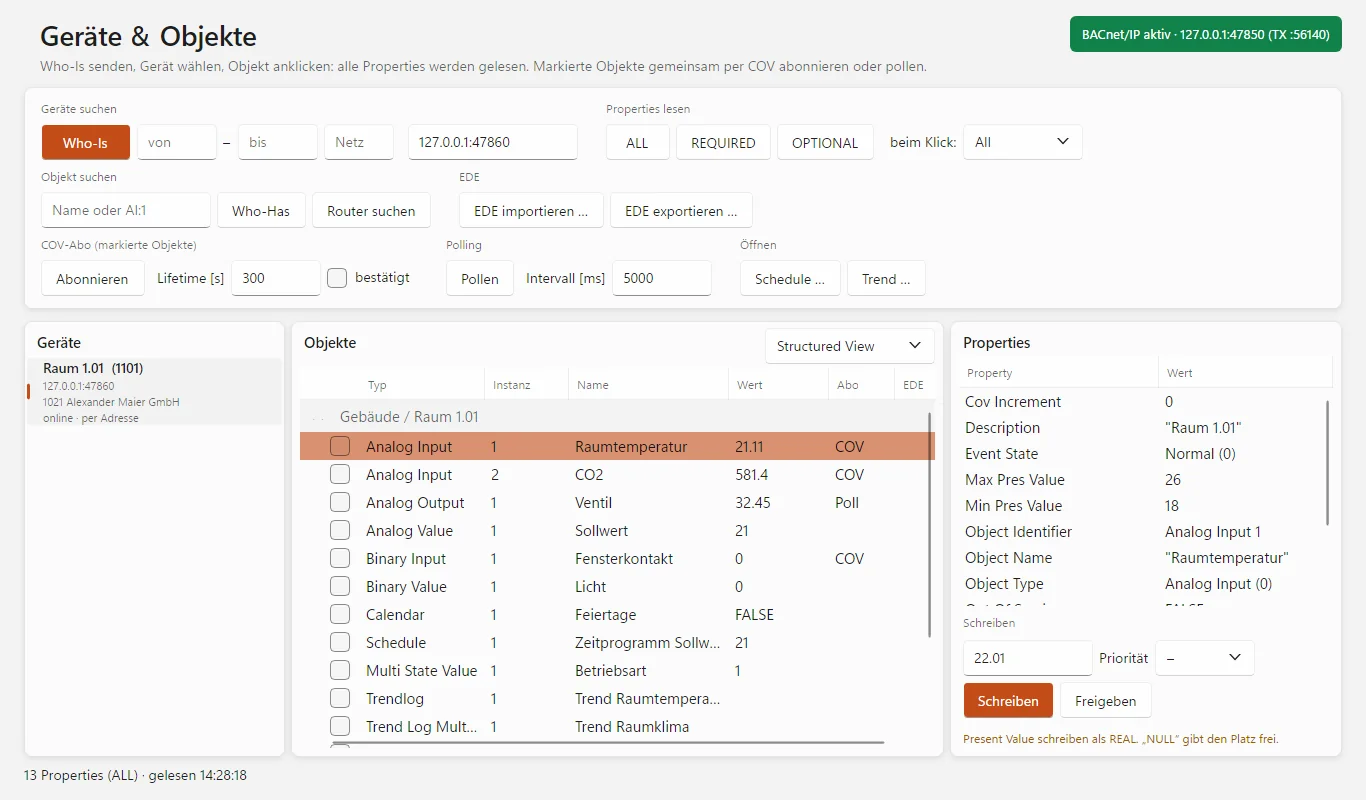
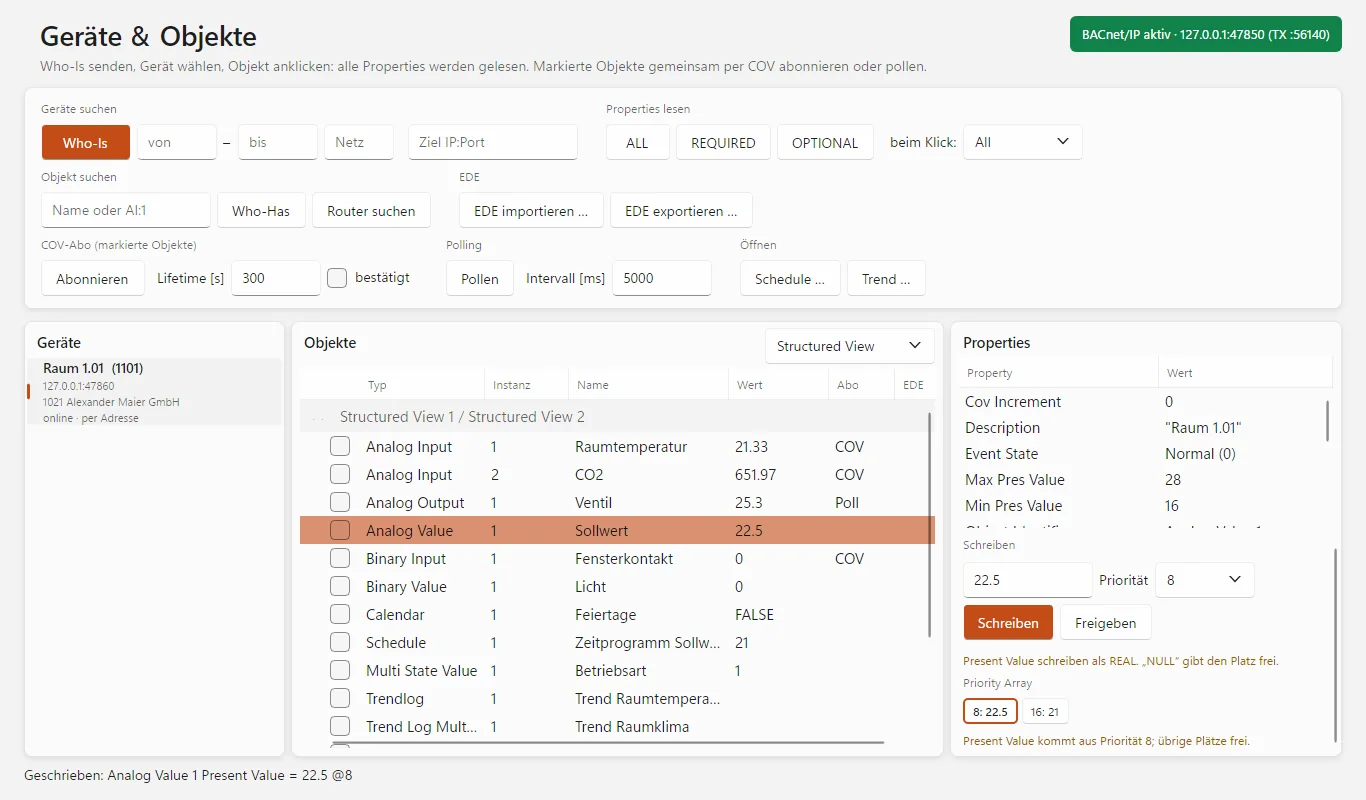
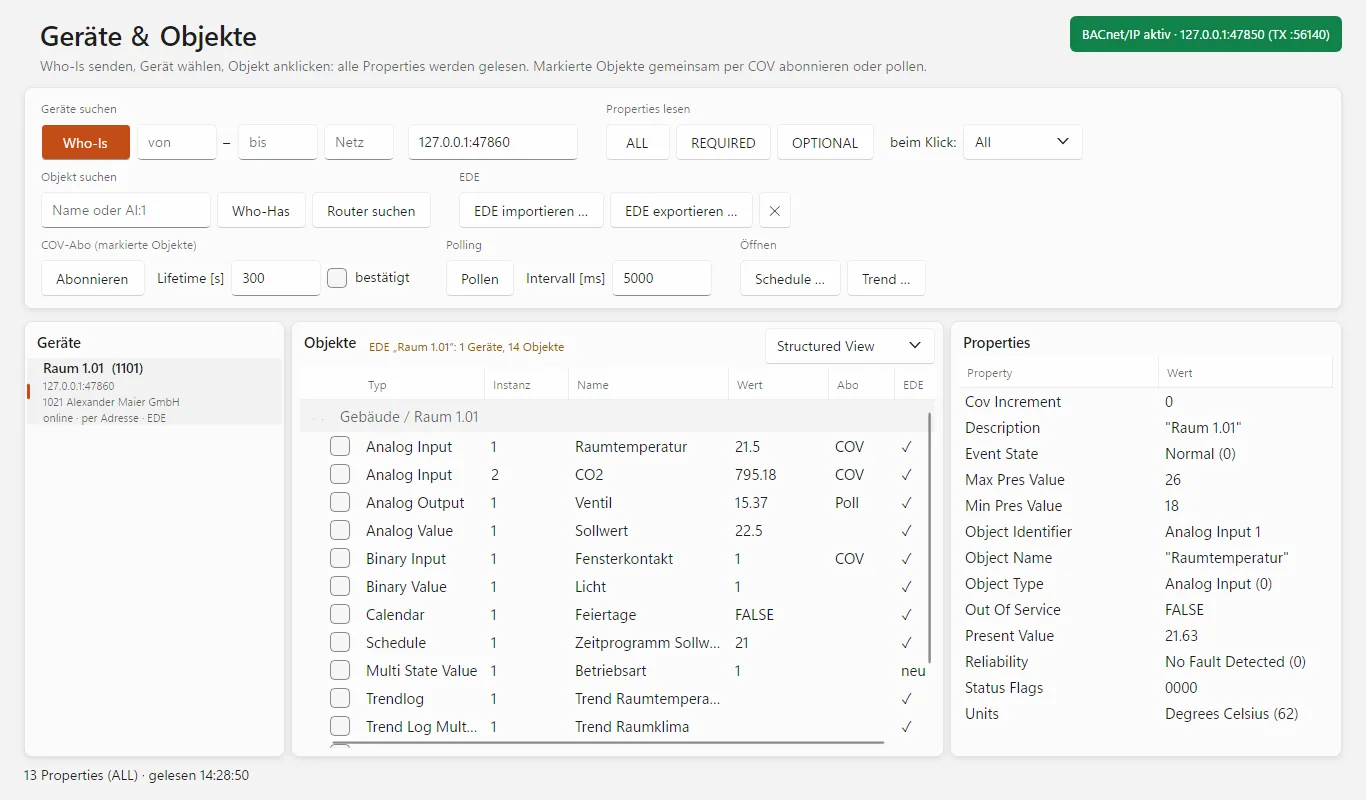
Devices & objects with read properties and running subscriptions. (Image from the program, demo data of the built-in server mode.)
Diagnostics, testing and a test counterpart in one
For system integrators, commissioning engineers and developers who test, commission and troubleshoot BACnet/IP devices and installations.
Find devices — even behind routers
Network scan across an IP range with device instance and manufacturer, Who-Is as broadcast or targeted at an address, Who-Has by object name or object ID. BBMD and foreign device with status display, devices behind BACnet routers with network number.
Check devices as in an acceptance test
Request properties specifically as ALL, REQUIRED or OPTIONAL. REQUIRED shows immediately whether a device delivers the mandatory properties of its object type. BACnetEye reads devices without ReadPropertyMultiple property by property automatically with ALL.
Watch many values at once
Tick several objects and subscribe via COV — with lifetime and automatic renewal — or poll them cyclically. The values update live in the object list.
Write values with priority
Write present value and other properties with priority 1 to 16, or relinquish them. The priority array shows which slot is occupied and which one is currently in effect.
Schedules and trends
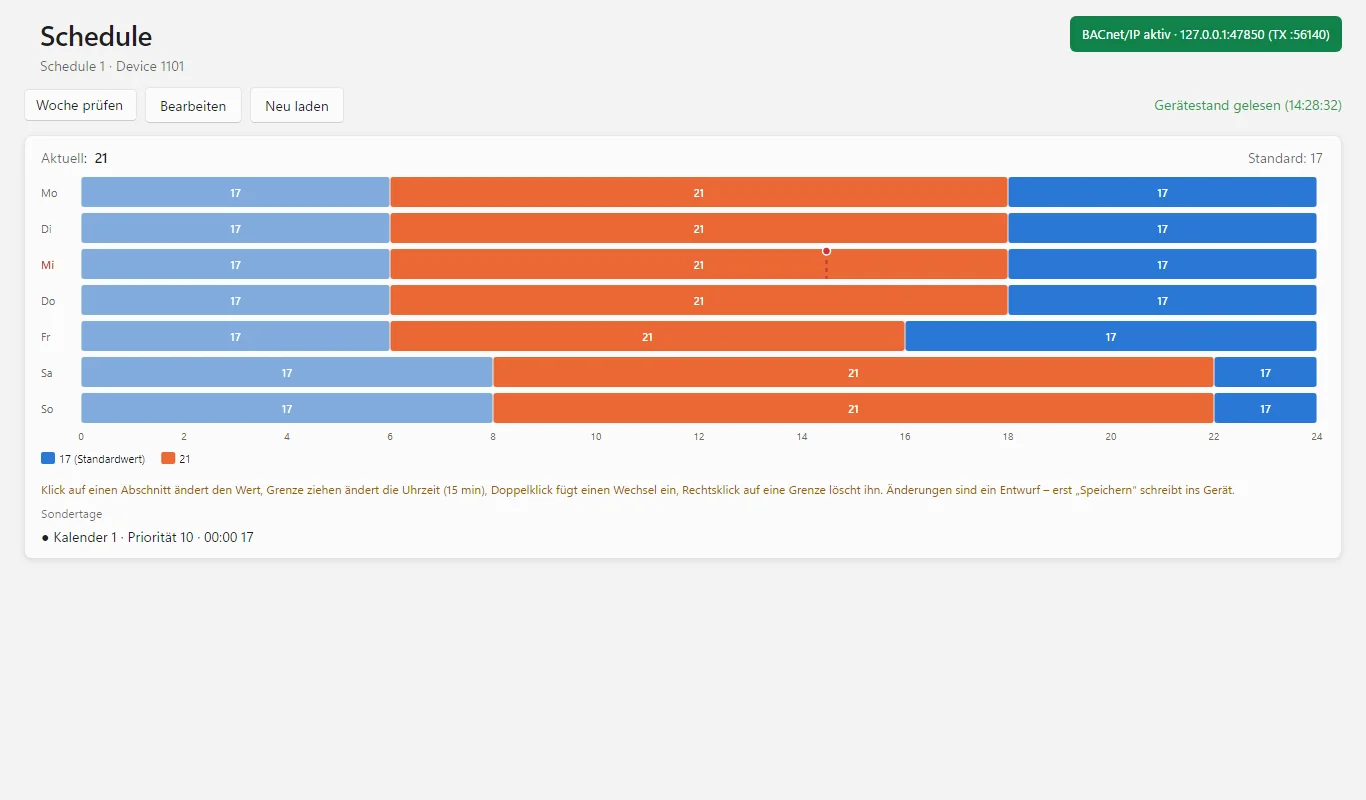
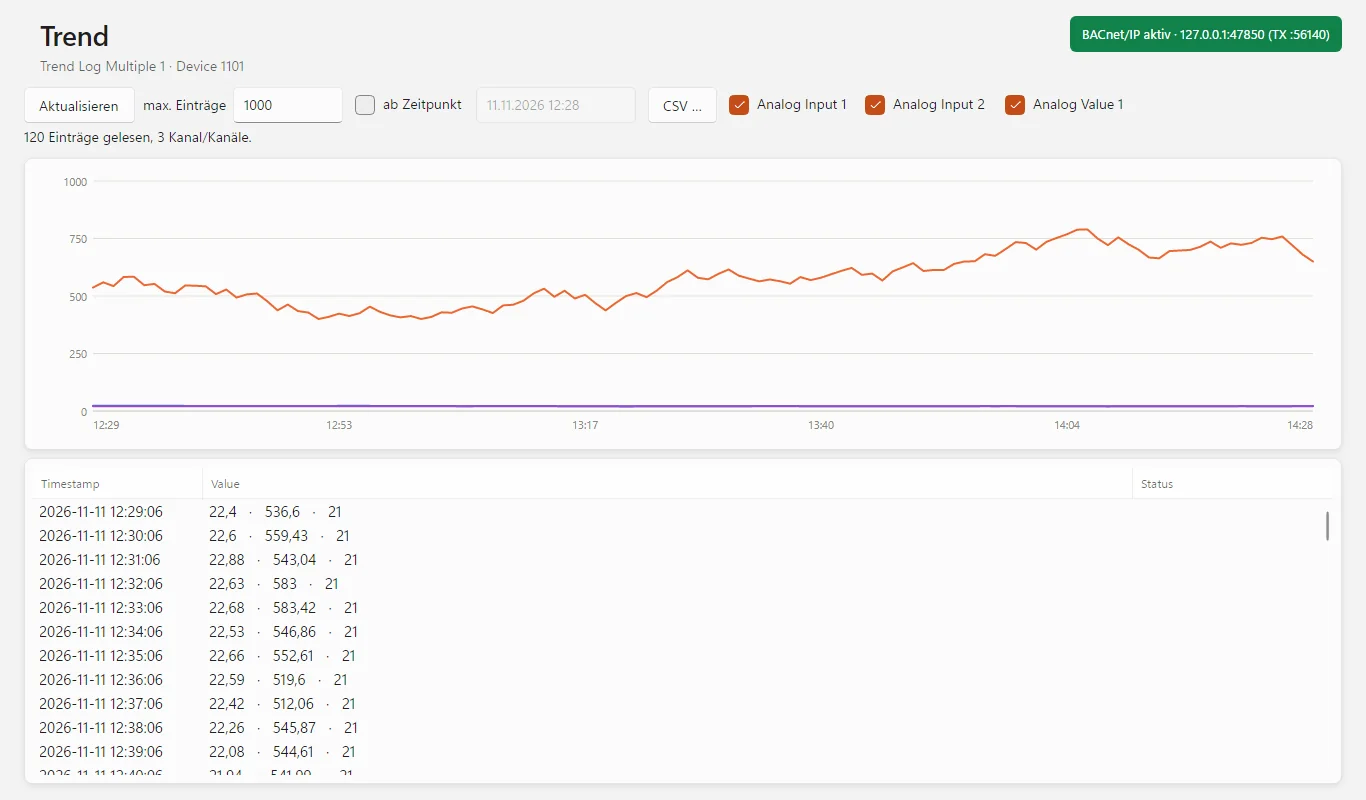
View, edit and write back the weekly schedule as day bars, exceptions and calendars. Trend log and trend log multiple as curve and table, by position or from a point in time, export as CSV.
Debug console like Wireshark
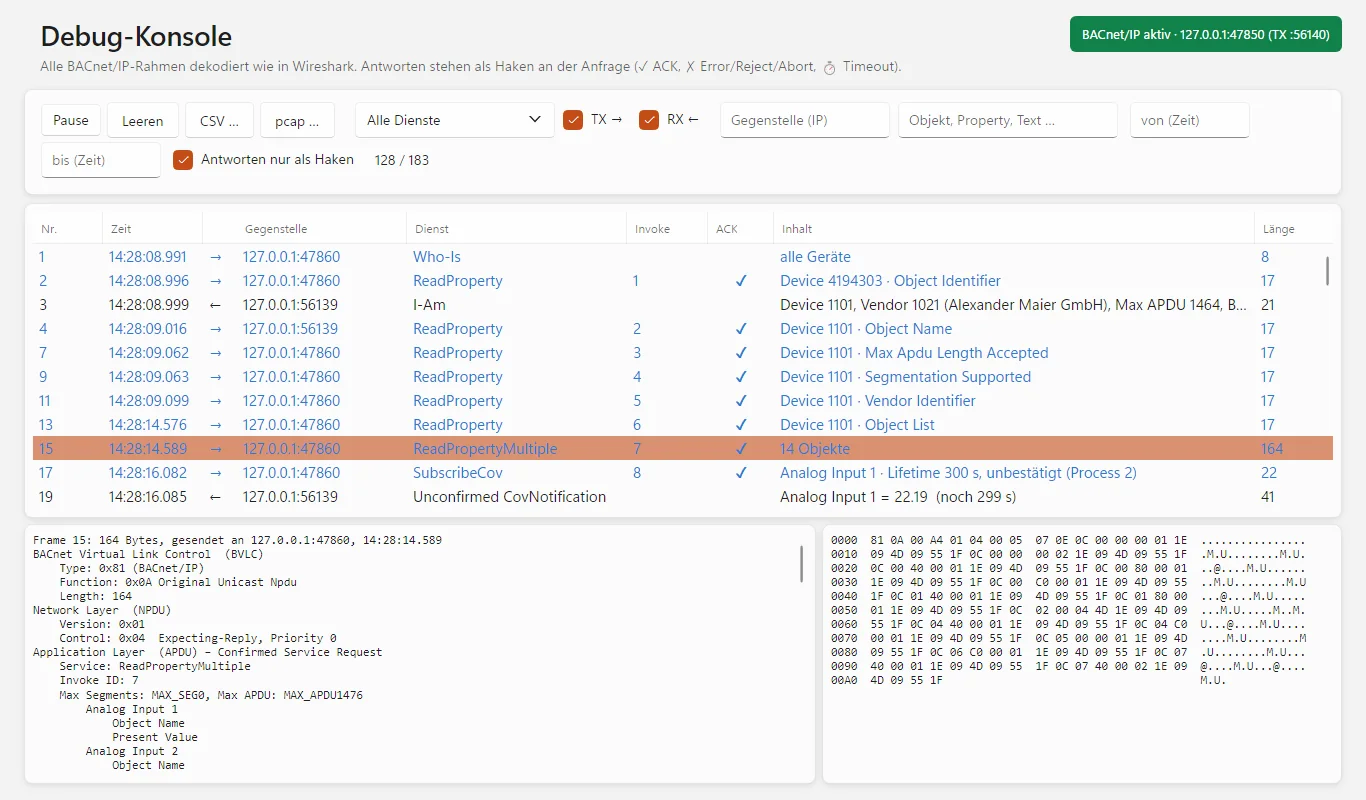
Every frame decoded into BVLC, NPDU and APDU, responses as ✓ or ✗ on the request, timeouts as ⏱. Segmented responses reassembled, time filter, export as CSV or pcap for Wireshark.
EDE data point lists
Import EDE files — even for devices that cannot be reached yet —, compare them with the installation (target/actual) and generate them from a device.
Server mode: the counterpart for testing
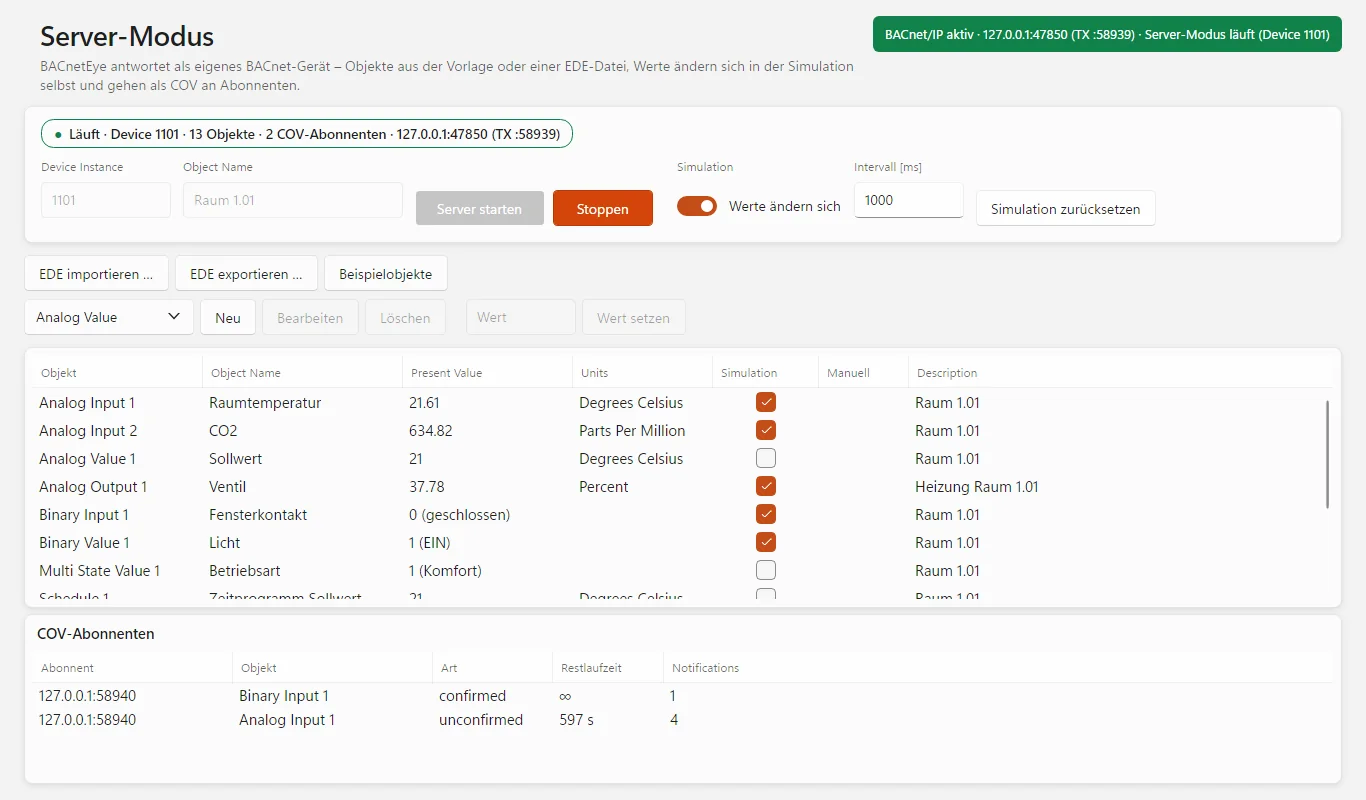
BACnetEye as a BACnet device of its own with a sample room or objects from an EDE file: simulation, COV notifications, priority array, schedule with holiday calendar and trend log. Create, edit and delete objects, set values.
Also: UDP port shareable with other BACnet programs on the same computer · BACnetEye as BBMD · complete BACnet vendor list · 19 languages · automatic updates
From network scan to a BACnet device of your own
Network scan
Checks every address of an IP range: ping and a BACnet query run at the same time, then names, MAC addresses and manufacturers are added. Because BACnet/IP works with UDP and there is no “open port”, BACnetEye sends each address a ReadProperty request for its device object, a targeted Who-Is and, on request, a query of the broadcast distribution table — so BBMDs are detected too. The network scan can also be used without a licence.
Connection, BBMD and foreign device
Choose network adapter and UDP port (47808 / 0xBAC0 or 47809 … 47823), set timeout and retries. By default the port is shared. For devices in other subnets, BACnetEye registers as a foreign device with the BBMD, shows the result of the registration and re-registers itself before the TTL expires. On request BACnetEye acts as a BBMD itself and checks other BBMDs.
Devices & objects
Who-Is as broadcast, for a range of device instances, for a specific network or by unicast to a target address (IP or IP:port). For a target address BACnetEye also queries device object 4194303 and so finds devices that only send their I-Am as broadcast. Who-Has searches for an object by name or ID; “Find routers” shows which BACnet router reaches which networks. The object list can be grouped by object type or by structured view.
Properties: ALL, REQUIRED, OPTIONAL
A click on an object reads all properties via ReadPropertyMultiple; enumerated values appear with names, errors of individual properties with class and code. Clicking again re-reads. REQUIRED and OPTIONAL specifically request the mandatory or the optional properties and show the actual behaviour of the device — without fallback, so nothing is glossed over.
Writing and priority array
Enter value, choose priority (1 … 16 or none), “Write” — then the object is read again. “Relinquish” writes NULL to the selected slot. If the device refuses, the status line names the reason, e.g. write-access-denied. For commandable objects BACnetEye shows the occupied slots of the priority array and highlights the effective one.
COV subscriptions and polling
Subscribe to several objects at once — unconfirmed or confirmed, with lifetime or unlimited. BACnetEye renews subscriptions at 80% of the lifetime and cancels them when stopping and exiting, so devices do not keep sending orphaned notifications. Where a device offers no COV, polling reads at the set interval.
Schedule, calendar and trend
Schedule with the weekly plan as bars from 0 to 24 h, exceptions (date, period, week pattern or calendar), schedule default and effective period — all editable and writable back via WriteProperty. “Check week” shows the course that actually applies in a calendar week. Trend log and trend log multiple via ReadRange, one curve per channel, export as CSV.
Debug console
Every frame sent and received, decoded into BVLC, NPDU and APDU, with hex dump. Responses are matched to their request: ✓ answered, ✗ error/reject/abort, ⏱ no response. BACnetEye reassembles segmented responses; pure BVLC messages appear as separate lines. Filter by service, direction, peer, object, property, free text and time. Export as CSV or pcap.
EDE files
Import data point lists according to B.I.G.-EU (layout 2.3) including state texts. Devices from the EDE appear even offline; for online devices the “EDE” column shows the target/actual comparison: ✓, “new” (only in the device) or “EDE only” (missing in the device). The export reads out a device completely and saves it as EDE.
Server mode
BACnetEye answers Who-Is, Who-Has, ReadProperty, ReadPropertyMultiple (ALL, REQUIRED, OPTIONAL), WriteProperty, WritePropertyMultiple, SubscribeCOV and ReadRange. Sample objects of a room with schedule, holiday calendar, trend log and structured view — or the objects of a device from an EDE file. Simulated values, COV notifications with adjustable COV increment, priority array with 16 slots. The server answers rejected write accesses with an error message including the reason.
BACnet services
| Service | as client | in server mode |
|---|---|---|
| Who-Is / I-Am | yes (broadcast, network, target address) | yes |
| Who-Has / I-Have | yes | yes |
| Who-Is-Router-To-Network | yes | – |
| ReadProperty / ReadPropertyMultiple | yes (ALL, REQUIRED, OPTIONAL) | yes (ALL, REQUIRED, OPTIONAL) |
| WriteProperty | yes, with priority | yes |
| WritePropertyMultiple | – | yes (schedules) |
| SubscribeCOV / COV | yes, confirmed and unconfirmed | yes |
| ReadRange (Trend Log) | yes, by position and time | yes, by position, sequence and time |
| Register-Foreign-Device / Read-BDT | yes | – |
Six typical jobs
Commissioning
Find devices on the network, check objects and values, write setpoints with priority and relinquish them again.
Device testing and acceptance
With REQUIRED and OPTIONAL you see whether a device delivers the mandatory properties. The debug console shows how it answers every request.
Integration and gateway development
The server mode plays the missing device — with simulation, COV, priority array, schedule and trend. With an EDE file you recreate a device before it is delivered.
Troubleshooting
Do COV notifications arrive? Does the device answer, and how fast? Is a write access refused, and why? Send the capture to the manufacturer as pcap.
Networks across subnets and routers
Reach devices behind BBMDs, as a foreign device or directly by IP; address devices behind BACnet routers with the network number.
Documentation
Compare the installation with the data point list, save the actual state of a device as EDE, export trends as CSV.
Try first, license later
Download BACnetEye 26 and request a free trial licence. The licence is activated right in the program.
- Windows: a single program file
- Linux x64 and arm64 (Raspberry Pi)
- The program installs updates itself on request
- Free, all features
- Usable even without a licence: network scan, viewing EDE files
- Annual licence for one computer, 12-month term
- All features including server mode
- Updates included during the term
- Activation right in the program
For a licence, please write to us at info@busbaer.de. The licence is tied to one computer; if you change computers, please get in touch. After expiry you can still use the network scan and view EDE files, but you can no longer communicate via BACnet/IP or start the server mode.

Part of the Eye Suite 26
All Eye tools fit into the free Eye Suite 26: once it is installed, its dashboard shows the licence status of BACnetEye 26, and the traffic also appears in the suite's combined monitor — together with KNX, Modbus and the other protocols. Without the suite, BACnetEye 26 works just the same.
On Windows, BACnetEye 26 asks once on first start whether it should install itself to C:\Program Files\Alexander Maier GmbH\BACnetEye 26\, and creates shortcuts on the desktop and in the Start menu. This needs administrator rights once; later updates run without them.
Windows, Linux and Raspberry Pi
| Windows | Windows 10 or 11, 64-bit |
| Linux | 64-bit: x64 for PCs, arm64 e.g. for Raspberry Pi 4 or 5 with Raspberry Pi OS 64-bit (Bookworm or later) and desktop. 32-bit systems are not supported. |
| Installation | Windows: a single program file, .NET included; on first start the program offers to install itself to C:\Program Files\Alexander Maier GmbH\.Linux: tar xzf BACnetEye26-linux-<arch>.tar.gz, then run bash install.sh in the unpacked folder — afterwards start it from the menu or with bacneteye26 in a terminal |
| Network | Access to the BACnet/IP network; the firewall must allow UDP 47808 (or the chosen port) inbound |
| Internet | for activation and updates |
After that, the program updates itself on request. There is no macOS download yet.
Frequently asked questions
How can I try BACnetEye?
Download the program, start it and request the trial licence via “Not licensed” at the top right — or via “Request trial licence” on this page. Without a licence you can already use the network scan and view EDE files; to communicate via BACnet/IP and for the server mode you need the trial or annual licence.
Which networks does BACnetEye support?
BACnet/IP over UDP, standard port 47808 plus 47809 … 47823 for further networks. You reach devices in other IP subnets via a BBMD as a foreign device or directly by IP; BACnetEye addresses devices behind a BACnet router via the router with the network number.
What do ALL, REQUIRED and OPTIONAL mean?
They are collective requests via ReadPropertyMultiple: all properties of an object, only those required by the standard, or only the optional ones. With REQUIRED you check whether a device delivers the mandatory properties of its object type. For REQUIRED and OPTIONAL, BACnetEye deliberately shows the raw behaviour of the device.
What happens with devices without ReadPropertyMultiple or segmentation?
With ALL, BACnetEye then reads property by property automatically: first the Property_List, otherwise a standard list. It reads trend logs in blocks and makes them smaller itself if a device rejects a response that is too large.
Can I write values?
Yes. Click a property, choose value and priority (1 … 16 or none) and write; “Relinquish” writes NULL to the selected slot. The priority array shows the occupied slots and the effective one. You write schedules and calendars on the schedule page.
Does BACnetEye change the installation?
Only if you explicitly make it — by writing, subscribing or writing back a schedule. Reading, Who-Is and the network scan have no effect on the installation.
Can I watch several objects at the same time?
Yes. Tick several objects in the object list and subscribe to them via COV in one step, or poll them. There is one subscription per object; BACnetEye renews COV subscriptions itself and cancels them when it exits.
Can I view the communication in Wireshark?
Yes. The debug console saves the displayed frames as a pcap file for Wireshark, or alternatively as CSV with hex data. It also shows every frame already decoded with a hex dump.
What is the server mode?
BACnetEye acts as a BACnet device of its own — with sample objects of a room or the objects from an EDE file. Values change by themselves in the simulation and go to all subscribers via COV. That way you test visualisations, gateways and building management systems before the real device is there.
How do I work with EDE files?
EDE files (B.I.G.-EU) can be imported, compared with the installation and generated from a device. In server mode, the import creates the objects of a device including device instance and name.
Can BACnetEye run alongside other BACnet programs?
Yes. By default BACnetEye shares the UDP port so that other BACnet programs on the same computer can run in parallel. On request it uses the port exclusively.
Does BACnetEye run on Linux or Mac?
Linux yes: packages for 64-bit (x64 and arm64), also for the Raspberry Pi 4 or 5 with Raspberry Pi OS 64-bit. There is no download for macOS yet.
Do I have to install anything?
On Windows, BACnetEye is a single program file that brings everything it needs. On first start it asks once whether it should install itself to “C:\Program Files\Alexander Maier GmbH\BACnetEye 26\”; this needs administrator rights once. On Linux a script sets up the program. BACnetEye installs new versions itself on request.
Can I transfer the licence to another computer?
The licence is tied to one computer. If you change computers, please get in touch with us.
What does BACnetEye have to do with the Eye Suite 26?
If the free Eye Suite 26 is installed, its dashboard shows the licence status of BACnetEye 26, and values that are read, written or reported via COV also appear in the suite's combined monitor. Without the suite, BACnetEye works unchanged.
Which languages are available?
The user interface can be switched between 19 languages or follows the system language.
Another question? Write to us at info@busbaer.de.
See what's going on on the BACnet network.
Download BACnetEye26.exe, request a trial licence — and read your first value within minutes.
Get in touch
Imprint
Alexander Maier GmbH
Beckstraße 3
D-69412 Eberbach
Managing director: Alexander Maier
Registered office: Eberbach
Register court: Mannheim
Commercial register: HRB 335404
VAT ID: DE177682654
Phone: +49 (0) 6271 – 91 94 70
E-Mail: info@busbaer.de