ETS-Fernzugang
verständlich erklärt.
ETS remote access,
explained clearly.
Installation, Inbetriebnahme und sicherer Betrieb — Schritt für Schritt vom ersten Setup bis zur Störungssuche. Für Techniker, die eine KNX-Anlage per ETS aus der Ferne programmieren, und für alle, die den Rechner am Kundenstandort betreuen. Installation, commissioning and secure operation — step by step, from the first setup to fault finding. For technicians programming a KNX installation remotely via ETS, and for anyone looking after the machine on the customer's site.
So funktioniert der FernzugangHow remote access works
Drei Stationen, zwei ausgehende Verbindungen: Der ETS Connector beim Techniker und der Remote Agent am Kundenstandort treffen sich im EisBär-Portal. Am Kundenstandort muss dafür kein Port geöffnet werden.Three stations, two outbound connections: the ETS Connector at the technician's end and the Remote Agent on the customer's site meet in the EisBär Portal. No port needs to be opened on the customer's site.
ETS Connector
Stellt der ETS eine lokale KNXnet/IP-Schnittstelle bereit.Presents ETS with a local KNXnet/IP interface.
EisBär-PortalEisBär Portal
Verschlüsselte Vermittlung — leitet nur verschlüsselte Daten weiter.Encrypted brokering — only passes encrypted data through.
Remote Agent + KNX-BusRemote Agent + KNX bus
Verbindet den Fernzugang mit der realen KNX-Anlage.Connects remote access to the actual KNX installation.
Zwei Programme, zwei BetriebsartenTwo programs, two operating modes
Der wichtigste Unterschied: Das eine Programm startet man bei Bedarf, das andere läuft dauerhaft im Hintergrund.The key difference: one program is started when needed, the other runs permanently in the background.
ETS Connector
Läuft auf dem Notebook des Technikers und wird nur gestartet, wenn er gebraucht wird.Runs on the technician's notebook and is only started when needed.
- StartStartmanuell über Desktop oder Startmenümanually, from the desktop or Start menu
- BedienungOperationim geöffneten Programmfensterin the open program window
- BeendenClosingFenster schließen trennt den Zugangclosing the window disconnects remote access
Remote Agent
Läuft dauerhaft am Anlagenstandort, damit die Anlage erreichbar bleibt.Runs permanently at the installation so that it stays reachable.
- StartStartautomatisch als Windows-Dienstautomatically, as a Windows service
- BedienungOperationTray-Symbol oder Verwaltungsfenstertray icon or management window
- BeendenClosingDienst läuft dauerhaft weiterthe service keeps running
Installation in vier SchrittenInstallation in four steps
Jeweils eine Datei, jeweils ein Doppelklick — beim Techniker der ETS Connector, am Kundenstandort der Remote Agent.One file each, one double-click each — the ETS Connector at the technician's end, the Remote Agent on the customer's site.
-
Setup-Datei startenRun the setup file
Beim Techniker
KNX2GO-EtsConnector-Setup-<Version>.exe, am KundenstandortKNX2GO-RemoteAgent-Setup-<Version>.exe.At the technician's endKNX2GO-EtsConnector-Setup-<version>.exe, on the customer's siteKNX2GO-RemoteAgent-Setup-<version>.exe. -
UAC bestätigenConfirm the UAC prompt
Windows fragt nach Administratorrechten. Die brauchen nur die Installation selbst — der spätere Alltagsbetrieb läuft ohne.Windows asks for administrator rights. Only the installation itself needs them — day-to-day operation later does not.
-
Lizenz akzeptierenAccept the licence
Lizenzvereinbarung lesen und annehmen — einmalig pro Rechner, Sprache DE/EN umschaltbar.Read and accept the licence agreement — once per machine, switchable between German and English.
-
Installation abschließenFinish the installation
Der ETS Connector legt ein Symbol auf dem Desktop und im Startmenü an und läuft danach noch nicht. Der Remote Agent richtet seinen Dienst ein, startet ihn und meldet sich ab jetzt bei jeder Anmeldung mit dem Tray-Symbol.The ETS Connector creates an icon on the desktop and in the Start menu and does not run yet. The Remote Agent sets up and starts its service, and from then on appears with its tray icon at every sign-in.
- Windows 10/11, 64 BitWindows 10/11, 64-bit
- Administratorrechte nur für die InstallationAdministrator rights for the installation only
- Internetzugang zum EisBär-PortalInternet access to the EisBär Portal
- WebView2 optional — auf aktuellem Windows 11 bereits vorhanden, sonst greift automatisch eine schlichtere, voll funktionsfähige AnsichtWebView2 optional — already present on current Windows 11; otherwise a plainer but fully functional view takes over automatically
--uninstall; die Konfiguration bleibt für eine spätere Neuinstallation bestehen.
Updating: simply run the same setup file again — the configuration (selected installation, credentials, PIN) is preserved. Uninstalling: via “Apps & features” or by running the setup file with the --uninstall switch; the configuration is kept for a later reinstall.
Fernzugriff zuerst im Portal freigebenRelease remote access in the Portal first
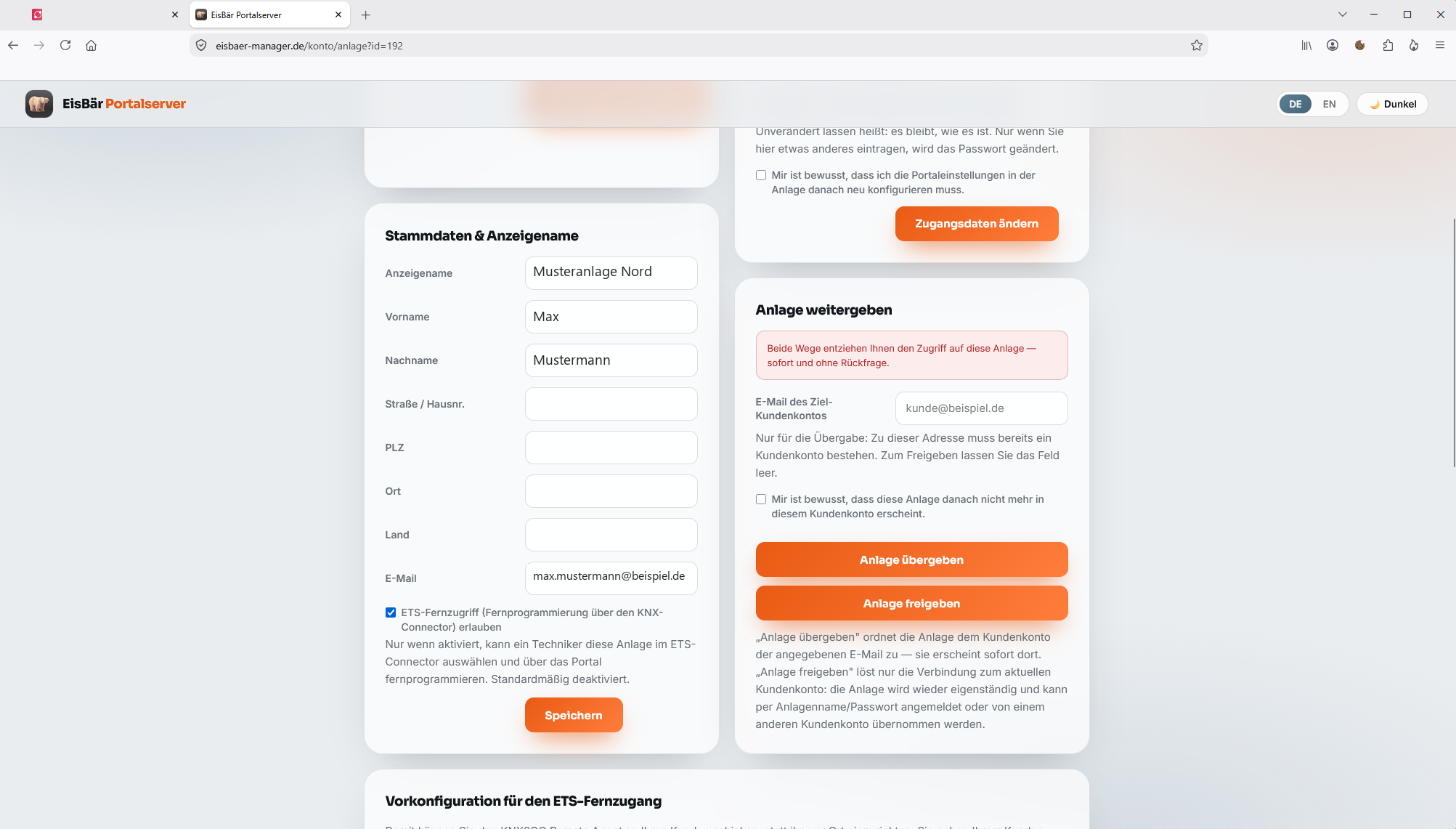
Dieser Schritt wird am häufigsten übersehen — ohne ihn taucht die Anlage im ETS Connector gar nicht auf.This step is the one most often missed — without it, the installation does not show up in the ETS Connector at all.
ETS-Fernzugriff erlaubenAllow ETS remote access
In den Stammdaten der Anlage die Option „ETS-Fernzugriff (Fernprogrammierung über den KNX-Connector) erlauben“ aktivieren und speichern. Erst danach erscheint die Anlage im ETS Connector.In the installation's master data, tick “Allow ETS remote access (remote programming via the KNX Connector)” and save. Only then does the installation appear in the ETS Connector.
Inbetriebnahme beim TechnikerCommissioning at the technician's end
-
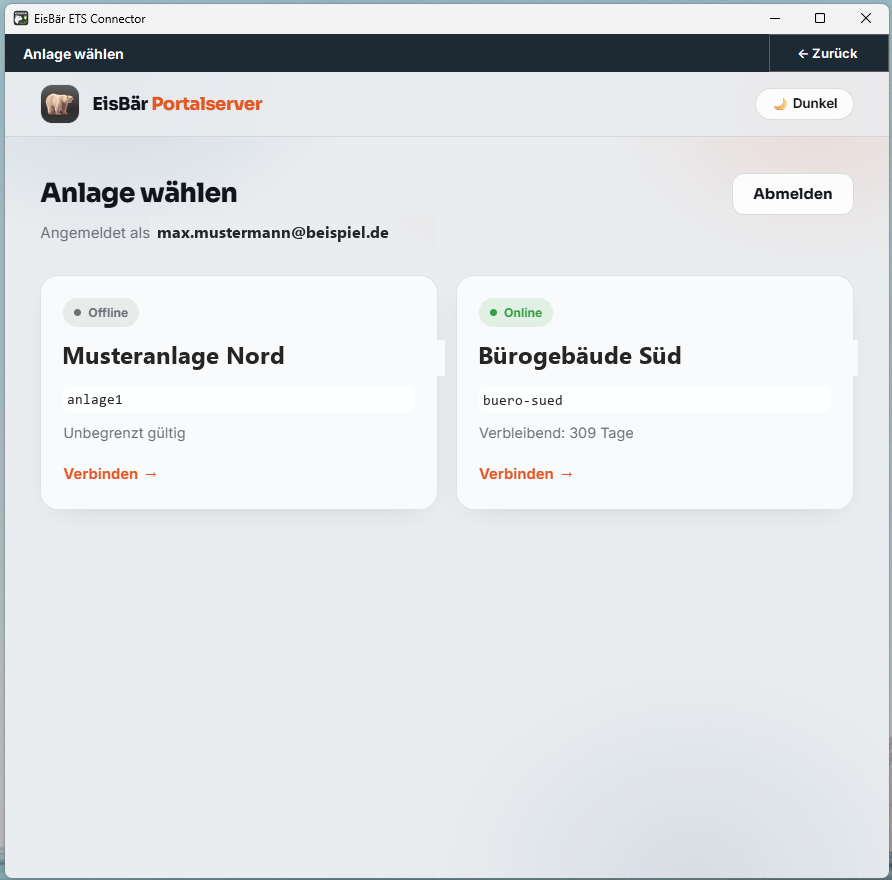
Anlage wählenSelect the installation
Mit dem Kundenkonto anmelden und die Anlage auswählen.Sign in with the customer account and select the installation.
-
Keyring importierenImport the keyring
Nur bei KNX IP Secure:
.knxkeys-Datei und Passwort angeben.Only with KNX IP Secure: provide the.knxkeysfile and its password. -
In ETS verbindenConnect in ETS
Die Anlage erscheint als normale KNXnet/IP-Schnittstelle — Programmieren, Gruppen- und Busmonitor wie vor Ort.The installation appears as an ordinary KNXnet/IP interface — programming, group and bus monitor just like on site.
Der Konfigurationsschlüssel verkürzt die EinrichtungThe configuration key shortens the setup
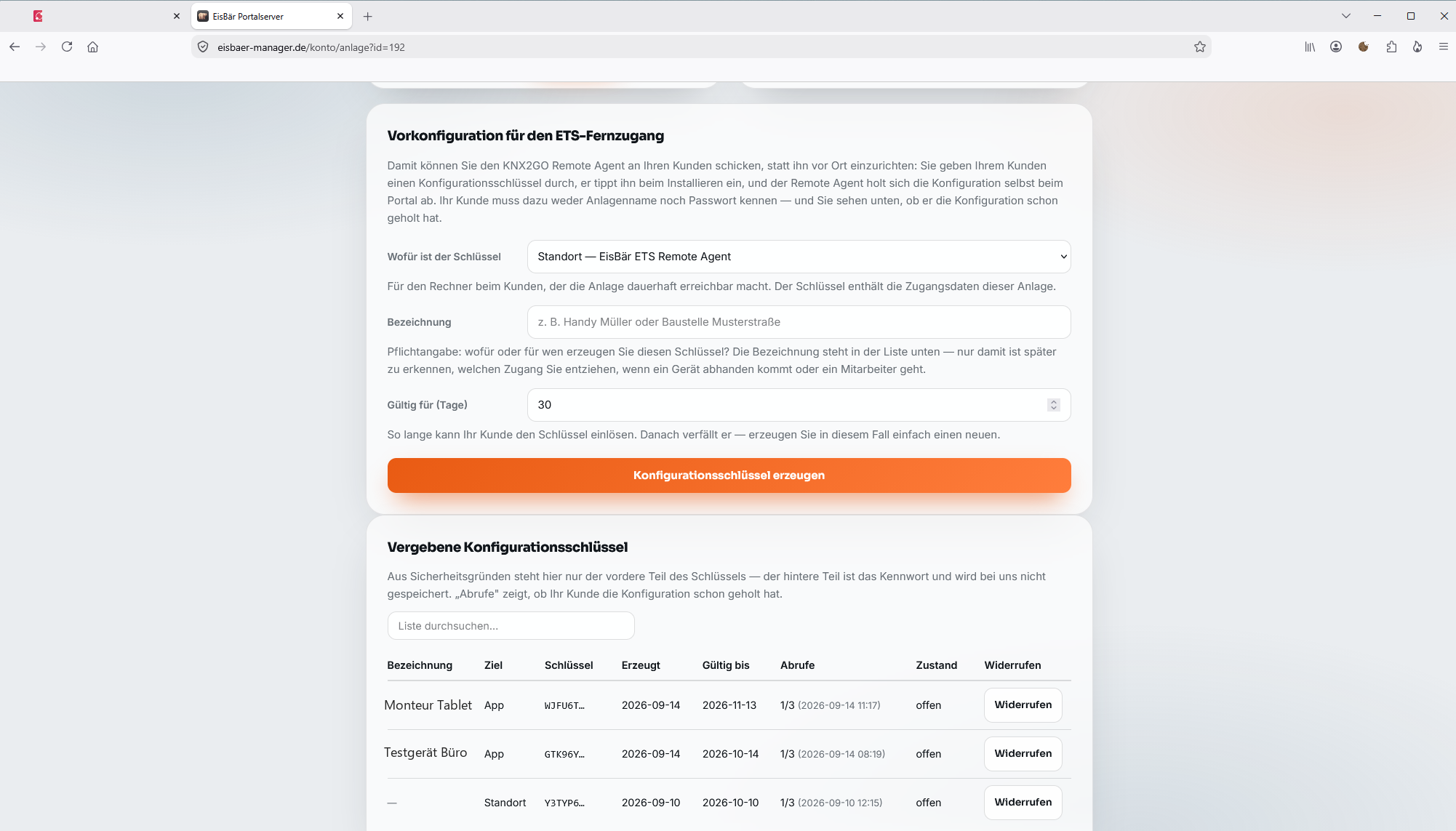
Damit lässt sich der Remote Agent an den Kunden schicken, statt ihn vor Ort einzurichten: Der Kunde tippt beim Installieren einen Schlüssel ein, den Rest holt sich der Remote Agent selbst beim Portal. Anlagenname und Passwort muss der Kunde nie kennen.This lets you send the Remote Agent to the customer instead of setting it up on site: the customer types in a key during installation, and the Remote Agent fetches everything else from the Portal itself. The customer never needs to know the installation name or password.
- Ziel wählen: Standort — EisBär ETS Remote AgentPick the target: Site — EisBär ETS Remote Agent
- Eine Bezeichnung ist Pflicht — nur so erkennen Sie später, welchen Zugang Sie entziehen, wenn ein Gerät abhandenkommt oder ein Mitarbeiter gehtA label is mandatory — it is the only way to tell later which access to revoke if a device goes missing or an employee leaves
- Gültigkeit in Tagen festlegen (Vorgabe 30)Set the validity in days (default 30)
- In der Liste sehen Sie, ob der Kunde die Konfiguration schon abgeholt hat — und können den Schlüssel jederzeit widerrufenThe list shows whether the customer has already fetched the configuration — and you can revoke the key at any time
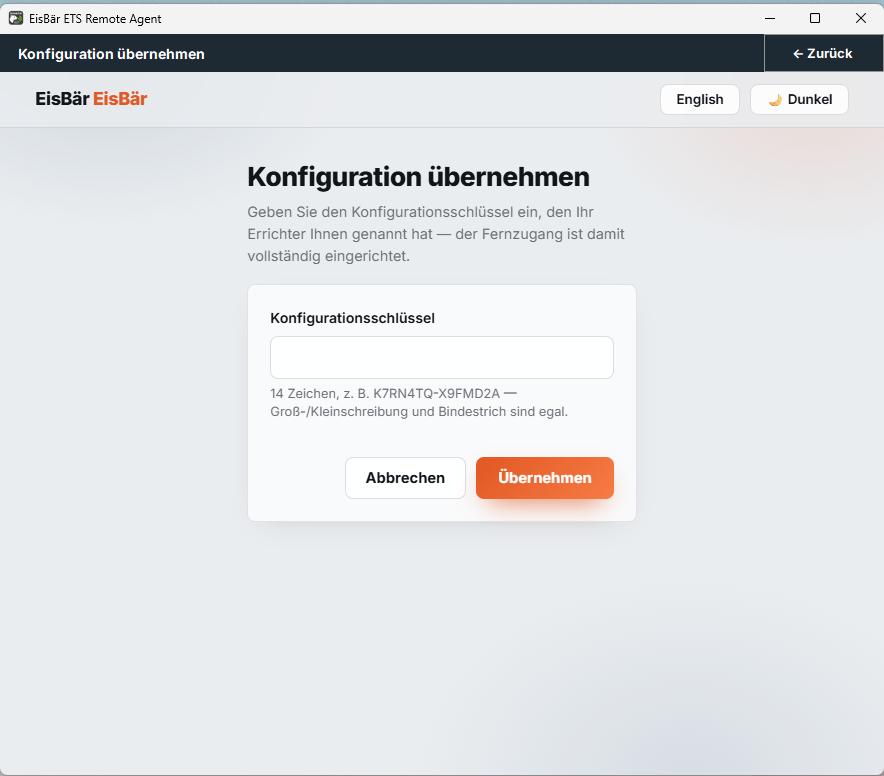
- Im Remote Agent „Konfiguration übernehmen…“ öffnenOpen “Apply configuration…” in the Remote Agent
- Schlüssel eintippen — Groß-/Kleinschreibung und Bindestrich sind egalType in the key — upper/lower case and the hyphen do not matter
- Der Remote Agent holt die Einstellungen selbst beim Portal ab; der Fernzugang ist damit vollständig eingerichtetThe Remote Agent fetches the settings from the Portal itself; remote access is then fully set up
Sicherheit wird an zwei Stellen gesteuertSecurity is controlled in two places
Keyring im ETS ConnectorKeyring in the ETS Connector
Der Techniker importiert die .knxkeys-Datei. Der Remote Agent erhält die benötigten Zugangsdaten über die gesicherte Verbindung — vor Ort muss dafür nichts eingetragen werden.The technician imports the .knxkeys file. The Remote Agent receives the required credentials over the secured connection — nothing needs to be entered on site.
PIN und ZugangssperrePIN and access lock
Die Konfigurations-PIN schützt Änderungen am Remote Agent. Die Zugangssperre blockiert den Fernzugriff sofort und jederzeit umkehrbar.The configuration PIN protects changes to the Remote Agent. The access lock blocks remote access immediately and reversibly at any time.
Statusfarben zeigen den Zustand auf einen BlickStatus colours show the state at a glance
- GrünGreen — bereit oder verbundenready or connected
- OrangeOrange — Zugang bewusst gesperrtaccess deliberately blocked
- RotRed — Dienst läuft, keine Verbindungservice running, no connection
- GrauGrey — Dienst nicht erreichbarservice not reachable
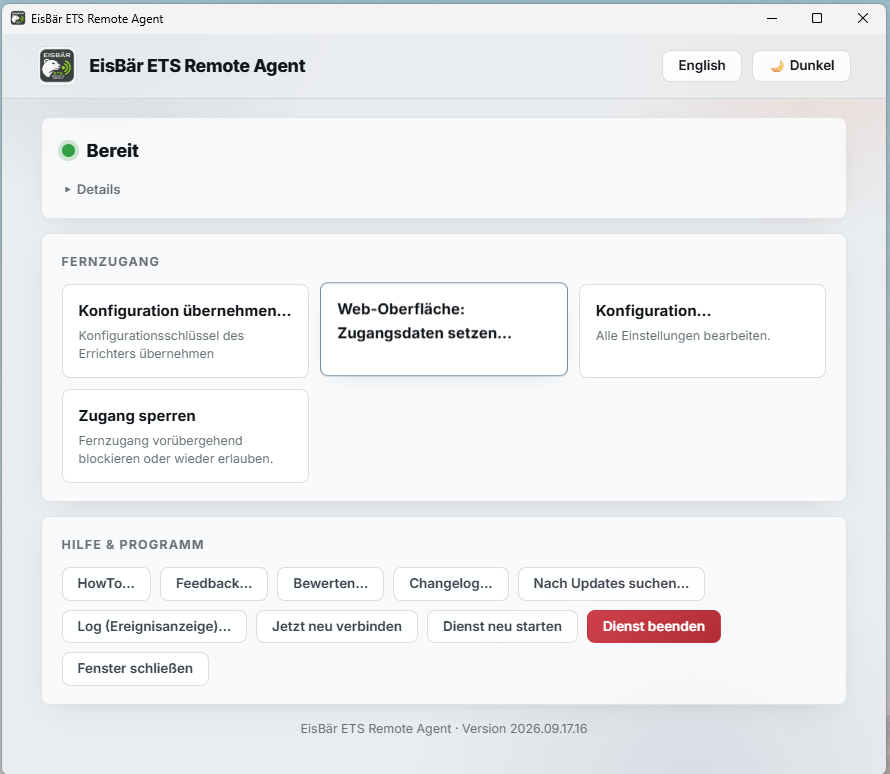
Der Remote Agent lässt sich auch per Browser verwaltenThe Remote Agent can also be managed from a browser
Status prüfenCheck the status
KNX-Interface suchenSearch for the KNX interface
Zugang sperren oder freigebenBlock or release access
Dienst stoppen oder neu verbindenStop the service or reconnect
Benutzername und Passwort werden im Tray-Menü gesetzt. Die Browserwarnung für das selbstsignierte Zertifikat ist einmalig zu bestätigen.Username and password are set from the tray menu. The browser warning about the self-signed certificate has to be confirmed once.
Damit andere Geräte im lokalen Netzwerk zugreifen können, muss die Windows-Firewall eingehende Verbindungen auf Port 8443 erlauben.For other devices on the local network to connect, the Windows firewall must allow inbound connections on port 8443.
Weitere Dienste und Updates aus der FerneFurther services and updates from afar
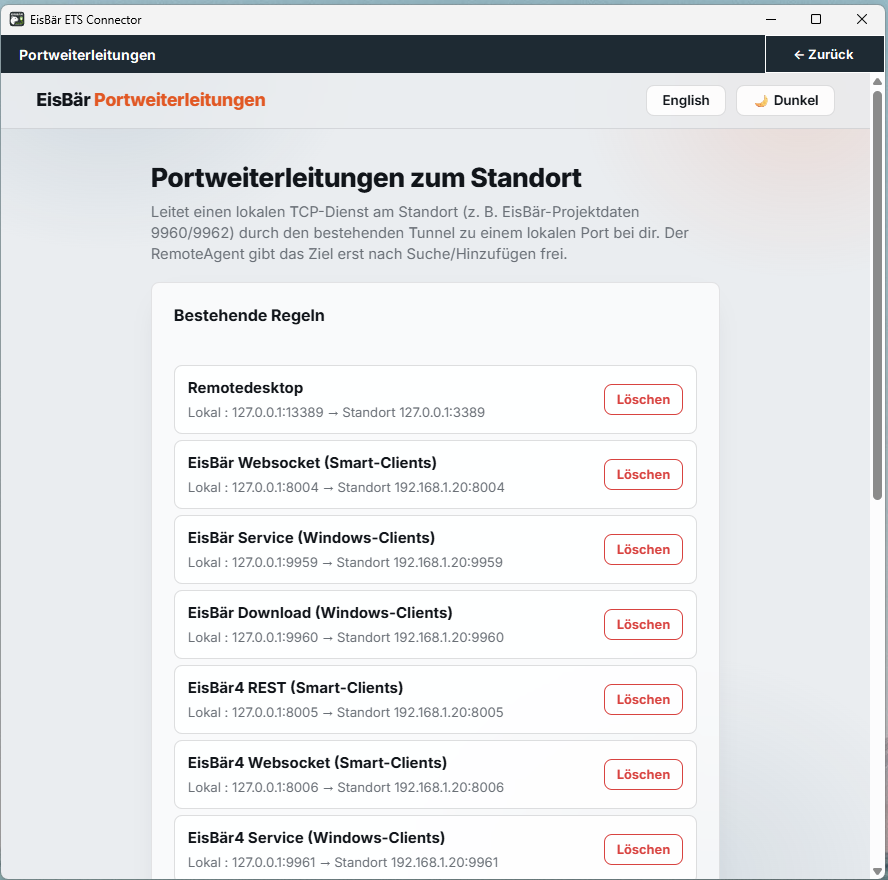
Lokale TCP-Dienste erreichbar machenMaking local TCP services reachable
Ein lokaler TCP-Dienst am Standort wird durch den bestehenden Tunnel auf einen lokalen Port beim Techniker geleitet — etwa für Fernwartung, Visualisierung oder Projektdaten. Der Remote Agent gibt das Ziel erst nach Suche bzw. Hinzufügen frei.A local TCP service on site is routed through the existing tunnel to a local port at the technician's end — for remote service, visualisation or project data, for example. The Remote Agent only releases the target after it has been searched for or added.
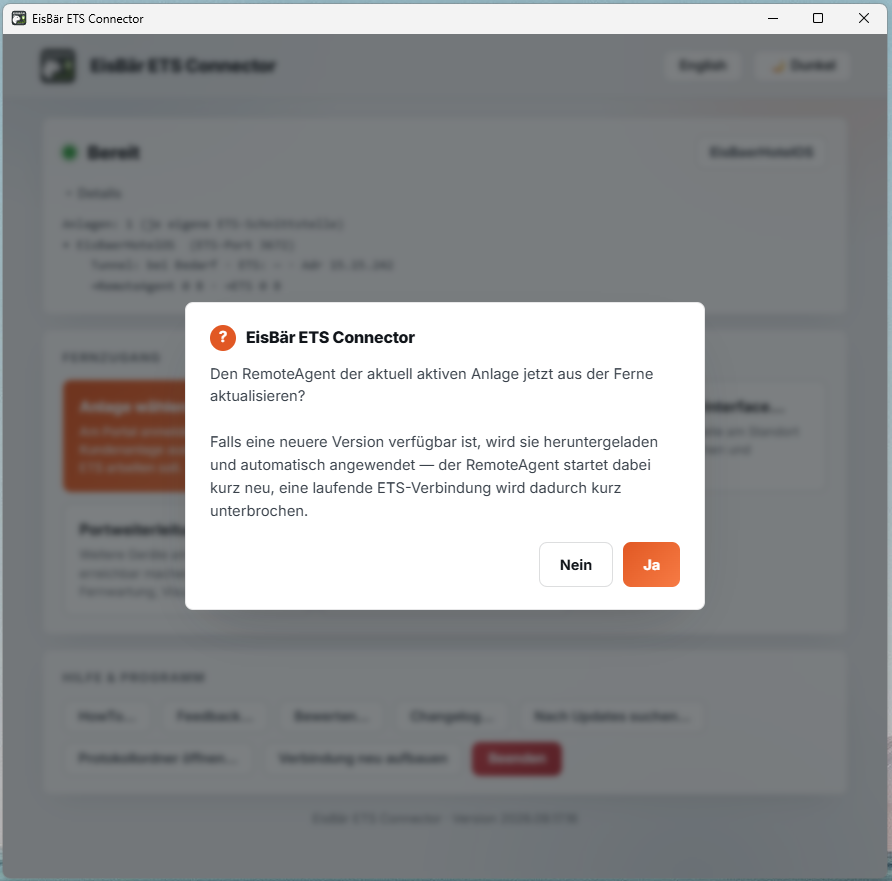
Remote Agent kontrolliert aktualisierenUpdating the Remote Agent in a controlled way
Der Remote Agent der aktiven Anlage lässt sich aus der Ferne aktualisieren: Ist eine neuere Version verfügbar, wird sie geladen und angewendet.The Remote Agent of the active installation can be updated remotely: if a newer version is available, it is downloaded and applied.
Die häufigsten Störungen lassen sich gezielt eingrenzenThe most common faults can be narrowed down quickly
| SymptomSymptom | Erster PrüfschrittFirst thing to check |
|---|---|
| ETS findet keine SchnittstelleETS finds no interface | Connector starten und Fenster geöffnet lassenStart the Connector and leave the window open |
| Remote Agent ist grauThe Remote Agent is grey | Windows-Dienst neu startenRestart the Windows service |
| Verbunden, aber keine TelegrammeConnected, but no telegrams | Zugangssperre prüfen und richtiges Gateway wählenCheck the access lock and select the right gateway |
| KNX IP Secure verbindet nichtKNX IP Secure does not connect | Keyring erneut importierenImport the keyring again |
| Schnittstelle gefunden, keine VerbindungInterface found, no connection | Freie Tunnel-Kanäle prüfenCheck for free tunnel channels |
| Remote Agent bleibt rotThe Remote Agent stays red | Secure-Schalter und Gateway-Einstellung prüfenCheck the Secure switch and the gateway setting |
Die komplette Präsentation als PDFThe complete presentation as a PDF
Alle Kapitel dieser Seite auf zwölf Folien — zum Weitergeben an Kunden und Kollegen.Every chapter on this page across twelve slides — ready to pass on to customers and colleagues.
ETS-Fernzugang verständlich erklärtETS remote access, explained clearly
Installation, Inbetriebnahme und sicherer BetriebInstallation, commissioning and secure operation
PDF · 12 Seiten · rund 1,1 MB · deutschPDF · 12 pages · about 1.1 MB · German
Häufige FragenFrequently asked questions
Warum erscheint die Anlage nicht im ETS Connector?Why doesn't the installation show up in the ETS Connector?
Weil im EisBär-Portal in den Stammdaten der Anlage die Option „ETS-Fernzugriff erlauben“ noch nicht aktiviert ist. Sie ist standardmäßig deaktiviert; erst nach dem Speichern erscheint die Anlage im ETS Connector.
Because “Allow ETS remote access” has not yet been ticked in the installation's master data in the EisBär Portal. It is disabled by default; the installation only appears in the ETS Connector once it has been saved.
Muss das Fenster des ETS Connector geöffnet bleiben?Does the ETS Connector window have to stay open?
Ja. Der ETS Connector wird gestartet, wenn er gebraucht wird; das Schließen des Fensters trennt den Fernzugang. Beim Remote Agent am Kundenstandort ist es umgekehrt: Er läuft als Windows-Dienst weiter, auch wenn das Verwaltungsfenster geschlossen wird.
Yes. The ETS Connector is started when needed; closing the window disconnects remote access. On the customer's site it is the other way round: the Remote Agent keeps running as a Windows service even when the management window is closed.
Wie lange ist ein Konfigurationsschlüssel gültig?How long is a configuration key valid?
Die Gültigkeit legen Sie beim Erzeugen im Portal fest, üblicherweise 30 Tage. Der Schlüssel hat 14 Zeichen und lässt sich nur begrenzt oft einlösen. Ist er abgelaufen oder verbraucht, erzeugen Sie im Portal einfach einen neuen.
You set the validity when generating the key in the Portal, typically 30 days. The key has 14 characters and can only be redeemed a limited number of times. If it has expired or been used up, simply generate a new one in the Portal.
Muss der Kunde Anlagenname und Passwort kennen?Does the customer need to know the installation name and password?
Nein. Genau dafür gibt es den Konfigurationsschlüssel: Der Kunde tippt beim Installieren nur den Schlüssel ein, alles Weitere holt sich der Remote Agent selbst beim Portal ab. Im Portal sehen Sie anschließend, ob er die Konfiguration schon abgerufen hat.
No. That is exactly what the configuration key is for: during installation the customer only types in the key, and the Remote Agent fetches everything else from the Portal itself. Afterwards you can see in the Portal whether the configuration has already been fetched.
Was ist die Werkseinstellung der Konfigurations-PIN?What is the factory setting of the configuration PIN?
1234. Die Konfigurations-PIN schützt Änderungen am Remote Agent vor Ort und sollte nach der Inbetriebnahme geändert werden.
1234. The configuration PIN protects changes to the Remote Agent on site and should be changed after commissioning.
Was ist der häufigste Fehler bei KNX IP Secure?What is the most common mistake with KNX IP Secure?
Dass „Secure verwenden“ aktiv ist, obwohl das Gateway gar kein KNX IP Secure benötigt. Aktivieren Sie Secure nur, wenn die Anlage es wirklich nutzt.
That “Use Secure” is switched on although the gateway does not require KNX IP Secure at all. Only enable Secure if the installation actually uses it.
Über welche Adresse erreiche ich die Weboberfläche des Remote Agent?At which address do I reach the Remote Agent's web interface?
Über https://<Rechnername oder IP>:8443/ im lokalen Netzwerk. Benutzername und Passwort werden einmalig im Tray-Menü gesetzt, die Warnung des Browsers zum selbstsignierten Zertifikat ist einmalig zu bestätigen. Für den Zugriff von anderen Geräten muss die Windows-Firewall eingehende Verbindungen auf Port 8443 erlauben.
At https://<computer name or IP>:8443/ on the local network. Username and password are set once from the tray menu, and the browser's warning about the self-signed certificate has to be confirmed once. For access from other devices, the Windows firewall must allow inbound connections on port 8443.
Was kostet der ETS-Fernzugang?What does ETS remote access cost?
Der ETS-Fernzugang wird über den EisBär Portal Service jährlich pro Anlage gebucht. Details und Preise auf Anfrage bei info@busbaer.de.
ETS remote access is booked annually per installation through the EisBär Portal Service. Details and pricing on request at info@busbaer.de.
Fragen zum Fernzugang?Questions about remote access?
Wir beraten zu Lizenzierung, Einrichtung und zum Zusammenspiel von ETS Connector, Remote Agent und EisBär Portal Service.We advise on licensing, setup and how the ETS Connector, the Remote Agent and the EisBär Portal Service work together.
Sprich uns anGet in touch
KontaktContact
+49 (0) 6271 – 91 94 70
info@busbaer.de
Alexander Maier GmbH
Beckstraße 3
D-69412 Eberbach
ImpressumImprint
Alexander Maier GmbH
Beckstraße 3
D-69412 Eberbach
Geschäftsführer:Managing director: Alexander Maier
Sitz der Gesellschaft:Registered office: Eberbach
Registergericht:Register court: Mannheim
Handelsregister:Commercial register: HRB 335404
USt-IdNr.:VAT ID: DE177682654
Telefon:Phone: +49 (0) 6271 – 91 94 70
E-Mail: info@busbaer.de